How to Set Up TikTok GMV Max Ads: 2026 First Campaign Guide
Set up GMV Max in Seller Center or Ads Manager: exact clicks, product-conflict rules, ROI and budget formulas, and why to hold ROI for 3 full days.

If you are looking for how to create GMV Max ads on TikTok Shop, start before the Create button. Confirm that your Shop connection, advertiser account, operator permissions, products, identities, and creative authorizations line up. Then choose Product or LIVE GMV Max, set a budget and ROI target your margins can defend, publish once, and hold your initial ROI setting steady long enough to judge delivery.
Below are the exact click paths for Seller Center and TikTok Ads Manager based on TikTok's June 2026 official creation guides, followed by product-conflict checks, official ROI and budget formulas, and post-launch rules. When interface labels or regional availability change, rely on the controls shown inside your account.
Quick answer: how to set up GMV Max
- Seller Center path: Go to Seller Center → click Shop Ads in the left-hand menu → click Create GMV Max ads.
- Ads Manager path: Sign in to TikTok Ads Manager → click GMV Max at the top of your dashboard → choose your TikTok Shop → click Next → click Create GMV Max ads.
- Shared setup steps: Click Promote products → select all products or specific products → set your ROI target → enter a daily budget → set the schedule → click Publish.
- Post-launch rule: Keep each ROI setting for at least three full days before making adjustments so you do not interrupt learning.
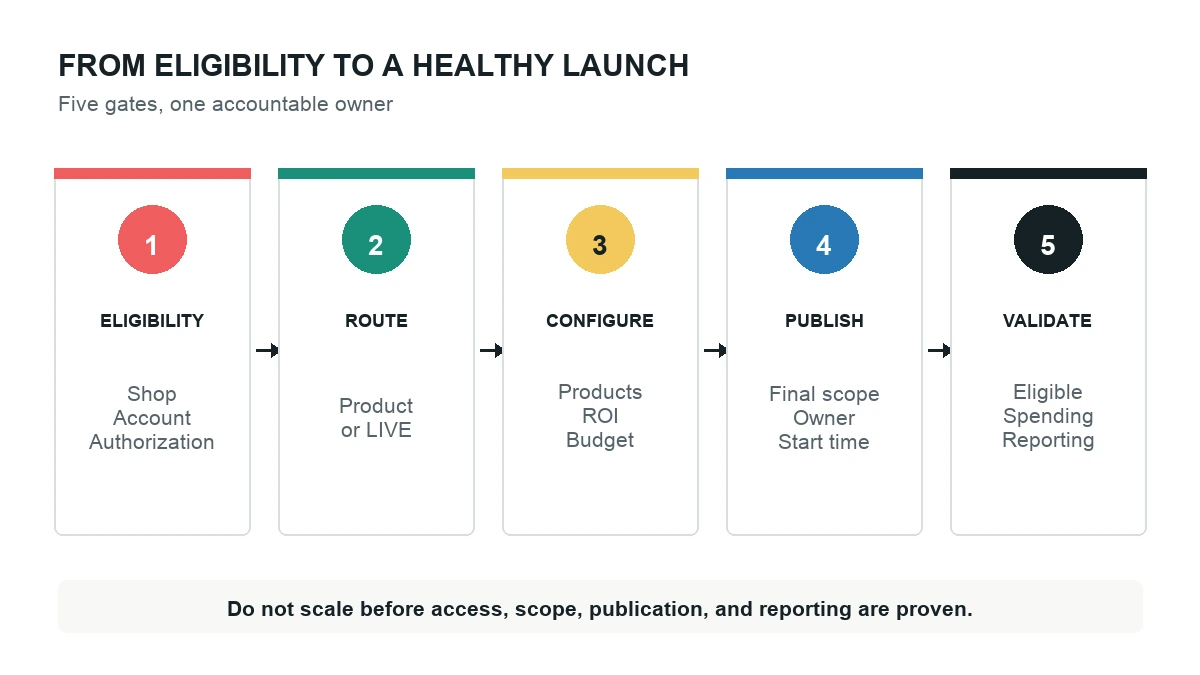
| Launch stage | Key decision | Evidence to verify |
|---|---|---|
| Eligibility | Can this Shop, account, operator, and catalog use GMV Max? | Shop connection, advertiser access, authorization, SKU status |
| Route | Is checkout driven by product listings or a LIVE room? | Product or LIVE destination |
| Configuration | Which products, creatives, ROI target, budget, and schedule apply? | Launch sheet with margin floor and timezone |
| Publish | Does the form match the approved plan? | Campaign name, settings, owner, start time |
| Validate | Is the campaign eligible, spending, and reporting cleanly? | Status, spend, asset availability, 72-hour report |
Choose Product or LIVE GMV Max first
Product GMV Max is the standard route when buyers purchase listed items through shoppable videos and product cards. LIVE GMV Max drives traffic and sales around an active livestream. They should not share one schedule or performance assumption.
| Question | Product GMV Max | LIVE GMV Max |
|---|---|---|
| Purchase context | Product listings and shoppable content | An active LIVE room |
| Main scope | All eligible products or selected products | LIVE identity and scheduled session |
| Creative supply | Shop videos, eligible posts, affiliate content | LIVE-to-LIVE and video-to-LIVE supply |
| Schedule | Continuous delivery from start time | Coordinated with the livestream window |
| Best next guide | This first-campaign setup | LIVE GMV Max automation SOP |
As checked on November 12, 2026, TikTok's official Product GMV Max guides for Seller Center and Ads Manager still do not list identical markets: Seller Center lists the United States, the United Kingdom, Indonesia, Malaysia, the Philippines, Thailand, Vietnam, and Singapore, while Ads Manager lists those markets except the United Kingdom. LIVE availability is narrower again. If the format choice is still uncertain, read what GMV Max is and when it fits first.
Pass the preflight before you configure a campaign
A greyed-out button or missing Shop points to an access or conflict issue—not a reason to recreate ad accounts.
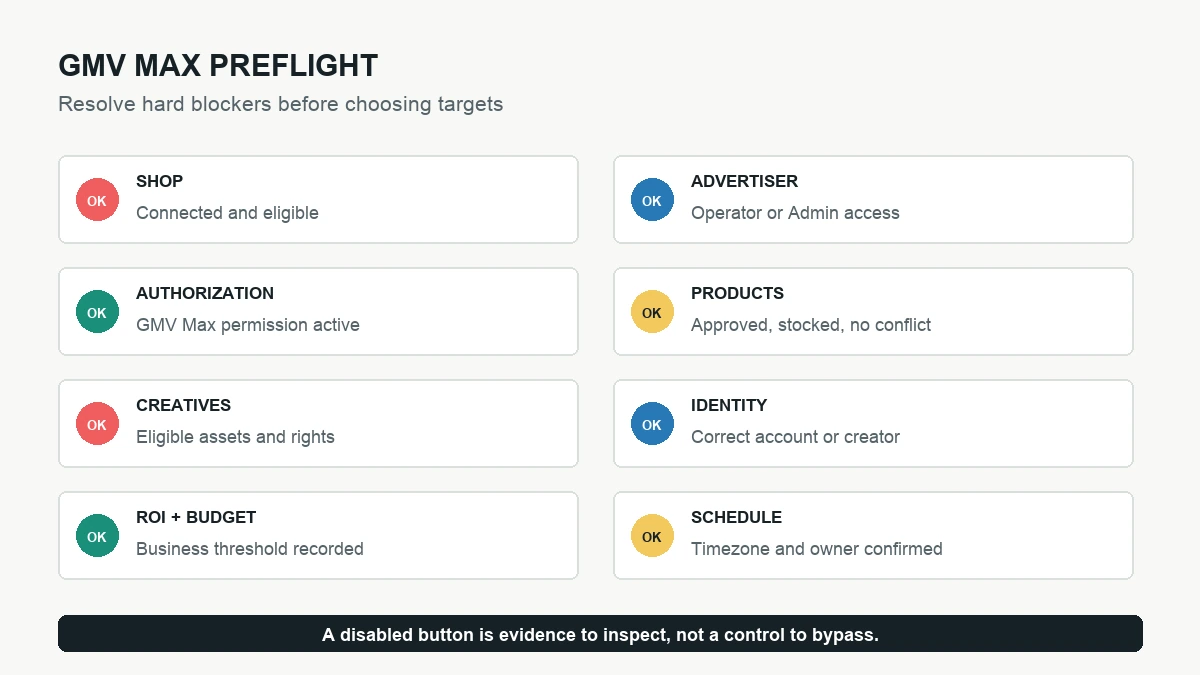
Confirm the Shop and advertiser relationship
In Ads Manager, sellers need a TikTok Shop connected to Business Center, Admin or Advertising Manager permission for the Shop, and GMV Max authorization for the advertiser account (checked in Business Center or Seller Center). Agencies also need ad promotion access to the Shop plus Operator or Admin access to the advertiser account.
Match any pre-launch blocker to TikTok's official troubleshooting checks:
| Symptom on screen | What to check first |
|---|---|
| "I don't see any shops to choose" | Connect your TikTok Shop to Business Center. If the Shop belongs to multiple Business Centers, choose the Business Center that also contains the advertiser account and TikTok account you want to use for GMV Max. |
| "The TikTok Shop I want to use is unavailable" | Check your Shop's operation country and confirm that GMV Max is supported in that market. |
| "Create GMV Max ads button can not be selected" (disabled / greyed out) | Verify that you hold Operator or Admin access to the advertiser account and that the account has GMV Max authorization for the Shop. |
Fix ownership in the right workspace rather than borrowing a colleague's login. See our Seller Center, Ads Manager, and Business Center guide for role boundaries.
Check products for conflicts and sales readiness
Every promoted item must be approved, in stock, and ready to fulfill. You must also check whether items are already active in a Video Shopping Ad (VSA), Product Shopping Ad (PSA), or another GMV Max campaign. TikTok's two official guides state different rules here:
- All products (
Promote all products in TikTok Shop): The Seller Center guide states that you must first close all active Video Shopping Ads at the ad group level and any specific-product GMV Max campaigns across all ad accounts, while active Product Shopping Ads pause automatically when GMV Max starts. By contrast, the Ads Manager product step says all VSA and PSA ads turn off automatically across all ad accounts—even though its "Before getting started" note says to remove products or close conflicting campaigns first. - Specific products (
+Add product): The Seller Center guide requires removing those products from Video Shopping Ads in all other ad accounts first, while same-account VSA and active PSA campaigns automatically stop showing the selected items. The Ads Manager product step states that corresponding VSA and PSA ads turn off automatically across all ad accounts.
Because the two official pages disagree on whether conflicting VSA campaigns close automatically, our operational recommendation is to manually close or remove conflicting campaigns before publishing rather than relying on automatic shutoff.
Conflicts also run in reverse: if your store is already running a full-shop GMV Max campaign, every product is already claimed, blocking new specific-product setups and promotional auto-creation—and canceling that active full-shop campaign during a sale can strip your promotional subsidies.
Verify identity and creative rights
Confirm that brand posts, affiliate posts, and creator videos have active ad authorization through the launch window, and that each video matches the promoted product listing.
Define the commercial guardrails
Record your contribution margin, break-even ROI, and daily cash risk limit before opening the form. Because GMV Max reporting includes attributed paid, organic, and affiliate orders, platform ROI is not paid-only ROAS or net profit. Use the GMV Max attribution guide to align your reporting baseline.
Create the first Product GMV Max campaign
Follow the creation path that matches your authorized entry point.
Path 1: Seller Center (Shop Ads)
- Go to Seller Center and click Shop Ads in the left-hand menu.
- Click Create GMV Max ads. The campaign is created in your default GMV Max ad account. To switch accounts, click the gear wheel next to the ad account name at the top of the Ads dashboard. Warning: changing your GMV Max account automatically turns off all existing GMV Max campaigns, and you must recreate them in the new account.
- Click Promote products.
- Click Promote all products in TikTok Shop for your full catalog, or +Add product for specific items.
- In Optimization goal, choose an ROI target (recommended or custom).
- In Budget, enter your daily budget (recommended or custom).
- In Schedule, set the start date and time for continuous delivery.
- Review the right-hand Reduce commission module, which shows a recommended ROI percentage and products to promote.
- Click Publish, then track performance in the Overview tab in Seller Center.
Path 2: TikTok Ads Manager
- Sign in to TikTok Ads Manager and click GMV Max at the top of your dashboard.
- Choose the TikTok Shop you want to promote. If it is missing, connect the Shop to Business Center; if the Shop is in multiple Business Centers, pick the Business Center that also contains the advertiser account and TikTok account you want to use.
- Click Next to open the overview page.
- Click Create GMV Max ads. If the button is disabled or greyed out, verify Operator or Admin access on the advertiser account and GMV Max authorization for the Shop.
- Click Promote products, then select Promote all products in TikTok Shop or +Add product.
- Configure Optimization goal (ROI target), Budget (daily budget), and Schedule (continuous delivery from start time), then click Publish.
Decisions to make on either path
1. Select the advertiser and Shop
Verify the account currency and timezone before setting schedules so a local calendar time does not launch hours early or late.
2. Name the campaign for operations
Include market, Shop or SKU scope, objective, and date instead of generic labels like GMV Max 1.
3. Choose product scope and creative mode
TikTok's best-practice guide recommends promoting all available products (or prioritizing best-sellers), choosing Auto-select videos over manual selection, and including affiliate videos. Use full-shop scope and auto-selection when margins and content rights are uniform; isolate specific products when margins or stock vary.
4. Set the ROI target
TikTok's Product GMV Max best-practice guide defines recommended ROI as:
Recommended ROI = Historical non-LIVE GMV ÷ Historical ad cost
TikTok advises following the system's recommended ROI or setting a slightly lower target—and if you have no prior performance data, starting with the front-end recommended ROI and budget for stable delivery and learning. Treat that figure as an input, cross-check it against your contribution margin, and see our net ROI rule thresholds guide for break-even math.
5. Set the daily budget
TikTok's best-practice formula for daily budget is:
Recommended budget = 2 × Historical non-LIVE GMV ÷ ROI target
TikTok recommends keeping budget consumption below 80% and raising budgets when performance improves. Official guides do not set a universal global minimum budget, so size your budget to stay under the 80% utilization ceiling while fitting your daily risk limit.
6. Set schedule and promotion-day controls
Confirm the continuous start time and tie any promotion-day budget increases to verified inventory and fulfillment capacity.
7. Review and publish once
Check Shop, advertiser, product scope, creative mode, ROI target, budget, and start time against your launch sheet, then publish once.
Validate the first 24 to 72 hours
The initial review confirms that the campaign is serving and reporting cleanly before you scale.
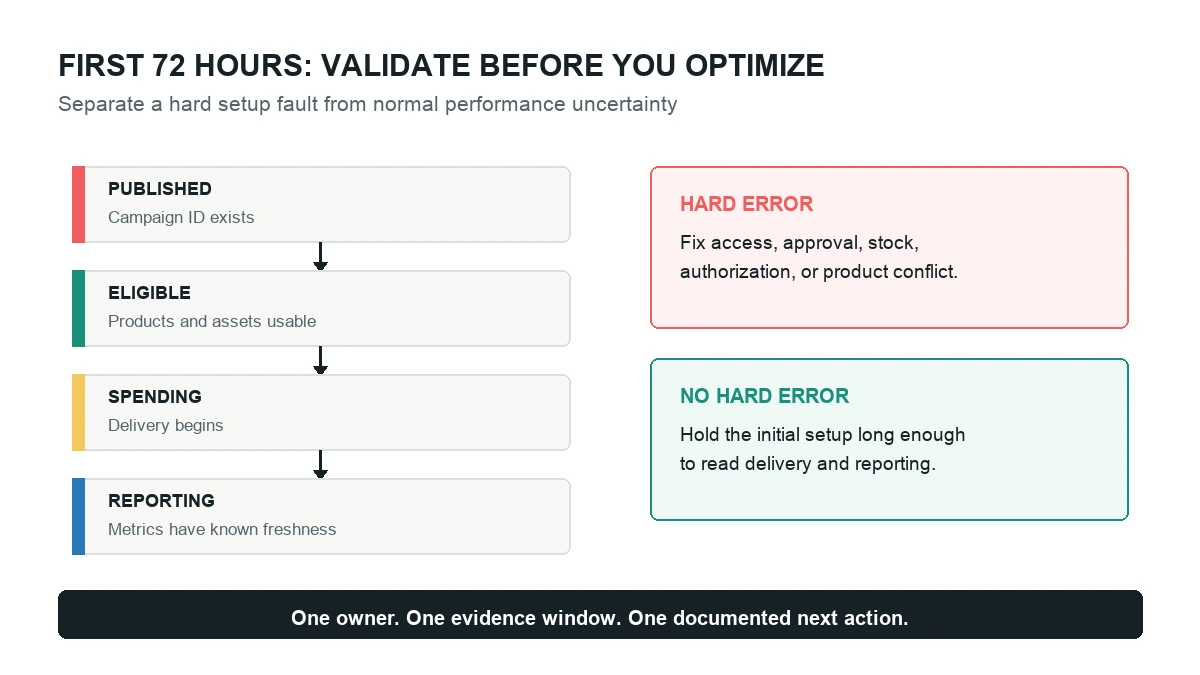
| Check | Healthy evidence | Action when it fails |
|---|---|---|
| Publication | Campaign ID and active status exist | Confirm submission before retrying |
| Eligibility | Products, identity, and creatives stay active | Fix approval, stock, authorization, or conflict |
| Delivery | Spend starts within a normal account window | Use the GMV Max not-delivering checklist |
| Reporting | Spend, orders, GMV, and ROI populate | Verify timezone and attribution window |
| Change discipline | Owner logs any edit and review time | Stop overlapping changes |
Once the campaign is spending, avoid frequent ROI edits. Because GMV Max optimizes ROI daily and frequent changes interrupt learning, TikTok's official best practices state that you should keep each ROI setting for at least three full days before making adjustments.
Holding steady also protects eligibility for TikTok GMV Max ROI protection—TikTok's conditional ad credit program when daily ROI falls below 90% of target with more than 20 daily orders. Per TikTok's official ROI protection rules (updated September 2026), three actions void coverage for the day the change is made:
- Manually raising Target ROI on a Product GMV Max campaign, or lowering it more than once in a day.
- Pausing or deleting the GMV Max campaign.
- Editing the products in the campaign.
Move from one campaign to a repeatable operating system
Native creation works well for one launch, but managing dozens of SKUs or multiple Shops manually raises the risk of product conflicts and premature ROI edits during the three-day window. With AdRate, teams can coordinate Product and LIVE GMV Max launches across stores, pair daily reporting with automated budget and ROI guardrails, and standardize operations as volume grows.
Once your first campaign passes its 72-hour check, use the GMV Max automation playbook to set ongoing rules. Start with AdRate and standardize your next GMV Max launch.
Frequently asked questions
Why is the GMV Max creation button greyed out?
Check market eligibility, advertiser Operator or Admin access, GMV Max authorization in Business Center or Seller Center, Shop connection, and product conflicts.
Where do I set up GMV Max: Seller Center or Ads Manager?
Use either Seller Center (Shop Ads → Create GMV Max ads) or TikTok Ads Manager (GMV Max → choose Shop → Next → Create GMV Max ads). As checked on November 12, 2026, TikTok's Seller Center guide lists the UK alongside the US and six Southeast Asian markets while the Ads Manager guide omits the UK, so rely on what your account displays.
Can I create legacy Product Shopping Ads or Video Shopping Ads instead?
Per TikTok's migration guidance, from July 2025 new Sales campaigns with TikTok Shop as the destination default to and only support GMV Max. Existing legacy Shop Ads may stay active but cannot be newly created, edited, or copied.
What is the minimum daily budget for GMV Max?
TikTok does not publish one global minimum across all currencies. Start from the system recommendation or 2 × Historical non-LIVE GMV ÷ ROI target and keep daily budget consumption below 80%.
How soon should I change the ROI target?
Keep each ROI setting for at least three full days before adjusting, unless fixing an immediate setup mistake. Frequent edits interrupt daily learning, and raising Target ROI or lowering it more than once in a day voids Product GMV Max ROI protection for that day.
Official TikTok new advertiser program - exclusive benefits for new advertisers
Open a new TikTok ad account and earn official ad credit as you spend
Spend $200 within 30 days of signing up and get $200 in ad credit, rising to $6,000 when you spend $10,000. Credits go straight into your TikTok ad campaigns.
Coupons are issued by TikTok once it confirms you qualify as a new advertiser. Actual issuance and tiers are shown on the Coupon Progress page inside your TikTok Ads account.