TikTok Ads Budget Monitoring and Pacing Strategies with Rules
Use practical TikTok ads budget monitoring and pacing strategies to set automated rule guardrails, stop pause-restart loops, and audit execution logs.

Automated budget rules should protect your ad account, not fight each other. A stop-loss rule checks same-day performance at 10:30, sees $400 spent with weak morning return, and pauses the ad group. By 14:30, delayed purchase attributions land in the dashboard. A second rule checking three-day ROAS sees efficiency back above target and turns the ad group right back on. By evening, the campaign has been paused, restarted, and edited multiple times, leaving you unsure whether the problem is the creative or the rules.
Most TikTok ads budget monitoring and pacing strategies break down here because each rule fires in isolation. Instead of treating every hourly dip as a reason to cut delivery, a reliable rule system separates spend speed from conversion maturity, caps how much any single rule can move a budget, blocks start-stop loops with cooldowns, and records an execution log that buyers can audit.
Different budget problems call for different workflows. If your main challenge is calculating how much daily spend an ad group needs to reach 50 conversions and exit learning, start with our TikTok ads minimum budget per day guide. To align delivery windows across buyer time zones or build hourly schedules, read our breakdown on setting a TikTok ads dayparting schedule. When a stable winner is ready for daily growth, follow the 20% budget scaling SOP. This guide focuses on the defensive rule layer: configuring budget guardrails that do not clash, stopping pause-restart cycles, and reading execution logs to fix false triggers.
Why Automated Budget Rules Clash and Loop
Teams rarely plan to build conflicting automation. Trouble starts when buyers add standalone rules one by one in reaction to past mistakes. After a costly morning, someone adds an intraday pause rule. After missing evening volume, someone else writes a midday restart or budget refill rule. Within weeks, four or five separate rules are watching the same campaigns on different schedules.
Uncoordinated budget rules typically collide in four ways:
| Conflict Pattern | Account Symptom | Root Cause in Rule Setup | Guardrail Fix |
|---|---|---|---|
| Pause-restart loop | Ad group pauses at 10:30 and re-enables at 14:30 | Pause rule checks Today while restart rule checks Last 3 or 7 Days | Block same-day auto-restarts after a stop-loss and require log review |
| Stacked budget cuts | Budget drops 15% three times within 90 minutes | 30-minute check interval with no execution cooldown | Enforce a 24-hour (once-per-day) cooldown per target for budget edits |
| Premature shutoff | $50/day test pauses at $30 spend before reaching 1x target CPA | Rule checks spend percentage without a minimum dollar spend gate | Require a minimum spend floor tied to target CPA before any action |
| Intraday tug-of-war | One rule adds 20% budget at 10:00 and another cuts it at 13:00 | Separate scale and slow-down rules attached to the same target | Merge pacing and refill logic into one prioritized multi-branch rule |
Timing and sample size drive all four failures. Ad spend registers almost immediately in TikTok Ads Manager, while purchase events often arrive hours later. If a rule checks every 30 minutes without a cooldown or a minimum dollar floor, a two-hour attribution lag looks like a performance collapse and triggers repeated edits that choke delivery for the day.
Platform Boundaries That Shape Your Rule Setup
Before setting conditional rules, anchor your thresholds to how TikTok Ads Manager handles budgets, learning stability, and reporting windows.
At the finance layer, TikTok separates campaign budgets, ad group budgets, and account spending caps. Daily budgets enforce hard platform minimums of $50 per day at the campaign level and $20 per day at the ad group level in USD accounts. Lifetime budgets cap spend across a scheduled run, while Budget Manager sets account-level spending caps across daily, monthly, or one-time limits.
Automated budget rules must respect these floors. On a $25 daily budget, a 25% cut either fails validation at the $20 floor or starves the ad group of auction volume. Cutting a converting ad group below its viable daily spend also blocks the 50 conversions in 7 days needed to exit learning.
Edit frequency matters just as much. TikTok's delivery guidance advises keeping budget edits moderate during learning and avoiding frequent back-to-back changes. Newly launched or recently edited ad groups should be shielded from hourly budget trims so their bidding models stabilize.
Finally, TikTok's official Automated Rules best practices warns advertisers not to set a rule's evaluation time range to Today. Because same-day reporting is incomplete and affected by conversion lag, longer windows such as Lifetime or Last X days work better for efficiency judgments.
To apply that guidance without losing intraday protection, split your rule metrics across two windows:
| Window Type | Metrics to Check | What It Should Control | What It Must Never Do |
|---|---|---|---|
| Intraday window (Today) | Budget used, spend velocity against plan, zero-conversion floor | Pacing alerts, small temporary slow-downs, hard stop-loss | Judge final ROAS or permanently kill a profitable ad group |
| Mature window (Last 3-7 days or Lifetime) | CPA, ROAS, total conversions, multi-day cost stability | Budget refills, sustained reductions, keep-or-kill decisions | Trigger hour-by-hour pacing edits |
Spend Velocity Checkpoints: How to Calculate Pacing Thresholds
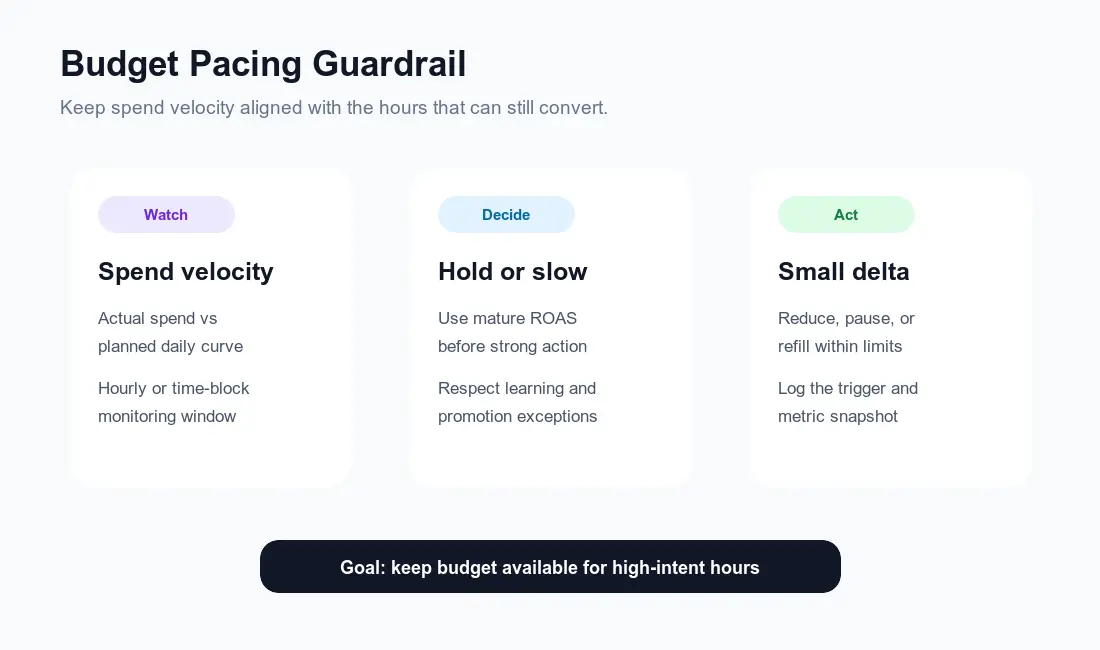
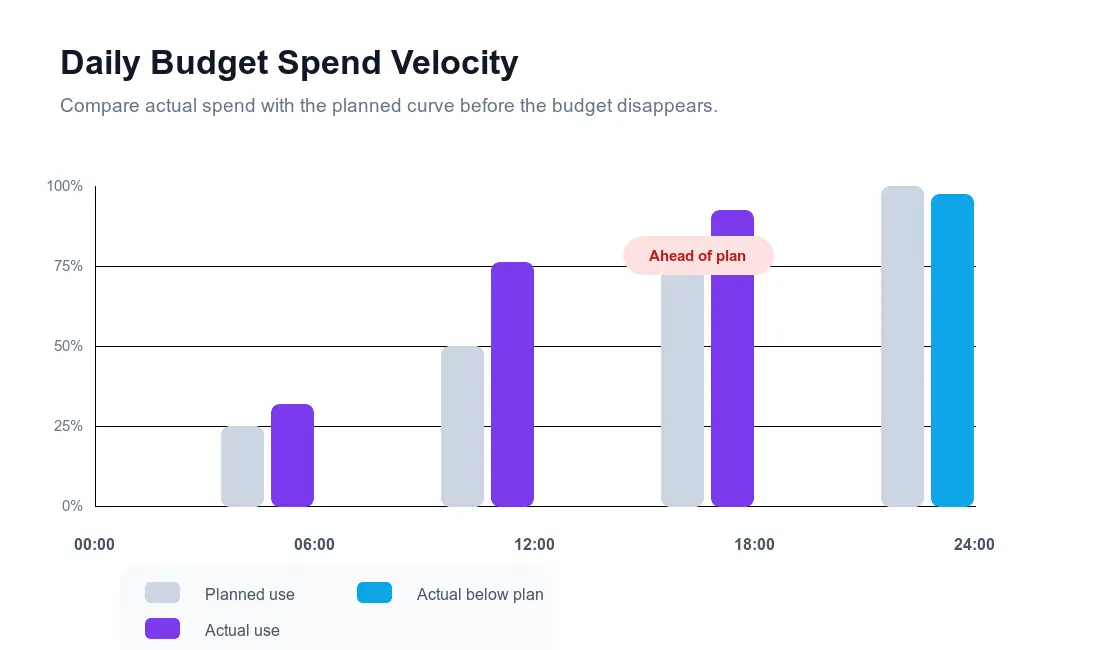
To stop an automated rule from guessing whether delivery is running hot, define explicit checkpoints. Spend velocity compares the share of daily budget already spent against the expected spend curve for that hour.
A flat linear curve assumes roughly 25% of the budget spends every six hours. Most ecommerce and TikTok Shop accounts, however, convert better during midday and evening windows than at 04:00. For those stores, a defensive curve holds morning spend tighter so budget remains available for peak buying hours.
Below is a checkpoint table for an ad group running a $500 daily budget with a $30 target CPA:
| Checkpoint (Account Time) | Planned Share | Planned Spend | Warning Line | Action Line | Rule Action When Action Line Is Crossed |
|---|---|---|---|---|---|
| Check 1: 06:00 | 15% | $75 | 25% ($125) | 35% ($175) | If 3-day ROAS < target, cut budget 10%; if spend >= $90 (3x target CPA) with 0 purchases today, pause |
| Check 2: 11:00 | 35% | $175 | 50% ($250) | 60% ($300) | If 3-day ROAS < target, cut budget 10-15% and lock edits for 24 hours |
| Check 3: 15:00 | 60% | $300 | 75% ($375) | 85% ($425) | Block automated budget increases for the rest of the day and log warning |
| Check 4: 19:00 | 80% | $400 | N/A | Below 50% ($250) | If behind plan AND 3-day ROAS >= 1.2x target with 5+ purchases, add 10% budget |
Each checkpoint pairs an intraday spend share with a mature efficiency check or a hard dollar floor. Crossing the 11:00 spend line alone does not trigger a blind pause. If the ad group spent $300 by 11:00 while holding a strong three-day ROAS, the rule leaves delivery alone. Slow-down actions fire only when fast spend coincides with weak mature efficiency.
Step-by-Step Setup: Automated Budget Guardrails That Do Not Fight Each Other
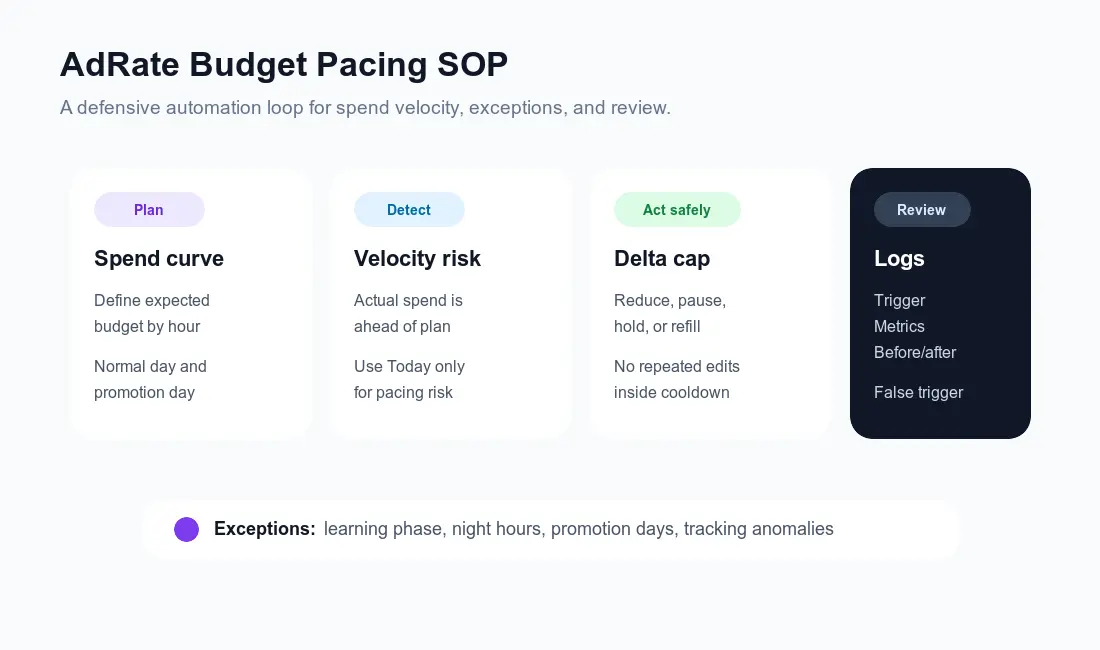
To keep automated rules from clashing, build three structural controls into your setup: prioritized branches, budget delta caps with cooldowns, and explicit targeting exceptions.
1. Combine Branches Instead of Writing Competing Rules
Instead of attaching four separate rules to the same campaign, structure your policy as ordered branches. The system evaluates the highest-priority condition first and stops as soon as one branch matches.
| Priority | Branch Name | Condition Logic | Execution Action |
|---|---|---|---|
| 1 | Emergency hard stop | Today's spend >= 3x target CPA ($90) AND purchases = 0 (all ad groups, no 48h age gate) | Pause ad group and alert buyer for review |
| 2 | Pacing slow-down | Spend share > action line AND 3-day ROAS < target AND spend >= 1.5x target CPA AND age > 48h | Reduce daily budget by 10% |
| 3 | Hold and log | Spend share > warning line BUT 3-day ROAS >= target (or spend < 1.5x target CPA) | Keep status and budget unchanged; log warning |
| 4 | Controlled refill | Time 18:00-21:00 AND spend share < 50% ($250) AND 3-day ROAS >= 1.2x target with 5+ purchases | Increase daily budget by 10% |
Branch 3 (Hold and log) eliminates most false triggers. Weak automation setups force every check into a binary choice between cutting and scaling. A wait-and-record branch stops the system from punishing campaigns when spend moves fast but conversion attribution is still catching up.
2. Lock In Budget Delta Caps and Cooldown Windows
A budget delta cap limits how much a single execution or a single day can change an ad group's budget. Cooldown windows stop the same rule from hitting the same target repeatedly before the auction settles.
- Single-Execution Cut Limit (5% to 15%): Trim budget modestly when velocity is high and mature efficiency is soft, slowing delivery without shocking the bidding model.
- Single-Execution Refill Limit (5% to 10%): Keep defensive refills smaller than full scaling steps; leave larger increases to your daily scaling workflow.
- Total Daily Movement Cap (20% to 30% Max): Cap cumulative daily budget movement at 20% to 30% unless a manager approves a promo override.
- Target Cooldown (24 Hours / Once Per Day): Lock an ad group from further pacing edits for 24 hours after a budget change, capping budget edits at once per target per day.
- No Same-Day Auto-Restart After Stop-Loss: Never let an enable rule turn on an ad group paused by a stop-loss rule earlier that day. Review the log the next morning before re-enabling.
3. Write Explicit Exceptions for Learning, Time Zones, and Promo Days
Guardrails fail when one everyday rule runs blindly across every campaign. Build three exceptions into your targeting tags before enabling actions:
- Learning Phase Protection: Exclude ad groups launched within the last 48 hours (or under 15 to 20 conversions) from automated budget cuts, while keeping the zero-conversion hard stop-loss active with no 48-hour age gate.
- Account Time Zone Alignment: Rules evaluate schedules and "Today" boundaries using the ad account's registered time zone, not viewer local time. Shift checkpoints whenever your account time zone differs from your target market.
- Promotional Day Overrides: Tag flash sales, live shopping sessions, and Q4 events separately so they run against a higher velocity ceiling and a clear dollar loss limit.
Copyable Rule Configuration Blueprint
Use this configuration table as your setup checklist when building a pacing guardrail. For additional templates covering CPA stop-loss or creative fatigue rotation, pair this blueprint with the setups in our TikTok automated rules guide.
| Configuration Field | Recommended Setting | Why This Prevents Rule Churn |
|---|---|---|
| Target Scope | Active ad groups with a "Pacing-Managed" tag | Keeps rules off learning tests and promo campaigns |
| Check Schedule | Every 30 to 60 minutes during active hours | Catches spend spikes without minute-by-minute noise |
| Intraday Trigger | Daily budget spent % exceeds checkpoint (> 60% before 11:00) | Flags abnormal delivery acceleration early |
| Efficiency Gate | Last 3 or 7 Days ROAS < target (or CPA > 1.3x target) | Protects fast-spending campaigns that convert well |
| Sample Floor | Today's spend >= 1.5x target CPA AND 3-day purchases >= 3 | Stops rules from firing on small spend swings |
| Primary Action | Cut daily budget by 10% (above $20 / $50 platform floors) | Slows velocity without resetting delivery |
| Cooldown Rule | Maximum 1 budget edit per target per 24 hours | Stops stacked cuts on consecutive checks |
| Conflict Lock | Exclude targets paused today from auto-enable rules | Eliminates morning-pause and afternoon-restart loops |
Run the rule in alert-only mode for the first three to five days. Check which ad groups would have been slowed or paused at 11:00, then review those ad groups the next morning after delayed conversions settle. Once triggers match how a senior buyer would act, enable automated budget edits.
How to Audit Rule Execution Logs and Fix False Triggers
Reviewing the execution log verifies what fired, what metrics the rule saw at trigger time, and whether the action protected or hurt performance.
Run a 15-minute log audit twice a week. Check the account hour of each trigger, compare the metric snapshot recorded at execution time against next-day settled numbers, filter by ad group name to spot repeated same-day actions, verify that percentage cuts did not push budgets down to the $20 floor, and track how often buyers manually reverse a rule's decision.
Use this diagnostic guide during log reviews to translate findings into exact parameter changes:
| Execution Log Finding | Underlying Cause | Parameter Adjustment |
|---|---|---|
| Rule cut or paused at 11:00, but final day ROAS finished 30% above target | Attribution lag made intraday efficiency look weak | Change efficiency lookback to Last 3 Days, or raise spend floor to 2x target CPA |
| Same ad group received three 10% cuts between 10:00 and 12:00 | Rule re-evaluated the same cumulative spend condition | Add a 24-hour (once-per-day) cooldown per target |
| Ad group paused at 10:30 by Rule A and re-enabled at 15:00 by Rule B | Competing rules with different windows share a target | Disable same-day auto-restarts or exclude targets modified today |
| Loser burned 90% of daily budget before the rule fired | Sample floor or check interval was too loose | Check every 30 minutes in peak hours and set spend floor to 1.5x target CPA |
| Rule trimmed budget on a Day 1 ad group after $40 of spend | Learning ad groups were not excluded from pacing cuts | Require ad group age > 48 hours on budget-cut branches (keeping only the zero-conversion hard stop active under 48 hours) or restrict cuts to tagged mature campaigns |
Where AdRate Fits in Your Budget Governance
TikTok's native budget settings and Budget Manager provide outer financial boundaries, while native rules handle basic single-account triggers. Once your team operates across multiple ad accounts, manages dozens of active ad groups, or pairs intraday spend checks with multi-day ROAS windows, maintaining scattered rules across individual dashboards breaks down.
AdRate serves as the centralized guardrail layer for TikTok advertising teams. You can bind rules dynamically across ad accounts using account labels, configure multi-branch pacing and stop-loss rules with cooldowns, protect learning-phase tests by creation age, and review every action through execution logs with before-and-after values and metric snapshots. Instead of refreshing Ads Manager every hour or untangling conflicting rules, your team sets the policy once and audits the execution trail on schedule.
If conflicting rules or erratic daily spend are creating noise in your accounts, start with one clean defensive rule. Start free with AdRate to set up your TikTok budget pacing guardrails, lock in safe cooldown limits, and keep every automated budget decision transparent and reviewable.
Official TikTok new advertiser program - exclusive benefits for new advertisers
Open a new TikTok ad account and earn official ad credit as you spend
Spend $200 within 30 days of signing up and get $200 in ad credit, rising to $6,000 when you spend $10,000. Credits go straight into your TikTok ad campaigns.
Coupons are issued by TikTok once it confirms you qualify as a new advertiser. Actual issuance and tiers are shown on the Coupon Progress page inside your TikTok Ads account.