TikTok Ads Insufficient Balance After Paying? Why & 4 Steps
Paid but TikTok Ads still shows insufficient balance? See why top-ups stay pending, allocate Business Center funds, and restore ad delivery in 4 steps.

Seeing "Payment unsuccessful or insufficient balance" in TikTok Ads Manager right after you already paid is frustrating—especially when winning campaigns shift to Not Delivering (Account Out of Balance) and cut traffic. When you have submitted a top-up or have a valid card on file but still see that your TikTok Ads Manager account balance is insufficient, the disconnect usually comes from one of three places: a 15 to 45 minute payment gateway callback delay leaving your deposit "Pending," funds sitting in your TikTok Business Center central wallet instead of the specific ad account, or a 3D Secure (3DS) blocker or bank decline that kept the payment from settling.
In prepaid accounts, delivery halts the moment wallet credits reach zero, regardless of daily campaign budgets. Submitting repeated payments while a top-up is still processing only creates duplicate pending holds on your card without clearing the TikTok Ads insufficient balance error. This guide explains why balances fail to update after paying, how to clear stuck top-ups safely in 4 steps, and what to avoid during the 15 to 30 minute auction reactivation window once your funds arrive.
Prepaid vs. Automatic Billing vs. Business Center Credit
Resolving balance alerts starts with identifying your account billing model:
- Manual Payment (Prepaid): Advertisers deposit funds into the ad account wallet. TikTok debits this balance as ads deliver. When credits hit zero, active bidding pauses immediately.
- Automatic Payment (Threshold Billing): TikTok charges a linked card or PayPal account after reaching a spend threshold or billing date. Delivery pauses here usually stem from bank declines or 3DS failures rather than depleted balances.
- Business Center Fund Allocation: Credit lines sit at the Business Center level. Even with funds in Business Center, an ad account cannot spend until an admin allocates balance to it.
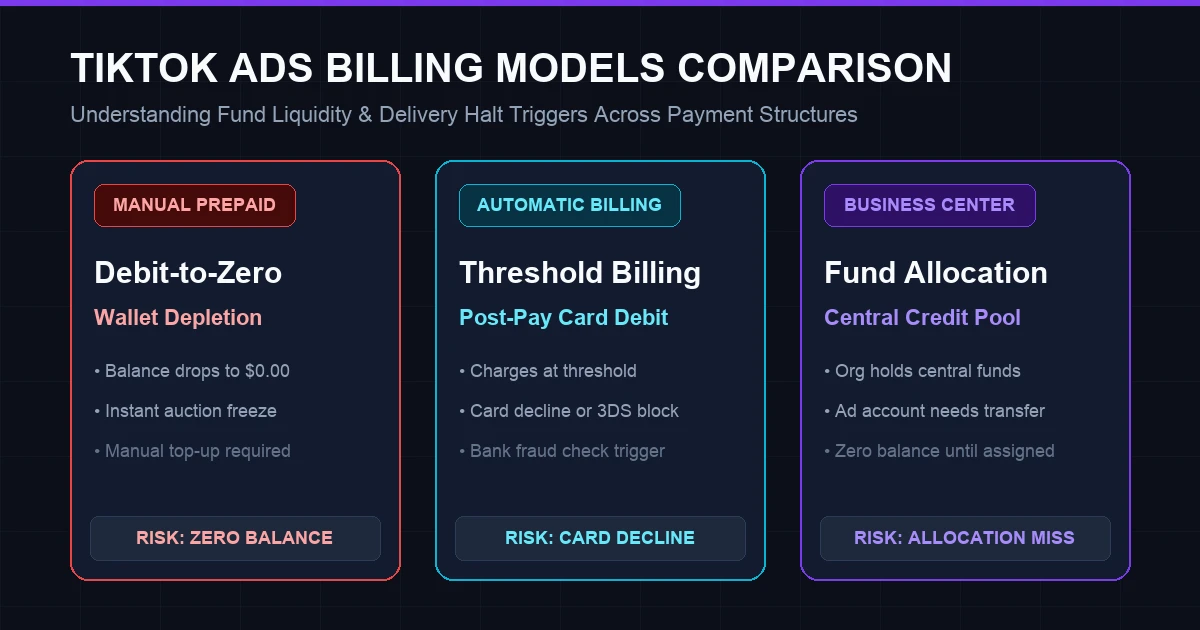
Distinguishing between ad account wallet funds and Business Center credits prevents misdirected troubleshooting when campaigns stall.
3 Technical Bottlenecks Behind Stuck Balances
Even after completing payment, balances can fail to update. Three technical bottlenecks cause most stuck balance issues.
1. Payment Gateway Webhook Latency
When funding an account, gateways like Stripe or Adyen process transactions instantly at the bank level. However, TikTok Ads Manager updates your ledger only after receiving an asynchronous webhook callback.
During peak shopping events, network queues delay this callback by 15 to 45 minutes. Submitting repeated top-ups during this window creates duplicate pending charges while the initial transaction processes.
2. Add-Balance Modal Freezing and 3DS Blockers
Clicking Add Balance opens an embedded iframe for 3D Secure (3DS) authentication. Browser privacy shields and ad blockers frequently intercept these third-party payment scripts.
When blocked, the modal renders a blank window or infinite spinner, leaving advertisers with tiktok ads add balance stuck on screen before authentication reaches TikTok.
3. Business Center Allocation Disconnect
Media buyers often ask how to add balance to tiktok ad account after funding their corporate portal. In TikTok Business Center, central deposits do not distribute automatically to linked ad accounts.
The central wallet acts as a holding pool. If an administrator funds the Business Center without transferring credits to the specific ad account, campaigns trigger a tiktok ads insufficient balance alert despite a funded organization balance.
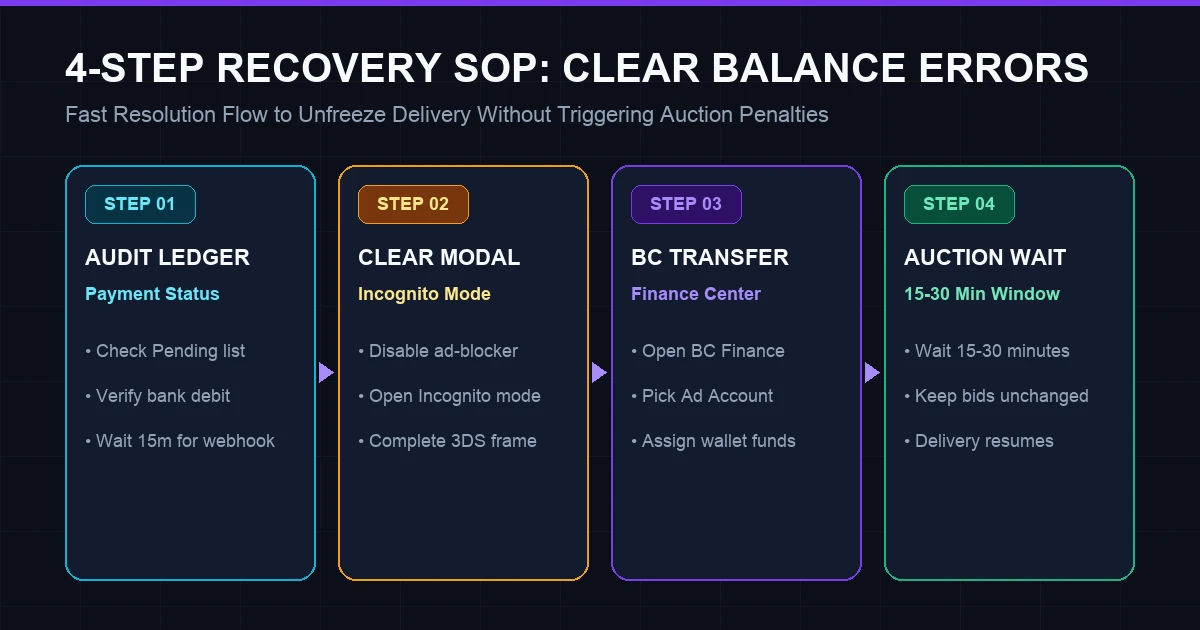
4-Step Emergency SOP to Clear the Insufficient Balance Alert
Follow this standard operating procedure to clear a tiktok ads insufficient balance flag quickly without creating accounting errors.
| Step | Action Item | Target Tool | Expected Outcome |
|---|---|---|---|
| 1 | Audit Ledger Status | Payment > Transactions | Distinguish settled credits from pending holds |
| 2 | Clear Modal Blockers | Incognito Window | Complete top-up without duplicate debit |
| 3 | Allocate BC Funds | Business Center > Finance | Transfer wallet balance to target ad account |
| 4 | Re-verify Ad Delivery | Ads Manager Overview | Clear delivery halt without bid tampering |
Step 1: Audit Transaction History and Ledger Status
Before attempting another payment, check TikTok Ads Manager > Tools > Payment > Transaction History. Inspect your latest transaction status.
If marked "In Progress" or "Pending," wait 15 to 20 minutes for the gateway webhook to settle. Submitting another payment risks duplicate card holds. If marked "Failed," review the decline code and verify whether international transaction restrictions apply.
Step 2: Clear Modal Blockers and Top Up
If the payment modal froze previously, open TikTok Ads Manager in an incognito window with all ad-blocking and privacy extensions disabled.
Retry the top-up. If your card continues to fail, test an alternative payment method such as PayPal or another corporate card to determine whether the issue is card-specific.
Step 3: Allocate Funds from TikTok Business Center
If your ad account is linked to a Business Center, log in to Business Center and navigate to Finance > Account Assets. Locate the affected ad account.
Click "Add Funds," choose your payment source or Business Center balance, specify the transfer amount, and confirm. The allocated balance updates the ad account wallet within seconds.
Step 4: Re-verify Campaign Delivery State
Once your balance updates, return to the Campaign dashboard. Delivery status shifts from Not Delivering (Account Out of Balance) back to Delivering automatically.
Do not edit ad groups or toggle campaign statuses during this step. Allowing the system to clear the flag naturally protects delivery stability.
The 15 to 30 Minute Auction Reactivation Window
A common mistake occurs right after funding an account. Advertisers expect impressions to resume the second their balance updates. When spend stays flat for ten minutes, teams panic.
When an ad account balance reaches zero, TikTok pulls ad groups from the auction. Once funds are restored, the pacing controller enters a 15 to 30 minute auction reactivation window to recalculate account liquidity, audience availability, and competitive eCPM.
To protect campaign stability during this window, avoid three costly mistakes:
- Do not toggle campaigns on and off: Toggling campaigns repeatedly forces the delivery engine to restart pacing calculations and can trigger fresh ad reviews.
- Do not raise bids aggressively: Increasing bids during reactivation causes severe CPM spikes once the auction unlocks, wasting budget.
- Do not duplicate ad sets: Duplicating ad groups fragments budget liquidity and restarts the learning phase unnecessarily.
Allow the auction engine to warm up naturally. Delivery velocity typically normalizes within 30 minutes of account funding.
Prevent Delivery Halts with Automated Balance Monitoring in AdRate
Managing prepaid ad accounts across multiple markets makes manual balance tracking risky. An unexpected overnight balance depletion pauses high-performing campaigns during peak shopping hours, driving up acquisition costs and disrupting learning phase progress.
AdRate helps performance teams safeguard campaign uptime with automated balance management:
- Unified Multi-Account Balance Dashboard: View real-time wallet balances across all authorized TikTok ad accounts and Business Centers in one centralized overview.
- Automated Low-Balance Alerts: Set proactive notifications that alert your team hours before an account reaches zero based on current spend velocity.
- Intelligent Spending Safeguards: Implement automated rules that adjust campaign budgets or pause lower-priority ad groups before an account runs out of funds.
Connect your TikTok ad accounts to AdRate to monitor prepaid balances in a unified dashboard and set automated balance alerts before campaigns stall. Explore automated rules to maintain continuous ad delivery and protect ad account profitability across every active campaign.
Official TikTok new advertiser program - exclusive benefits for new advertisers
Open a new TikTok ad account and earn official ad credit as you spend
Spend $200 within 30 days of signing up and get $200 in ad credit, rising to $6,000 when you spend $10,000. Credits go straight into your TikTok ad campaigns.
Coupons are issued by TikTok once it confirms you qualify as a new advertiser. Actual issuance and tiers are shown on the Coupon Progress page inside your TikTok Ads account.