TikTok Ads Rejected or Stuck in Review? Why & How to Fix
TikTok ads rejected or stuck in review? Use the 2026 decision table to know when to wait, edit, appeal, or escalate—and what evidence to submit safely.

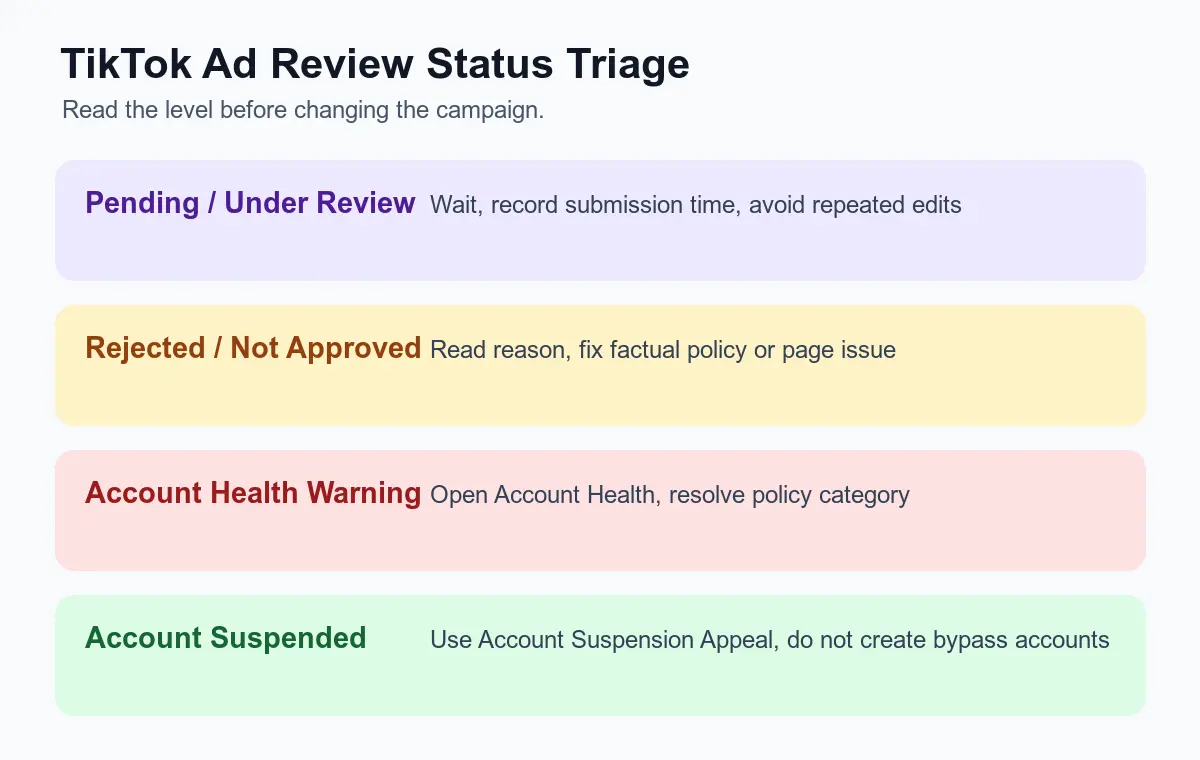
If your TikTok ads are rejected or stuck in review, identify the exact status before changing the ad. Pending, Rejected, Account not approved, and Suspended belong to different review paths.
Quick answer: Pending means wait; a documented defect means edit; a compliant ad with a mismatched reason means appeal; account restrictions require account-level action.
| Symptom / Ads Manager status | How long | What to do now | Do not do |
|---|---|---|---|
| Pending / Under Review | Under 24h: normal; 24–48h: check recent edits; >48h: escalate | WAIT, or ESCALATE past 24–48h via our stuck in review guide | Edit every few hours or duplicate in bulk |
| Rejected / Disapproved | Act after reading the full reason | EDIT a real defect; APPEAL a mismatch with evidence | Send a vague appeal or resubmit unchanged copies |
| Account not approved | Usually <24h; act within 3 working days if disapproved | Fix business details, website, or qualifications; see account under review | Treat it as a single-creative problem |
| Suspended | Act immediately (30-day conservative window) | Use the account-level suspension appeal path | Use ad-level appeal or open new accounts |
Limited Delivery is different: the ad may still deliver partially due to an asset, authorization, keyword, anchor, or identity limit; check the secondary status before treating it as Pending or Not Delivering.
1. First Separate Review, Rejection, and Account Approval
TikTok's ad status definitions say Under Review (or Pending) needs no specific action yet. Not delivered / Not delivering requires action; its secondary detail may show Review not approved, Account failed review (Account not approved), Account suspended, The contract has not taken effect, missing authorization, expired qualifications, or insufficient balance. Use the TikTok Ads Not Delivering status guide when the primary label hides the blocker.
Route by level:
- Ad or Ad Group rejection ("Review not approved"): Edit the defective creative, copy, or landing page, or submit a One Click Appeal inside the Ad Group.
- Account review hold ("Account under review" / "Account not approved"): Fix business details, official website, or promotion-link review via the TikTok ads account under review guide.
- Contract block ("The contract has not taken effect" or "Your advertising agreement is not effective yet or has already expired. No new ads can be delivered. Please contact the sales team."): Confirm Business Center, agency, or credit terms using the TikTok ads contract has not taken effect fix.
- Account suspension ("Account suspended"): Use the account-level suspension appeal path, even when one ad appeared to trigger it.
This guide covers ad rejection and appeals. If an approved campaign has no spend, use the TikTok ads not spending diagnosis; if it spends without conversions, use the no-conversions checklist.
2. What To Do When A TikTok Ad Is Stuck In Review
TikTok's Ad Review FAQs state that most ads are reviewed within 24 hours, though some take longer, and editing location targeting or creative (images, ad text, links, or videos) restarts review. Do not repeatedly edit or duplicate ads to force approval—for queue timelines, crawler checks, and the 4-step escalation protocol past 24 hours, use the TikTok ads stuck in review guide.
3. Common TikTok Ad Rejection Reasons: Causes, Fixes, and Appeal Evidence
TikTok reviews the ad and the page it links to. Its ad review checklist checks Language, Actions, Media, Consistency, and Authorized Use, while the Ad Format and Functionality policy and Misleading and false content policy list what gets an ad rejected.
Find the row that matches the reason in your rejection notice:
| Rejection type (policy area) | What triggered it (per TikTok policy) | How to fix (edit path) | Appeal evidence (if falsely flagged) |
|---|---|---|---|
| Ad creative not consistent with landing page / Mismatched promotion or discount | Ad shows Product A or Brand A while page shows Product B; conflicting discounts ("up to 50% off" vs. "up to 30% off"); Display Name or App Name conflicts with site | Align video, caption, discount, Display Name, and SKU with landing page URL, then save | Mobile screenshots of matching page and offer |
| Non-functional or incomplete landing page | Destination is expired, erroneous, under construction, not mobile-friendly, auto-downloads files, gates content behind personal data or installs, or uses a Hashtag Challenge page | Fix broken links, redirects, mobile layout, or gated pop-ups, then save an ad edit or request re-review | Full-page mobile screenshots and live URL |
| Landing page missing information required by local regulations | E-commerce page omits contact details (phone/email), company name, address, business license, local-currency price, shipping info, return/refund policy, terms, or privacy policy | Add company details, local currency pricing, shipping, and refund/privacy links to footer and product page | Product page and footer policy screenshots |
| Misleading claims, exaggerated results, or before-and-after comparisons | Promising instant effects ("Get slim legs right away", "Get money in 10 seconds"), unverified superlatives ("Number 1"), or before-and-after comparisons | Remove absolute claims, instant-result promises, and before-and-after split screens from video, audio, and copy | Third-party test reports and substantiation docs |
| Language or currency inconsistent with targeted region | Ad copy, voiceover, subtitles, or page language/currency mismatch targeted locations, or mandatory local-language disclaimers are missing (Indonesia, Thailand, Vietnam) | Restrict Ad Group locations to matching language markets, add local subtitles, or use a localized URL | Ad Group locations and local-currency page screenshots |
| Media quality, unsupported actions, or QR code violation | Blurry video, muffled or missing audio ("Clear audio is required for video ads"), static images >50% of video, masked watermarks, third-party QR codes in restricted regions, or fake UI cues ("Swipe up", fake play/close buttons) | Re-export high-res video (9:16, 1:1, or 16:9, ≥5s) with clear audio and no fake cues; see video upload troubleshooting | Creative spec sheet and clean frame screenshots |
| Authorized use / IP infringement / Missing music copyright / Post authorization revoked | Unapproved brand logos, imitations/replicas, unlicensed audio ("Missing music copyright"), or creator revoking access ("Post authorization revoked") | Use Commercial Music Library audio, renew access via the Spark Ads authorization SOP, or remove unapproved brand assets | Trademark certificate, brand authorization, music license, or Spark screenshot |
| Lead ads requested sensitive information / Privacy Policy rejected | Site collects personal data without a Privacy Policy, Privacy Policy is missing from Link URL, or Lead Ads ask for sensitive data (health, financial/bank info, government IDs, passwords, or exact birth date) | Remove restricted fields from Instant Form, link a compliant Privacy Policy in form and page, and resubmit | Instant Form fields and Privacy Policy screenshots |
| Undisclosed AI-generated or significantly edited media (AIGC) | Completely AI-generated video/audio, AI voice-cloning, or depicting a real subject doing something they did not do without an AIGC disclosure—or misusing a public figure's likeness | Apply TikTok's AIGC label or add an on-video disclaimer/watermark; remove unauthorized public figure likeness | Enabled AIGC label screenshot and talent release |
| Qualification required / expired or Search keywords not approved | Restricted industry certificates are missing/expired, or search ad keywords failed review ("Some keywords approved" / "Search keywords not approved") | Upload valid industry qualifications in Ads Manager, or remove disapproved search keywords inside the Ad Group | Valid industry license or regulatory permit PDF |
Two operational traps cause repeated rejections after a fix:
- Fixing only your website does not trigger re-review. TikTok's Ad Review FAQs state that external website edits do not restart review automatically. After updating your store footer, currency, or redirect, save an ad/Ad Group edit or request re-review via One Click Appeal or Support.
- Mobile checks include redirects and pop-ups. Open the destination on a phone in the target market and confirm redirects, prize wheels, or regional switches match the ad's offer.
Spanish Ads Manager Status Names
If your Ads Manager is set to Spanish, a rejected ad shows under No se publica (Not delivering). TikTok's Spanish status definitions and Ad Review FAQs use these sub-statuses:
- "No se ha aprobado la revisión": Review not approved (ad rejected in review; open the mensaje de rechazo del anuncio to edit or appeal).
- "Se requiere calificación" / "Calificación caducada" / "Calificación no aprobada": Qualification required / expired / not approved (submit or renew industry/brand documents).
- "Faltan los derechos de autor de la música" / "Autorización de publicación revocada": Missing music copyright / Post authorization revoked (replace audio or re-authorize the Spark post).
- "Cuenta no aprobada" / "Cuenta suspendida": Account not approved / Account suspended (account-level hold, not a creative rejection).
- "Pendiente: Anuncio en revisión" / "Revisión por modificación": Pending: Ad under review / Review for modification (in the review queue).
4. Wait, Edit, Appeal, or Escalate: The Decision Tree
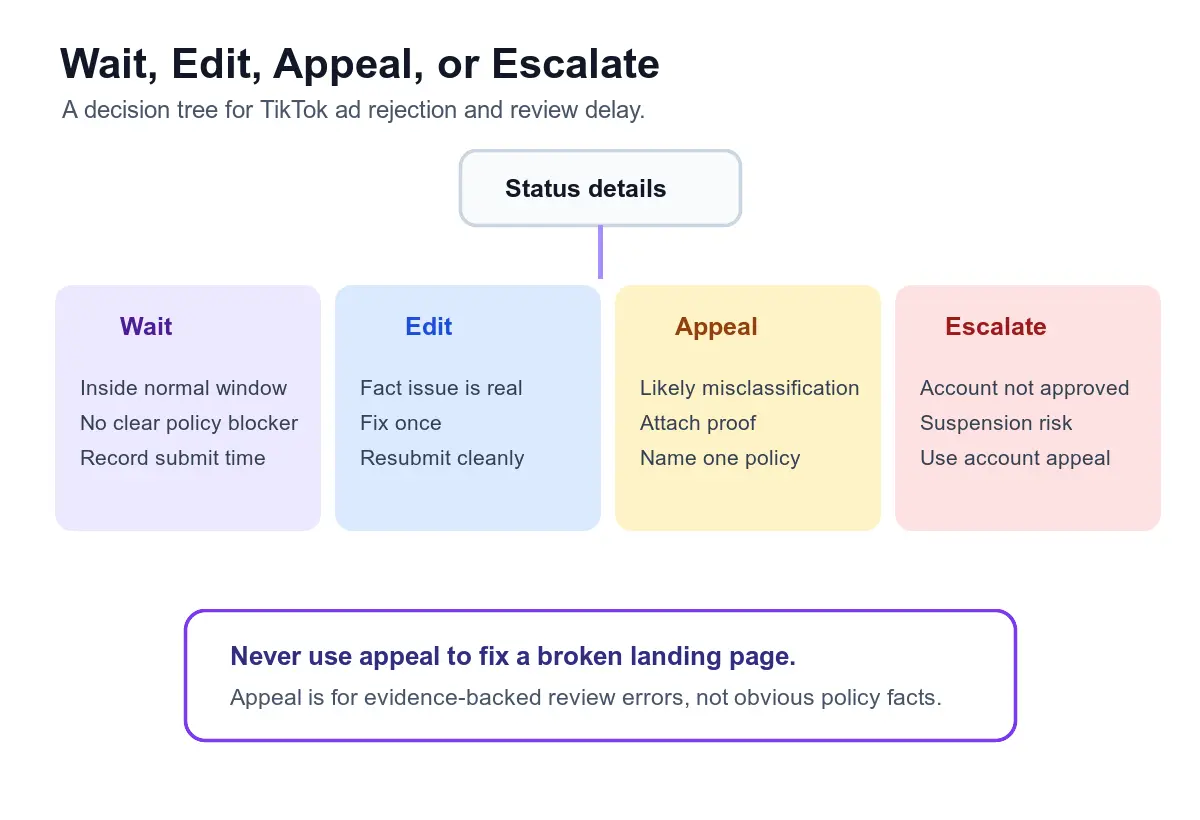
Wait while a Pending item remains inside the normal window. Edit once when the cited defect is real, then let the new review finish. Appeal when the ad and destination are compliant but the stated category does not fit. Escalate prolonged delays, account holds, suspensions, or broken appeal routes with IDs, timestamps, screenshots, and existing case numbers.
5. How To Appeal A TikTok Ad Rejection With Evidence
TikTok's One Click Appeal guide allows one appeal per incident from the Ad Group or Ad list (hover over the status, click View more, then Appeal). TikTok targets a reply in 24 hours. The required description accepts up to 2,000 characters, plus up to five PNG, JPG, or PDF files (10 MB max each).
Two boundaries matter: appealing from an ad or Ad Group sends the entire Ad Group back through review, and edits are locked until review finishes. If the account is suspended, ad-level One Click Appeal is disabled—use the account suspension appeal path.
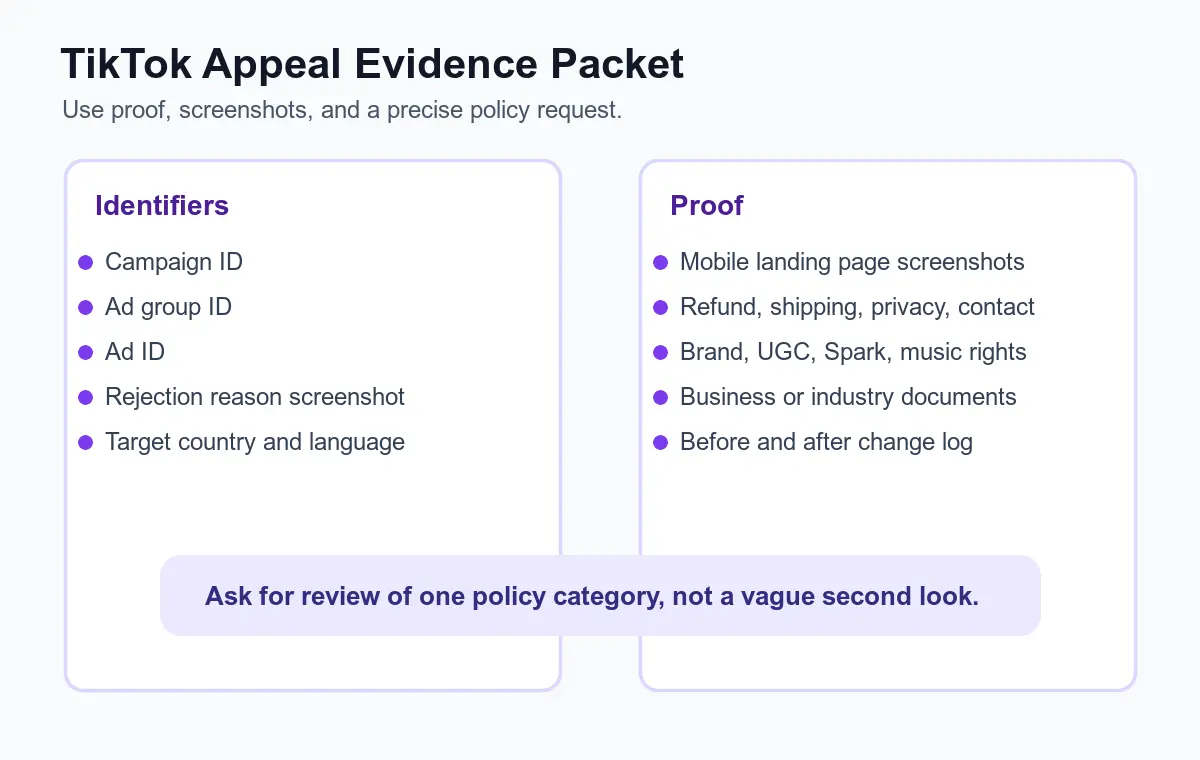
| Evidence item | Why it matters |
|---|---|
| Campaign, ad group, and ad ID | Support can identify the exact object |
| Rejection reason screenshot | Prevents the case from drifting into a generic policy discussion |
| Mobile page and redirect screenshots | Shows function, product match, offer, shipping, refund, contact, and privacy details |
| Market, authorization, and change evidence | Covers relevance, rights, qualifications, fixes, and the category to re-review |
A short appeal template:
Please re-review ad ID [ID] under [policy category]. The rejection says [reason]. The ad promotes [product] in [market]. Attached screenshots show the matching page, offer, policies, contact details, and relevant authorization.
Do not edit while the appeal is pending; TikTok disables edits to the appealed Ad Group and ads. If the appeal fails and the evidence still supports your case, self-serve accounts can submit a support ticket and managed accounts can contact their TikTok Sales Representative.
6. When Account Not Approved Becomes An Account-Level Problem
TikTok's Account Approval FAQs say most account reviews take under 24 hours, an official website is required, and updating a promotion link can trigger another review of up to 24 hours; if disapproved, submit an Account Review ticket within three working days. For onboarding verification holds, use the TikTok ads account under review guide, and use the TikTok Ads agency account launch checklist before launching. TikTok's suspension overview also notes that changing an ad's landing page after campaign creation can trigger suspension.
Treat every suspension notice as urgent. TikTok's June 2026 overview gives a 30-day window to resolve or appeal a first temporary suspension before it may become permanent, while its suspended-account troubleshooting guide states an absolute 180-day acceptance limit for appeals and targets a reply within two business days. Act within 30 days, follow the deadline in your account notice, and do not open new accounts or file duplicate appeals during review. Check Account Health (Good, Attention needed, Restricted, Poor) before delivery stops.
7. What AdRate Can And Cannot Do For Review Problems
AdRate can centralize ad and account status checks across accounts and keep performance-based budget rules running when rejection shifts spend to the remaining live ads. Its automation rules do not use Rejected or Not Approved as a trigger, and AdRate cannot change TikTok's review decision, guarantee approval, or make a non-compliant page safe.
If that narrower operating layer fits your team, start free and centralize multi-account monitoring. No credit card required.
8. FAQ
Why is my TikTok ad not approved?
Most not-approved cases come from policy mismatch, landing page issues, authorization gaps, unsupported products, missing qualifications, or account review holds. Open the secondary status in Ads Manager and match the exact reason to the creative, landing page, or account layer.
What should I do if a TikTok ad is stuck in review?
Wait while inside the normal 24-hour window, and avoid repeated edits that reset the queue. Past 24 hours, follow the TikTok ads stuck in review guide to check destination crawling and submit a support ticket.
Is TikTok ad rejection different from TikTok ads not spending?
Yes. Rejection is an approval gate. Not spending happens after approval due to bids, budget, learning, balance, audience, or delivery limits—use the not-spending guide when status is Active.
What if TikTok gives me a rejection reason that clearly does not match my ad?
Inspect visuals, on-screen text, audio, copy, CTA, and the mobile landing page. If the category still does not fit, explain the actual product and page point by point and attach screenshots proving why the cited violation is absent; do not blame automated reviewers. Community discussion: r/TikTokAds thread
Can my landing page cause a TikTok ad rejection even when the product itself is allowed?
Yes. Review covers the destination, including pop-ups, prize or draw language, redirects, ad-to-product match, local currency, privacy policy, and contact details. Remember that editing only your website does not restart TikTok review until you save an ad change or appeal. Community discussion: r/TikTokAds thread
What if the TikTok appeal form keeps sending me back to the same suspended-account appeal?
Save the error screen, timestamp, ad-account ID, and original case ID. Check whether the prior case is still open, then report the submission loop as a technical issue to Advertiser Support rather than filing under an unrelated category. Community discussion: r/TikTokAds thread
Why was my new TikTok Ads account suspended before my first campaign ran?
Treat this as account-level verification or risk review, not a creative rejection. Reconcile the legal entity, billing records, login history, and first funding proof into one structured account appeal, and do not open replacement accounts to bypass the hold. Community discussion: r/gamedev thread
Official TikTok new advertiser program - exclusive benefits for new advertisers
Open a new TikTok ad account and earn official ad credit as you spend
Spend $200 within 30 days of signing up and get $200 in ad credit, rising to $6,000 when you spend $10,000. Credits go straight into your TikTok ad campaigns.
Coupons are issued by TikTok once it confirms you qualify as a new advertiser. Actual issuance and tiers are shown on the Coupon Progress page inside your TikTok Ads account.