TikTok Pixel Content ID Missing? Fix Catalog Match Rate Errors
Fix TikTok Pixel content ID missing warnings and low catalog match rates. Check Event Builder parameters, content_id format, and SKU ID alignment.
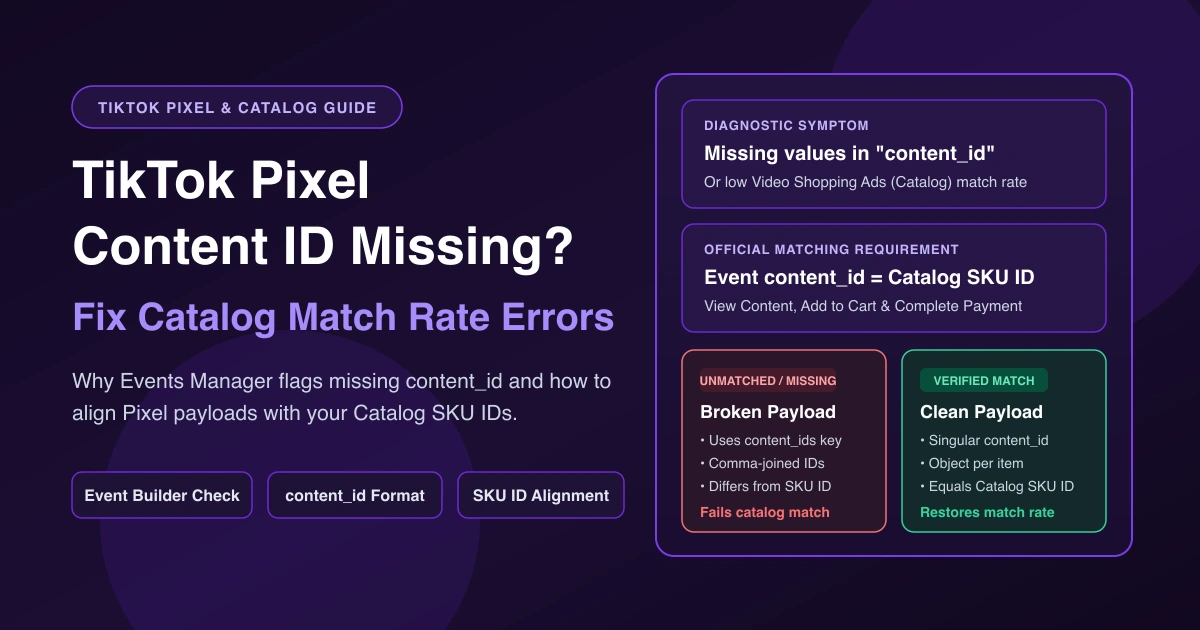
You open TikTok Events Manager and see "More than 10% of your events are missing values in 'content_id,'" or you check Catalog Manager and find your Video Shopping Ads (Catalog) match rate is low. When your TikTok Pixel content ID is missing or fails to match your feed, TikTok cannot link storefront actions—viewing a product, adding to cart, or completing payment—to the items in your catalog. If your alert instead flags a missing value or currency parameter and Ads Manager reports $0.00 ROAS, see our TikTok Pixel missing value parameter guide.
What the Content ID Warning Means
In Video Shopping Ads (Catalog), SKU ID uniquely identifies each catalog product. When a shopper interacts with an item on your website or app, your Pixel or Mobile Measurement Partner (MMP) sends an event to TikTok. To match that event to the catalog product, the content_id parameter must equal the item's SKU ID in your catalog (catalog match rate troubleshooting guide).
Some custom store advertisers see Events Manager warn, "More than 10% of your events are missing values in 'content_id'" (r/TikTokAds thread). Treat that wording as the prompt shown in your account, not a documented threshold—TikTok's Web Diagnostics and catalog match rate help pages don't mention a 10% cutoff. If you don't run catalog ads yet, the warning still means your web events are firing without item IDs.
For Video Shopping Ads (Catalog), confirm View Content, Add to Cart, and Complete Payment fire with content_id, quantity, price, currency, and value (for apps, enable content_id in your MMP).
Where to See It: Events Manager Diagnostics and Catalog Manager
Check both views first to see whether content_id is absent or mismatched:
- Events Manager: The home Diagnostics section lists data connection issues—including missing parameter data or content ID—across your Pixels, with the issue, severity, affected dataset, and impacted ads. Inside a Pixel, open Diagnostics → Active issues → Learn more for impact, steps, and sample affected events (Web Diagnostics guide). On the Overview tab, the event table lists Event Type, Event Details, EMQ Score, Diagnostics, Event Status, Connection Method, Total Events, and Last Received plus parameter, matching, and deduplication details (Events Manager monitoring guide). If your event has zero activity, see our TikTok Pixel not ready for campaign guide.
- Catalog Manager: In Diagnostics, filter Issue Category by Pixel or event issue and export the CSV of affected items and suggestions (Catalog Diagnostics guide). Under Event Sources, select your Pixel or App for two exports (TikTok shows no match rate if zero events arrived in the past 7 days):
| Event Sources Export | What It Reveals | Cause |
|---|---|---|
| Export events without content ID | Events arriving without an item ID | Cause 1 or Cause 2 |
| Export content IDs that don't match with this catalog | content_id values missing from catalog SKU ID | Cause 3 |
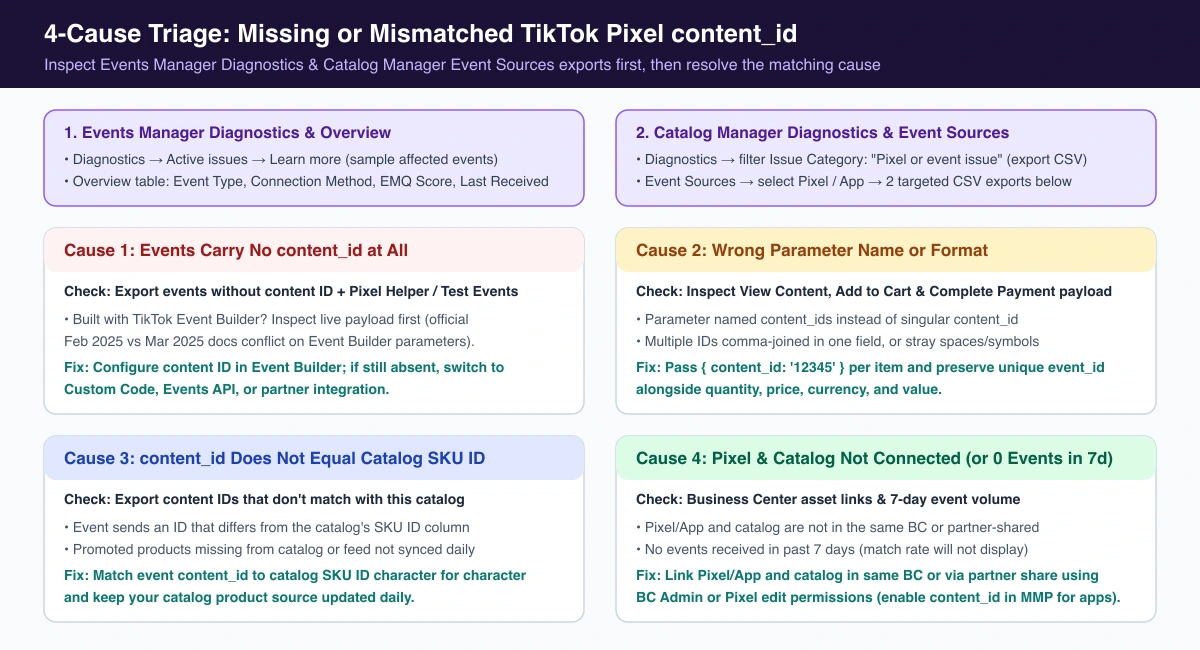
Cause 1: Your Events Aren't Carrying content_id at All
After running Export events without content ID, open your store with TikTok Pixel Helper or Test Events and trigger View Content, Add to Cart, and Complete Payment to check whether content_id is sent.
If you built events with TikTok Event Builder, inspect the live payload in Pixel Helper or Test Events first. If content_id is missing, configure the content ID parameter in Event Builder (such as setting the SKU ID as the content ID parameter on Add to Cart). If it still sends no parameters, switch to Custom Code, our TikTok Pixel and Events API dual tracking setup, or a partner integration.
Why verify first? TikTok's docs conflict: the February 2025 catalog match rate page says Event Builder events do not send back any parameters, whereas the March 2025 TikTok Event Builder guide says Event Builder can configure value, currency, content ID, and content type without code.
Cause 2: Wrong Parameter Name or Format
When your TikTok Pixel content ID is not working despite passing an ID in code, check three formatting rules from TikTok's catalog troubleshooting guide:
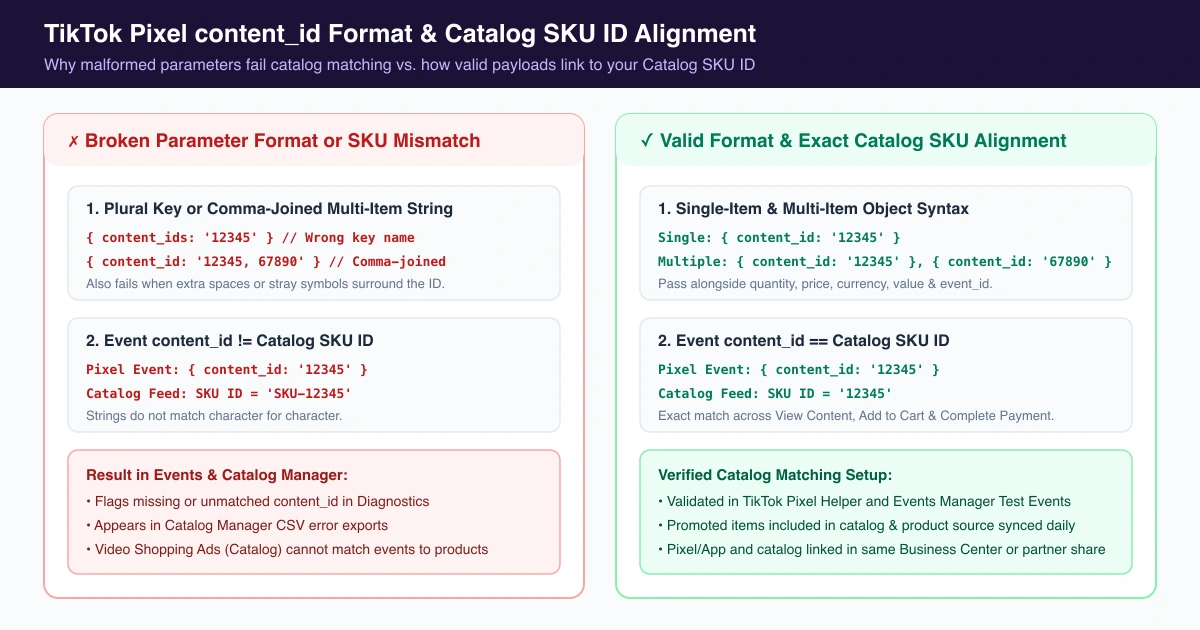
- Write content_id, not content_ids: Using content_ids is ignored.
- Do not comma-join multiple items: Pass separate objects per product instead of a comma-separated string.
- Remove extra spaces and symbols: Strip stray whitespace or punctuation.
Use this structure for single-item and multi-item events:
// Single item
{ content_id: '12345' }

// Multiple items (separate objects, not '12345,67890')
{ content_id: '12345' }, { content_id: '67890' }
When editing checkout code, keep your unique event_id intact to avoid TikTok Pixel duplicate purchase events.
Cause 3: content_id Doesn't Match Your Catalog SKU ID
If content_id fires cleanly but match rate stays low, run Export content IDs that don't match with this catalog in Catalog Manager → Event Sources:
- Exact string match: TikTok's guide doesn't say whether to use product or variant IDs—only that the event's content_id must equal the catalog's SKU ID.
- Daily catalog sync: Confirm promoted items are in the catalog, linked to a product source, and updated daily.
Cause 4: Pixel and Catalog Aren't Connected
Your Pixel (or App) and catalog must belong to the same Business Center or be shared via partner permissions, with Business Center Admin or Pixel edit permissions. Once matched, organize your inventory with our TikTok catalog ads product sets guide.
Verify the Fix and Guard Catalog Ad Spend
Test View Content, Add to Cart, and Complete Payment in TikTok Pixel Helper and Test Events, then re-check both exports in Catalog Manager → Event Sources. TikTok does not state how fast resolved Diagnostics alerts clear automatically, though you can click ... → Dismiss on an issue card.
While you fix content_id mismatches and wait for catalog signals to rebuild, Video Shopping Ads can keep spending on uncalibrated delivery. In AdRate, you can set automated rules based on spend and CPA conditions to pause or cap catalog ad groups before tracking gaps burn your budget.
Frequently Asked Questions
Is the 10% missing content_id warning an official TikTok threshold?
Not one TikTok documents. The 10% appears in the Events Manager alert text ("More than 10% of your events are missing values in 'content_id'"), but TikTok's Web Diagnostics and catalog match rate help pages don't define it as a cutoff. Fix the missing IDs either way.
Can TikTok Event Builder send the content_id parameter?
TikTok's February 2025 catalog guide says Event Builder sends no parameters, while the March 2025 Event Builder guide says it supports no-code content ID setup. Test in Pixel Helper or Test Events first; if content_id is still missing, use Custom Code, Events API, or a partner integration.
Official TikTok new advertiser program - exclusive benefits for new advertisers
Open a new TikTok ad account and earn official ad credit as you spend
Spend $200 within 30 days of signing up and get $200 in ad credit, rising to $6,000 when you spend $10,000. Credits go straight into your TikTok ad campaigns.
Coupons are issued by TikTok once it confirms you qualify as a new advertiser. Actual issuance and tiers are shown on the Coupon Progress page inside your TikTok Ads account.