"Custom Identity Is No Longer Supported" TikTok Ads: What to Do
Seeing "Custom identity is no longer supported" in TikTok Ads? Check the 5 exempt campaign types, compare linking paths, and keep ads off your profile.
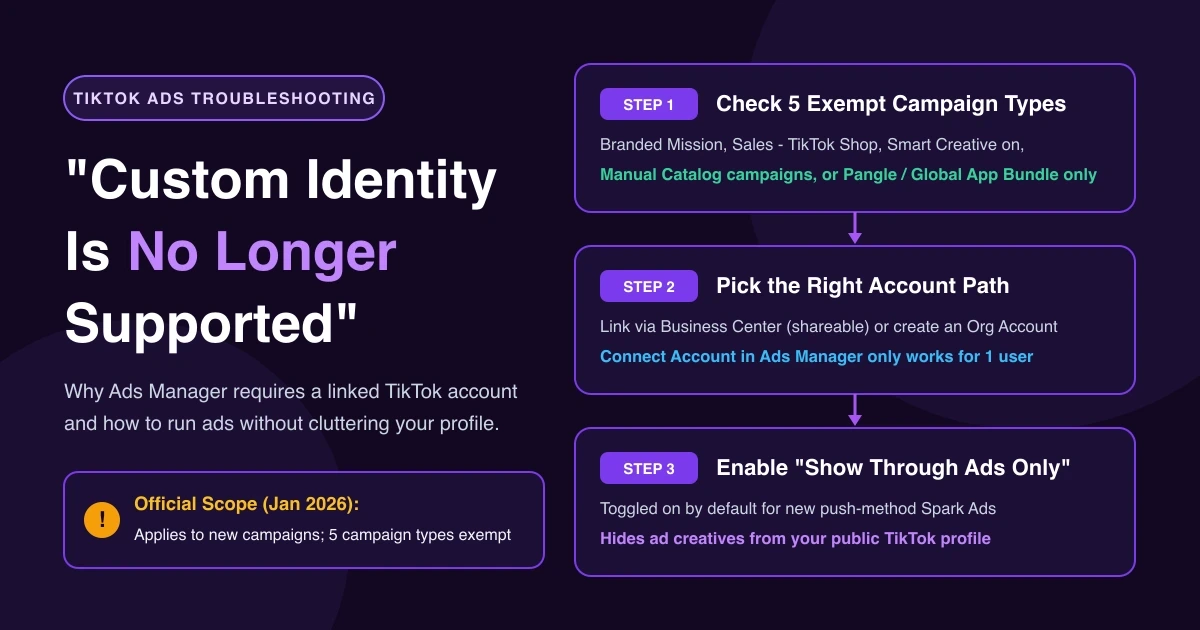
When "Custom identity is no longer supported" appears in TikTok Ads Manager while you upload a video or build a campaign, ad setup stops—especially if your client has no TikTok login and you will not attach your personal profile. Check whether your campaign fits one of the five exempt setup types, pick the right account-linking path for team access, and keep "Show through ads only" on so ads stay off the public profile.
What "Custom identity is no longer supported" means
One buyer running ads for a client shared the interface text in r/TikTokAds:
"I just went to upload a new video and now it's saying 'Connect a TikTok account Custom identity is no longer supported. Using a TikTok account maximizes ad engagement and helps people find and engage with your brand.' The client doesn't have a TikTok to log in to … without using my personal tiktok account?"
That wording comes from user reports in Ads Manager rather than help docs, and some buyers saw it before the official date. In TikTok's About the Identity feature guide, Custom Identity means running ads with custom profile images and display names when Identity is off—previously the only way to publish non-Spark ads without an official account.
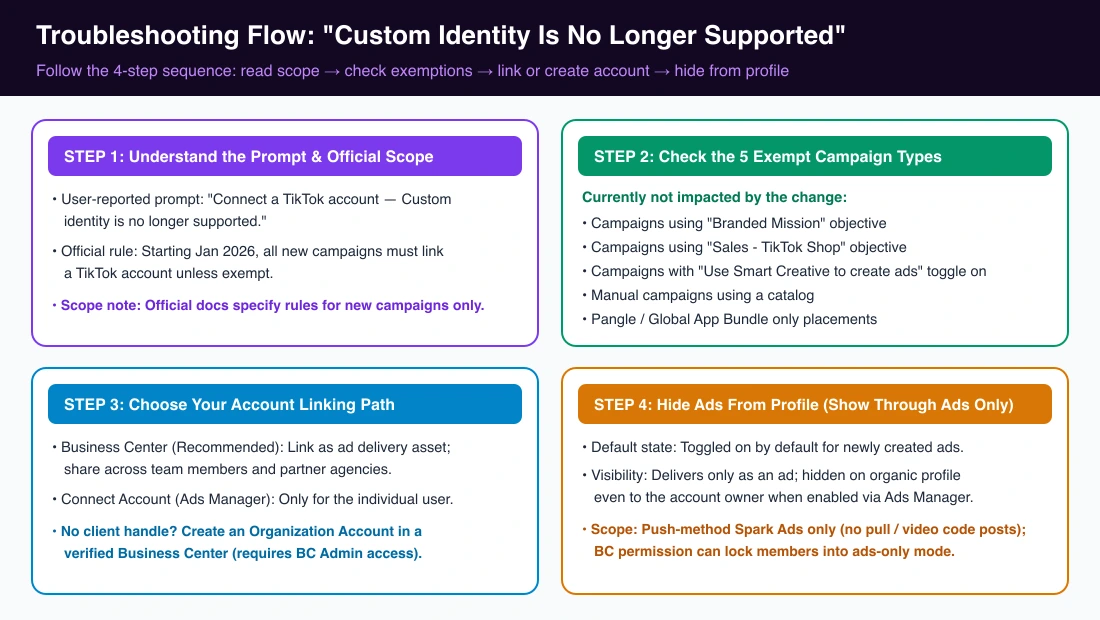
TikTok's About changes coming to Custom Identity notice states that starting January 2026, all new campaigns must be linked to a TikTok account unless exempt. Both that page and the Custom Identity transition blog cover new campaigns only and set no rules for running campaigns.
First, check whether your campaign is exempt
TikTok's change notice lists five campaign types "currently not impacted by this change":
| Exempt Campaign Type | Where to Check | Status |
|---|---|---|
| Campaigns using "Branded Mission" objective | Campaign → Objective | Not impacted |
| Campaigns using "Sales - TikTok Shop" objective | Campaign → Objective | Not impacted |
| Campaigns with "Use Smart Creative to create ads" toggle on | Ad setup → Smart Creative | Not impacted |
| Manual campaigns using a catalog | Campaign / Ad Group catalog | Not impacted |
| Pangle/Global App Bundle only placements | Ad Group → Placements | Not impacted |
Note "currently" in TikTok's notice—these exemptions reflect current behavior rather than a permanent guarantee. If the carousel format is missing during setup, see 5 checks when the TikTok Carousel Ads option is missing. For live shopping identity errors under Sales - TikTok Shop, see how to fix TikTok LIVE ads identity not eligible.
Two ways to link a TikTok account: Business Center vs. Connect Account
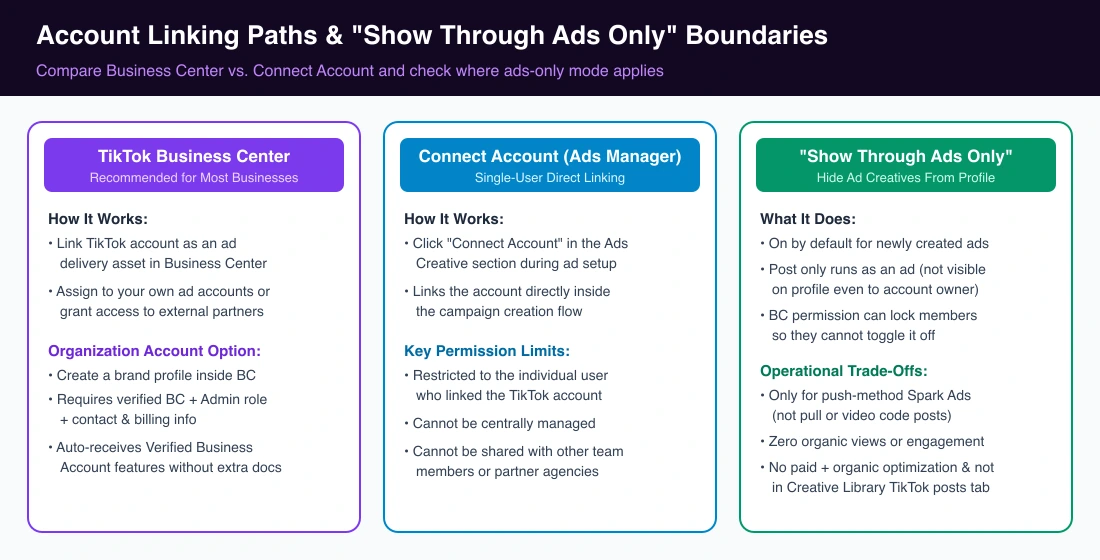
If your new campaign is not exempt, link a TikTok account via TikTok Business Center or in TikTok Ads Manager:
| Path | Where You Link | Who Can Use It | Official Guidance |
|---|---|---|---|
| TikTok Business Center | Business Center as ad delivery assets | Your ad accounts or partner accounts | Recommended for businesses, teams, and agencies |
| TikTok Ads Manager | Ads Creative → Connect Account | Only the individual user who linked it | Solo buyers; cannot be centrally managed or shared |
For team or agency work, link the account in Business Center as an ad delivery asset first, then assign delivery permissions to your ad account or partner accounts. For the step-by-step linking flow, see how to connect a TikTok account to Ads Manager.
No brand account yet? Organization Account prerequisites
If a client lacks a TikTok handle, create an Organization Account in Business Center instead of using a personal login. While TikTok's blog describes Organization Accounts as tied to verified business status, the prerequisites in How to create an Organization Account in Business Center are:
- A Business Center that has completed business verification
- Admin access to that Business Center
- Completed contact and billing details (agencies must first create a verified ad account for the client)
Go to Business Center → Accounts → TikTok accounts → Add a TikTok account → Create a new TikTok account → Create new, enter the nickname and operating region (agencies also pick the client), and click Create. New Organization Accounts get Verified Business Account features without extra verification documents. Mainland China advertisers cannot select China as the operating region.
Keep ads off your profile with "Show through ads only"
To keep ad creatives off a brand's organic feed, use Show through ads only mode (formerly "ads-only" mode or "Don't show on TikTok profile"). When enabled in Ads Manager, the post runs strictly as an ad and is hidden on the profile even to the account owner.
- Default state and scope: On by default for newly created ads after selecting a linked identity, and in Ads Manager it applies only to push-method Spark Ads (not existing organic or video code posts).
- Trade-offs: Posts get no organic views or engagement metrics, cannot use paid and organic optimization, and do not appear in Creative Library → TikTok posts.
- Team lock: Under Managing "Show through ads only" permission in Business Center, granting this permission forces all push-method Spark Ads that member creates through the account into ads-only mode so they cannot toggle it off.
FAQ
Do exempt campaigns still use Custom Identity?
TikTok states the five exempt campaign types above are currently not impacted by the requirement to link a TikTok account on new campaigns.
Can my team share an account linked via Connect Account?
No. Accounts linked via Connect Account in Ads Creative belong only to the user who linked them and cannot be shared with teammates or agencies.
Will "Show through ads only" posts appear on my profile?
No. When turned on in Ads Manager for a push-method Spark Ad, the video runs only as an ad and stays hidden from the profile even to the account owner.
What about my running campaigns?
TikTok's help center and blog specify rules for new campaigns starting January 2026 and publish no rules for running campaigns. Check live campaigns in Ads Manager.
Scale across linked accounts without repetitive setup
Once your new campaigns use linked TikTok account identities, launching a winning setup across ad accounts still takes manual work. With AdRate, you can copy campaigns across ad accounts in bulk and pick the matching linked TikTok account identity for each ad group in every target account.
Official TikTok new advertiser program - exclusive benefits for new advertisers
Open a new TikTok ad account and earn official ad credit as you spend
Spend $200 within 30 days of signing up and get $200 in ad credit, rising to $6,000 when you spend $10,000. Credits go straight into your TikTok ad campaigns.
Coupons are issued by TikTok once it confirms you qualify as a new advertiser. Actual issuance and tiers are shown on the Coupon Progress page inside your TikTok Ads account.