TikTok Lead Generation CRM Integration Not Working? 6 Checks
TikTok Lead Generation CRM integration not syncing leads to Google Sheets, Salesforce, or Webhooks? Run these 6 checks on timing, permissions, and status.
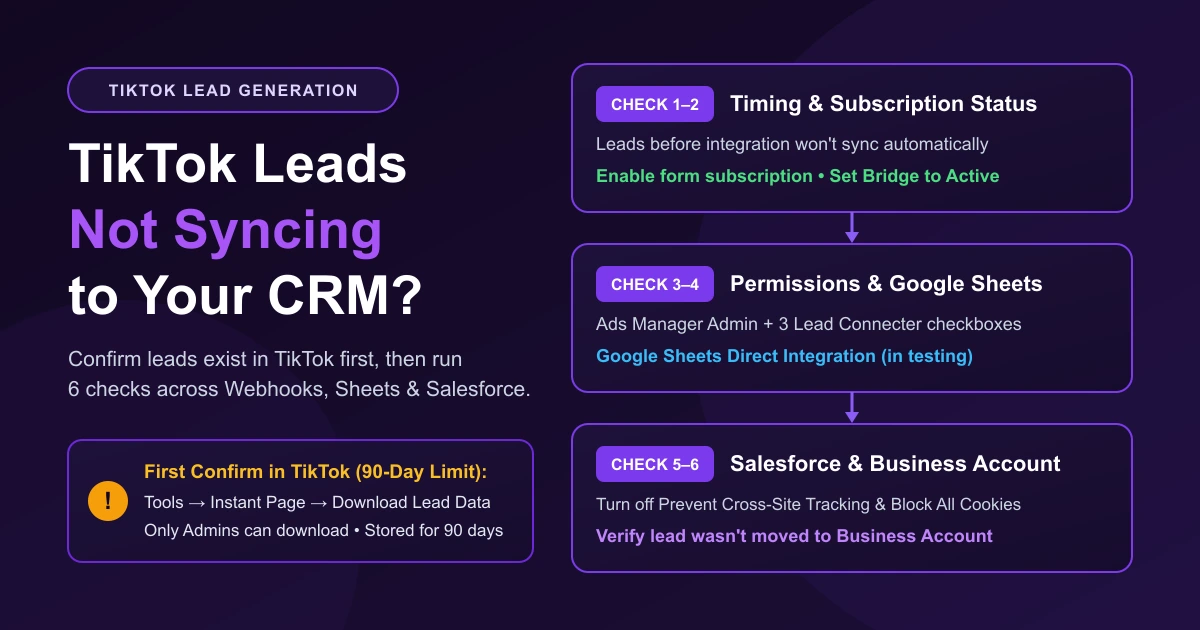
Your Instant Form campaign gets submissions in TikTok Ads Manager, yet your CRM, Google Sheet, or Webhook stays empty. When a TikTok Lead Generation CRM integration stops syncing leads, split the check in two: first verify TikTok recorded the lead, then run the six checks below.
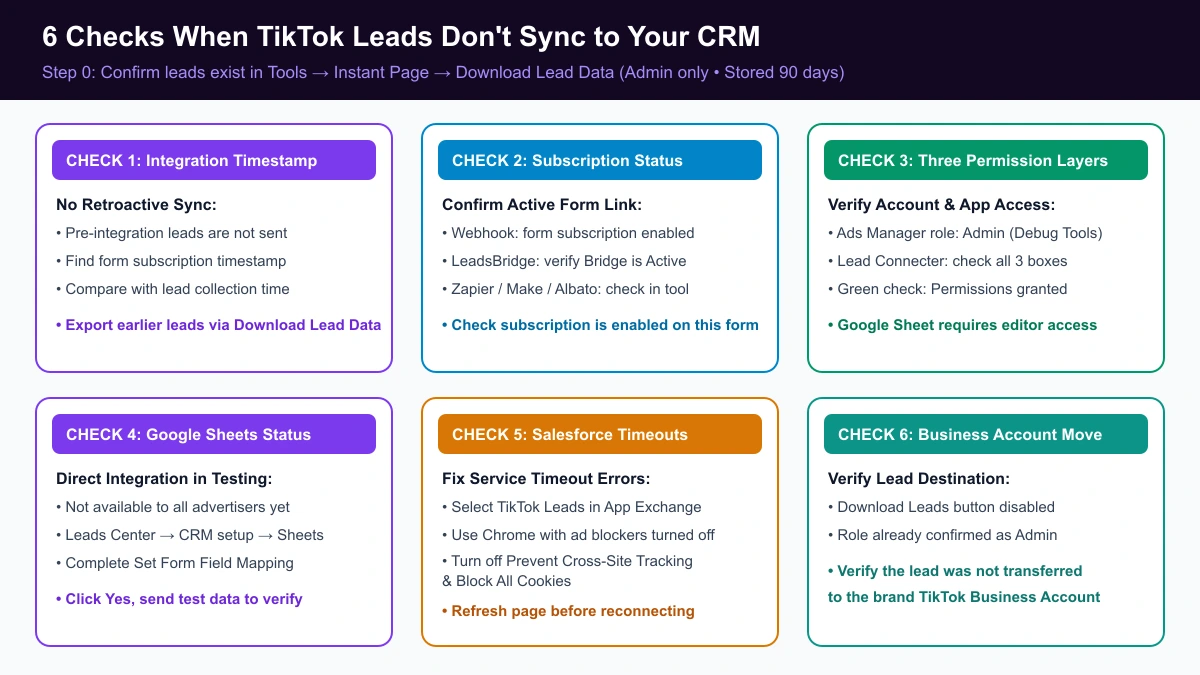
First, Confirm TikTok Actually Has the Lead
In TikTok Ads Manager, open Tools → Instant Page, hover over your form, and click Download Lead Data. The file includes all leads from that form, even if used in multiple ads. You can also filter leads by status, tags, form ID, owner, or time in TikTok Leads Center.
Only Admin users can download and manage leads, and TikTok Ads Manager stores lead data for 90 days.
If no leads appear in TikTok, your form may still be in review (reviews take up to 24 hours during standard operating hours; see TikTok ads rejected or stuck in review) or was not attached to the ad (see TikTok Instant Form not showing). If the download button fails, disable AdBlock, try Chrome Incognito, switch to Firefox or Safari, or restart your computer.
Check 1: Leads Submitted Before the Integration Won't Sync
TikTok only sends lead data collected after the integration is complete; earlier leads will not sync.
Run the three-step check from TikTok's Webhook troubleshooting guide and LeadsBridge troubleshooting guide:
- Find the subscription time of the form.
- Pull leads via Download Leads or Leads Center.
- Compare the time of leads collection with the time of form subscription.
Export earlier leads manually and test live syncing only with newer submissions.
Check 2: Is the Form Subscription (or Your Bridge) Still Active?
Check the form-level connection status:
- Webhooks: Make sure form subscription is enabled on that form.
- LeadsBridge: Make sure your Bridge is Active.
- Other third-party tools: In Zapier, Make, or Albato, check the connection status in that tool's dashboard.
Check 3: Permissions — Ads Manager Admin + Three Permission Boxes
Check all three permission layers:
- Ads Manager Admin role: On TikTok's Debug Tools site, enter your ad account URL and click Confirm → Query Ad Account Permission to confirm Permission Role is Admin (see our Business Center permission error guide).
- Three permission boxes: Under CRM setup, click Confirm Permissions. On the Lead Connecter permissions page, check Ad Account Management, Creative Management, and Lead Management so Permissions granted appears with a green checkmark next to your Business Account name.
- Google Sheet access: Ensure editor access on the target Google Sheet.
Check 4: Google Sheets Direct Integration Is Still in Testing
If you're looking for the Google Sheets option in Leads Center, note that TikTok's direct Google Sheets integration is currently in testing and not available to all advertisers.
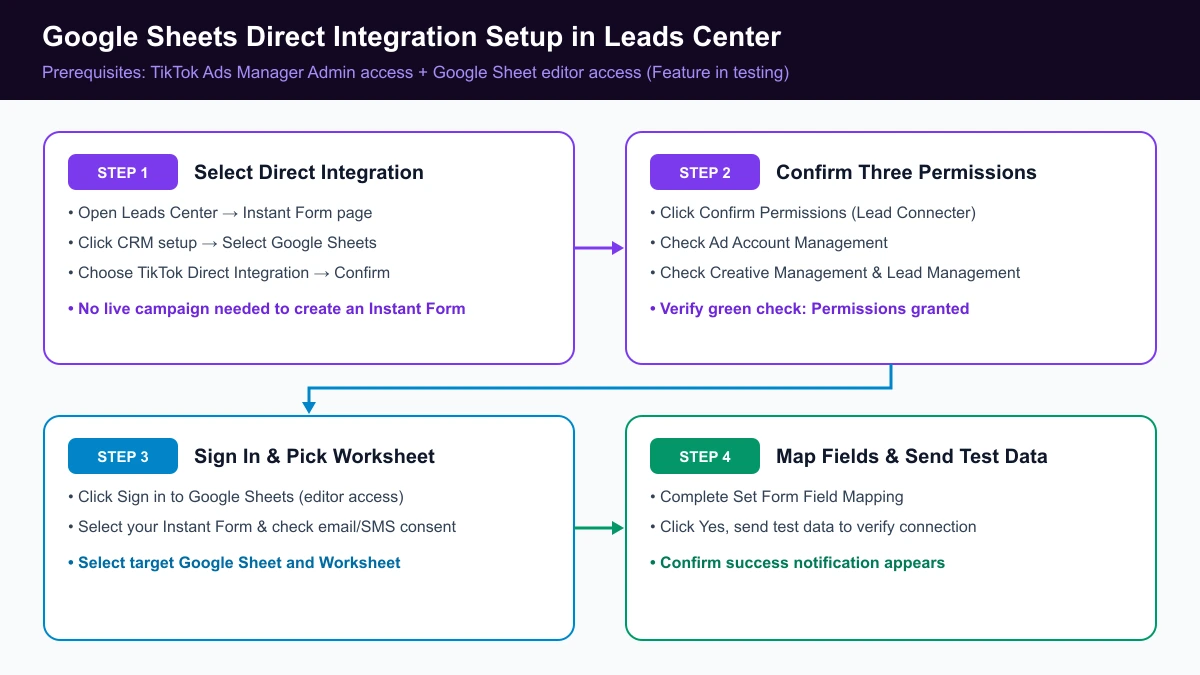
If available on your account, verify the setup flow (no live campaign is needed to create an Instant Form):
- Open Leads Center → Instant Form → CRM setup → Google Sheets → TikTok Direct Integration → Confirm.
- Click Confirm Permissions, check all three boxes on the Lead Connecter permissions page, and verify Permissions granted.
- Click Sign in to Google Sheets, pick your form, and check email/SMS consent.
- Select the Sheet and Worksheet, finish Set Form Field Mapping, and click Yes, send test data.
Check 5: Salesforce Marketing Cloud Connection Errors
If your Salesforce Marketing Cloud connection fails during setup, TikTok lists four reasons you may see an error: choosing an option other than TikTok Leads in App Exchange, signing in to the wrong TikTok Ads Manager account, hitting Service Timeout while creating a form connection, or seeing "ads.tiktok.com took too long to respond".
Use Chrome without ad blockers, turn off Prevent Cross-Site Tracking and Block All Cookies, and refresh to see if the connection completed before reconnecting.
Check 6: Was the Lead Moved to the Brand's TikTok Business Account?
If the Download Leads button stays disabled even though your role is Admin, TikTok's download troubleshooting guide says to verify that the lead has not been transferred to the brand TikTok Business Account.
Which Integration Are You Using?
Leads Center can send leads from Instant Forms, organic lead generation forms, direct messages, and paid Messaging Ads to your CRM across four integration types:
| Type | Platforms | Where to Check |
|---|---|---|
| Direct Integrations | HubSpot, Salesforce Marketing Cloud, Salesforce Sales Cloud, Google Sheets, Klaviyo, ActiveCampaign, Privyr, Constant Contact | Leads Center → CRM setup (the Google Sheets flow shows Permissions granted and Yes, send test data; for Salesforce Marketing Cloud see Check 5). |
| Third-Party Integrations | LeadsBridge, Zapier, Albato, Make | Bridge is Active (in LeadsBridge) or connection status in the tool, plus subscription time. |
| TikTok Custom API with Webhooks | Custom Webhooks | Form subscription enabled and subscription time. |
| Website Builder Plugins | Website builder plugins | See your website builder's plugin settings. |
Syncing leads differs from exporting ad metrics; for report data, see how to export TikTok ads to Google Sheets.
Running Lead Gen Across Many Ad Accounts
When managing multiple client accounts (see our agency ad account checklist), AdRate flags missing target forms during multi-account Lead Generation campaign copy so you can share or swap them. Automated rules can watch form submissions and cost per form for each account, so you have a TikTok-side number to compare against your CRM row count.
FAQ
How do I test a TikTok lead form?
In the Google Sheets direct setup in Leads Center, finish Set Form Field Mapping and click Yes, send test data to verify the link.
How long does TikTok keep leads?
TikTok Ads Manager stores leads for 90 days, and only Admins can download or manage them.
Is there a limit on leads?
No. TikTok sets no weekly limit on leads collected.
Why can't I find the Google Sheets option?
Direct Google Sheets integration in Leads Center is in testing and not available to all advertisers yet.
Official TikTok new advertiser program - exclusive benefits for new advertisers
Open a new TikTok ad account and earn official ad credit as you spend
Spend $200 within 30 days of signing up and get $200 in ad credit, rising to $6,000 when you spend $10,000. Credits go straight into your TikTok ad campaigns.
Coupons are issued by TikTok once it confirms you qualify as a new advertiser. Actual issuance and tiers are shown on the Coupon Progress page inside your TikTok Ads account.