Claude Fable 5.2 for TikTok Ads: Should Media Buyers Switch?
Claude Fable 5.2 hits 73.4% on chart reading at a 20% lower API price than 5.1. What it means for TikTok Ads buyers, GMV Max sellers, and rule automation.
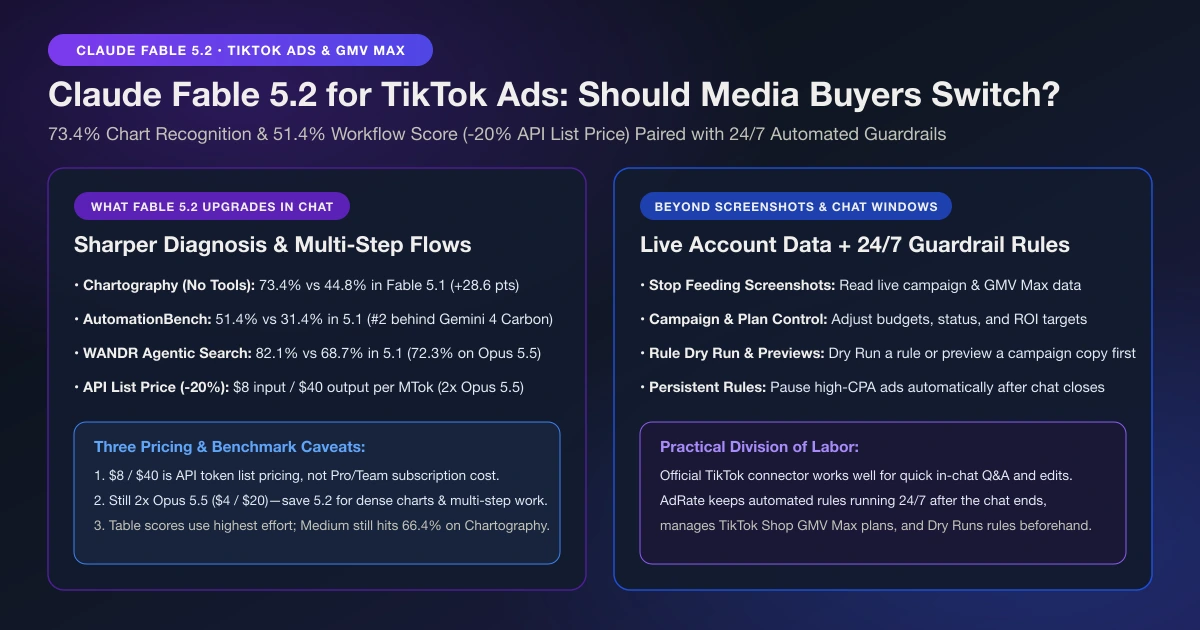
If you already drop TikTok Ads Manager screenshots into Claude to ask why CPA spiked after lunch, Claude Fable 5.2 (released November 9, 2026) is an upgrade you will notice right away. In Anthropic's official release, chart recognition on Chartography jumped from 44.8% in Fable 5.1 to 73.4%, while business workflow execution on AutomationBench climbed 20 percentage points to 51.4%. Reading charts better still leaves you pasting screenshots, though. Feed Claude live campaign data instead, and turn its diagnosis into automated rules that keep watching your budget after you close the chat.
It Reads Charts Better, So Stop Feeding It Screenshots
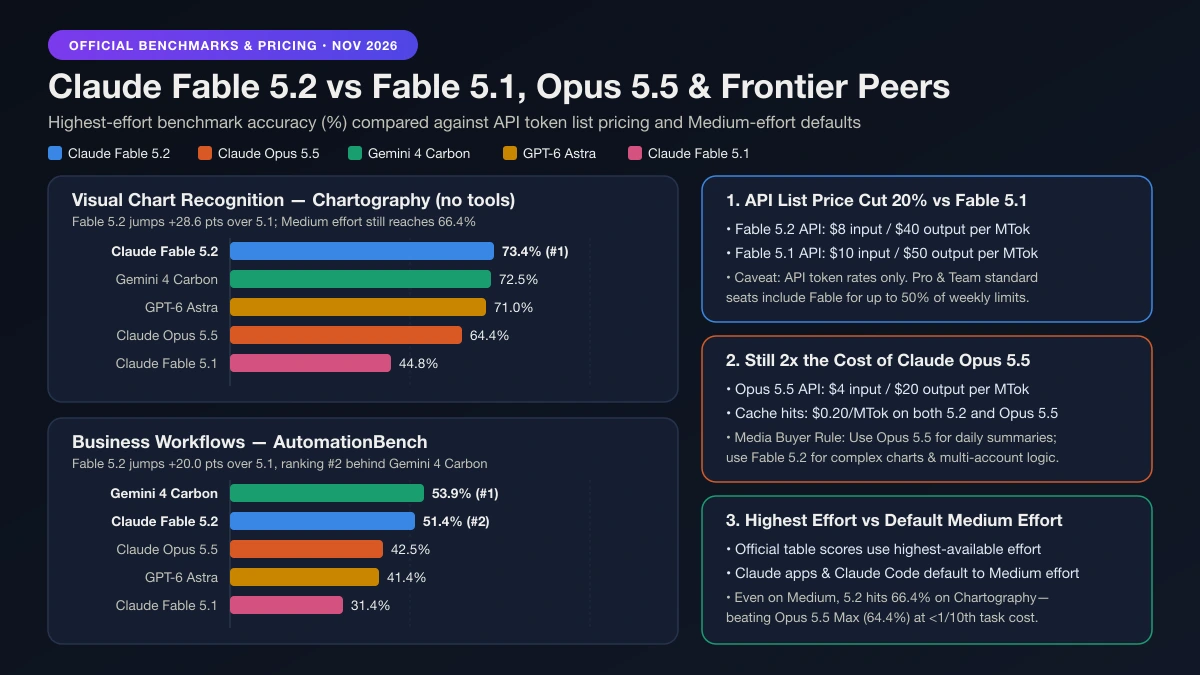
For paid social buyers, the standout metric in Claude Fable 5.2 is Chartography (no tools), which tests how accurately a model reads charts and figures. Fable 5.2 scores 73.4%, up 28.6 percentage points from Fable 5.1 (44.8%) and leading the five-model comparison ahead of Gemini 4 Carbon (72.5%), GPT-6 Astra (71.0%), and Claude Opus 5.5 (64.4%). When you paste a TikTok Ads spend curve or a GMV Max pacing chart into chat, 5.2 is far less likely to misread axes or miss the hour conversion rates dropped. For competitive research or creative brief prep, Anthropic's WANDR agentic search benchmark (relaxed score for large data-collection tasks, compared across Anthropic's own models) also rose to 82.1%, versus 68.7% on Fable 5.1 and 72.3% on Opus 5.5.
Better chart reading is not a reason to run accounts off screenshots. A screenshot is lossy and immediately stale, hiding collapsed columns, attribution settings, and cross-account context. If you run TikTok ads with Claude, let it read actual campaign reports and TikTok Shop GMV Max metrics rather than guessing from pixels.
The second gain is in multi-step workflows. On AutomationBench (business workflows), Fable 5.2 reaches 51.4%, a 20-point leap over Fable 5.1 (31.4%). It ranks second overall behind Gemini 4 Carbon (53.9%), while beating Opus 5.5 (42.5%) and GPT-6 Astra (41.4%). For media buyers, that 20-point jump means steadier multi-step reasoning when Claude inspects spend, compares targets, and drafts budget edits or guardrail rules for your approval.
Fable 5.2 vs Opus 5.5: Pricing, Effort, and Which to Use
Comparing Fable 5.2 with Opus 5.5 comes down to benchmark gains and three pricing caveats. (Anthropic also released Mythos 5.2 on the same underlying model and pricing, though Mythos is restricted to Anthropic's Cyber and Life Sciences Verification Program, so Fable 5.2 is the version media buyers and sellers use.)
| Capability or Spec | Claude Fable 5.2 | Claude Fable 5.1 | Claude Opus 5.5 | GPT-6 Astra | Gemini 4 Carbon |
|---|---|---|---|---|---|
| Chart reading (Chartography, no tools) | 73.4% | 44.8% | 64.4% | 71.0% | 72.5% |
| Business workflows (AutomationBench) | 51.4% (#2) | 31.4% | 42.5% | 41.4% | 53.9% (#1) |
| Agentic search (WANDR relaxed) | 82.1% | 68.7% | 72.3% | Not reported | Not reported |
| Computer use (OSWorld 2.1 partial) | 89.3% | 83.5% | 87.2% | 79.5% | 81.5% |
| API list price (Input / Output per MTok) | $8 / $40 | $10 / $50 | $4 / $20 | — | — |
| Prompt cache hit (per MTok) | $0.20 | $0.25 | $0.20 | — | — |
Before switching your daily workflow to 5.2, keep three facts in mind:
- The 20% cut applies to API list prices, not chat subscriptions. Fable 5.2 lowers standard API token pricing by 20% versus Fable 5.1 ($8 vs $10 per million input tokens and $40 vs $50 per million output tokens). Fast mode runs $16 / $80 per million tokens, and the model has a 1M context window, 128K max output, and up to 30% faster speeds. On Claude Pro or Team standard seats, Fable is included for up to 50% of weekly usage limits, so check your plan rather than counting token rates.
- Fable 5.2 still costs 2x as much as Opus 5.5. At $4 / $20 per million tokens, Opus 5.5 is half the API price of Fable 5.2. For single-account spend checks or weekly client summaries, Opus 5.5 is plenty.
- Headline scores use highest effort, while apps default to Medium. Anthropic's table shows each model's highest-available effort, whereas Claude apps and Claude Code run on Medium effort by default. Even at Medium effort, 5.2 finishes hard tasks with fewer tokens than 5.1: on Chartography, 5.2 at Medium effort scores 66.4%, beating Opus 5.5 at Max effort (64.4%) for less than one-tenth of the cost per task; on WANDR, Medium effort matches Opus 5.5's top score at about 40% of the cost per task.
Keep Opus 5.5 for routine lookups, and switch to Fable 5.2 when diagnosing multi-account anomalies, reading dense charts, or drafting multi-step optimization plans.
Why Computer Use Should Not Run Your Ads Manager
Fable 5.2 also leads on OSWorld 2.1 (computer use, offline set, partial) at 89.3%, ahead of Opus 5.5 (87.2%), Fable 5.1 (83.5%), Gemini 4 Carbon (81.5%), and GPT-6 Astra (79.5%). Should you let Claude control a browser tab and click around TikTok Ads Manager for you?
No. Accurate clicking does not make browser automation a safe way to manage ad budgets. Interfaces shift, pop-ups interrupt flows, and screen clicks offer no preview of affected objects and no audit log. A dependable setup for running TikTok ads with Claude Code, where you can load AdRate directly, relies on structured data reads, explicit confirmation, and deterministic rules rather than an AI cursor clicking live toggles.
Official TikTok Connector vs AdRate: What Happens After You Close the Chat
TikTok's official connector is already inside Claude, and Fable 5.2's stronger chart reading and workflow reasoning benefit it directly. If you only want to ask occasional questions in chat or make a one-off adjustment at your desk, the official connector is enough.
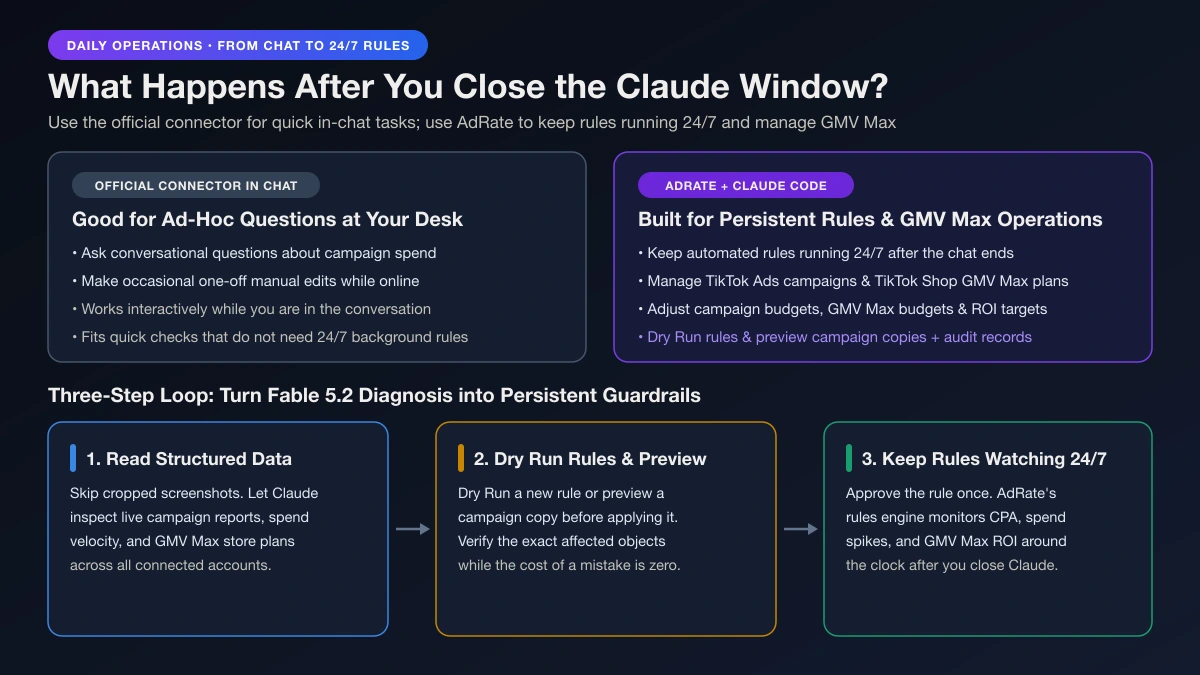
Where AdRate comes in is what happens between conversations. Connecting AdRate to Claude Code adds three capabilities to your daily workflow:
- Rules keep watching after you close the chat. Any model only works while you are prompting it. As we explain in our dual-layer AI agent and rules engine model, AI should handle diagnosis and drafting while deterministic rules handle continuous execution. Instead of manually hunting down bleeding creatives, have Claude help you draft one of your TikTok Ads automation rules, such as a rule that pauses high-CPA ads or trims budgets when spend spikes without conversions. For direct campaign actions, Claude can also switch campaigns on or off, adjust campaign budgets, or preview and then copy winning campaigns across accounts.
- GMV Max lives in the same workflow. AdRate lets Claude inspect GMV Max campaigns across stores, adjust plan budgets and ROI targets, and set automated guardrail rules around the clock. Pair Claude's diagnostics with our TikTok Shop GMV Max automation playbook and GMV Max ROI protection stop-loss guide to curb daytime bleed before midnight.
- Rule Dry Runs, copy previews, and verifiable records. Following a structured TikTok Ads AI Agent workflow, you can Dry Run a rule or preview a campaign copy to see affected objects before anything changes. Every change leaves an audit record, and no update is reported as completed until execution is confirmed.
Put Claude Fable 5.2 to Work on Real Account Data
Use Fable 5.2 for the hard diagnosis (reading dense charts, comparing accounts, and drafting multi-step plans at a 20% lower API list price than 5.1), then let a rule hold the line overnight instead of relying on static screenshots.
Connect AdRate in Claude Code to check your TikTok Ads and GMV Max performance, adjust campaign budgets, and draft Dry Run-verified rules that watch your accounts 24/7. Start with AdRate and turn your next session into guardrails that stay active long after you close the tab.
Official TikTok new advertiser program - exclusive benefits for new advertisers
Open a new TikTok ad account and earn official ad credit as you spend
Spend $200 within 30 days of signing up and get $200 in ad credit, rising to $6,000 when you spend $10,000. Credits go straight into your TikTok ad campaigns.
Coupons are issued by TikTok once it confirms you qualify as a new advertiser. Actual issuance and tiers are shown on the Coupon Progress page inside your TikTok Ads account.