TikTok Ad Credit Not Applied? Check This Status Table First
TikTok ad credit not applied to your campaigns? Match your Promotions status to the exact fix for missing rewards, unspent coupons, or suspended credits.
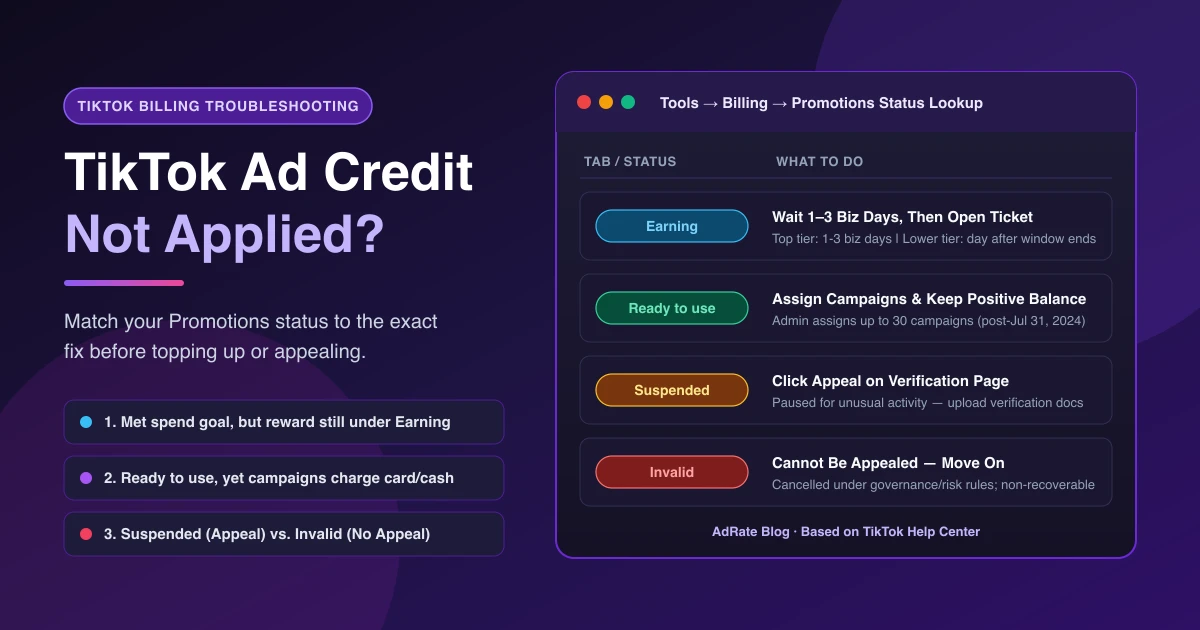
If your TikTok ad credit is not applied to live ads (also called a coupon or voucher, not a Shop buyer coupon), pause before topping up. Open TikTok Ads Manager → Tools → Billing (under Settings) → Promotions first (or Tools → Payments → Promotions; TikTok Shop sellers check Ads Dashboard → Coupon Progress).
Unapplied credits fall into three buckets: you met the spend goal but the reward is not issued yet, the credit sits in your account while ads charge your card or cash, or TikTok suspended, invalidated, or expired it. Your Promotions status shows whether to change a setting, wait, or contact support.
Promotions Status Table: What Each Badge Means and What to Do
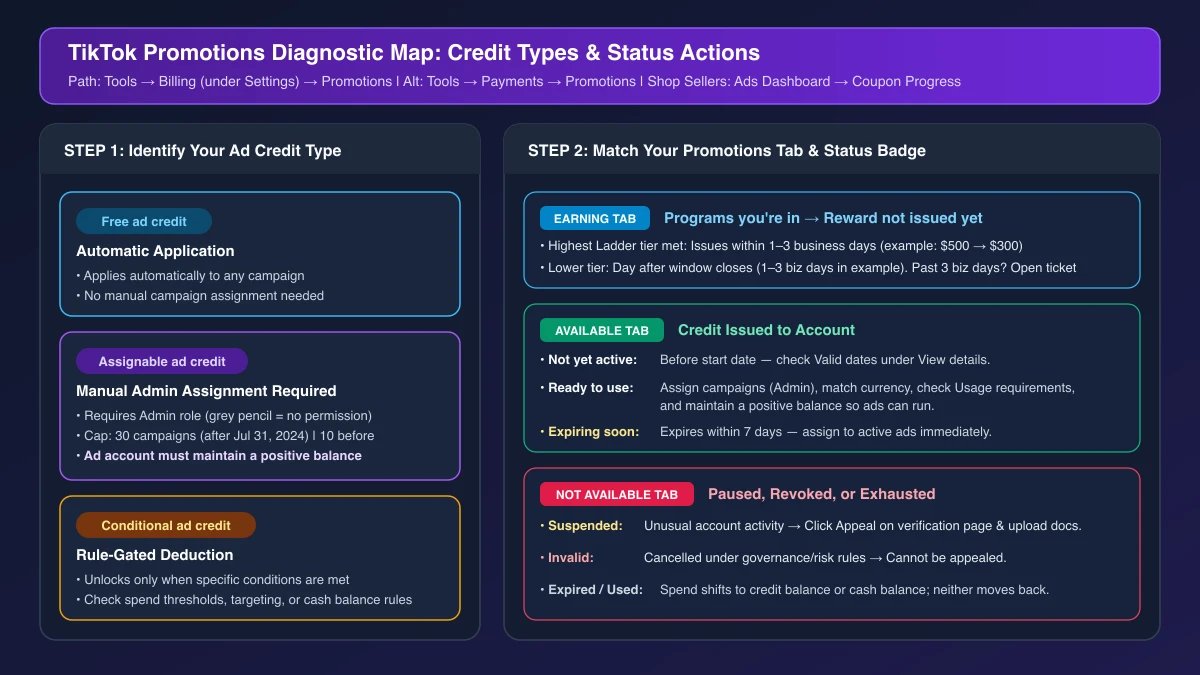
Per TikTok's About ad credits, credits come in three types:
- Free ad credit: Applies automatically to any campaign without action.
- Assignable ad credit: Must be manually assigned to campaigns before use.
- Conditional ad credit: Applies only when specific conditions are met (spend thresholds, targeting rules, or cash balance requirements).
Then find the credit under the Earning, Available, or Not available tab:
| Promotions Status | Tab | What it means | What to do |
|---|---|---|---|
| Program under Earning | Earning | A program you are currently participating in; reward not issued yet | Top tier issues in 1-3 business days; lower tiers the day after window close. Past 3 business days? Open a support ticket. |
| Not yet active | Available | Before valid start date | Check Valid dates in View details and wait. |
| Ready to use (charging card/cash) | Available | Active, yet bypassed | Admin assigns Assignable credits (30 campaigns after July 31, 2024; 10 before). Check Usage requirements and keep a positive balance. |
| Expiring soon | Available | Expires in 7 days | Assign to active ads now; unused value expires. |
| Suspended | Not available | Paused for unusual activity | Click Appeal on the verification page that day and upload docs. |
| Invalid | Not available | Cancelled under governance/risk or admin rules | Cannot be appealed. Ask support for context only. |
| Expired / Used | Not available | Passed valid dates or spent | Spend shifts to credit or cash balance; neither moves back. |
| Not in any tab | — | Credit was never issued to this account | Check eligibility, banner disappearance, or Business Center claims; past 3 business days after qualifying, open a support ticket. |
Situation 1: You Met the Spend Goal — Why Isn't the Ad Credit Showing?
If your "Spend X, Get Y" reward has not arrived, check TikTok's incentive program for new advertisers:
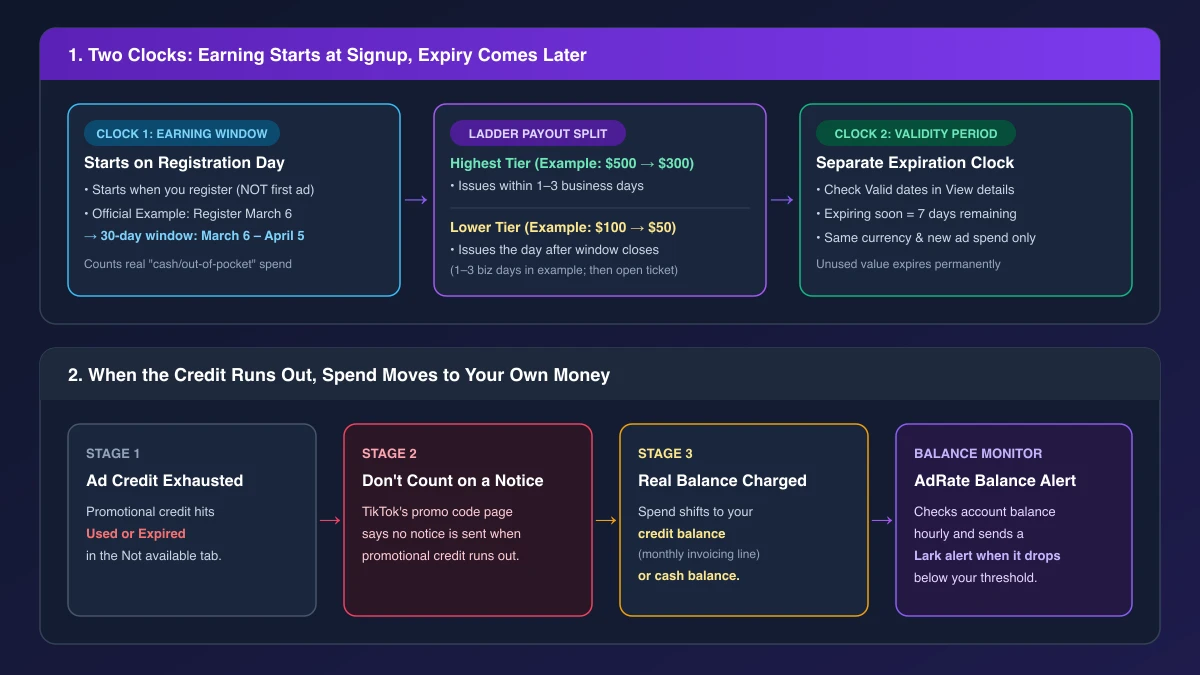
- Your tier sets the payout clock. Ladder Coupons count "cash/out-of-pocket" spend in the earning window. Hitting the top tier issues the reward in 1-3 business days (TikTok example: spend $500 → $300). For a lower tier ($100 → $50), TikTok says rewards issue the day after the window closes, while its example allows 1-3 business days after window end. A Discount Coupon (a% OFF, up to b) has no minimum spend and deducts a percentage per charge until capped.
- The earning window starts on registration day, not first ad launch. Two clocks apply: registering March 6 runs the 30-day window March 6–April 5, while issued rewards carry a separate expiry date. Registering early burns that window.
- Pre-loading and billing settlement may apply. TikTok's regional promotional codes page notes you may need to pre-load your account, hit the threshold, and be billed before credit appears (within one day on your payment page). For declines, see TikTok ads payment failed fixes.
- Channel and eligibility rules apply. Incentives cover only TikTok Ads Manager (TikTok Promote vs. Ads Manager), once per advertiser. No credit issues if the banner vanished before signup or another account under the same TikTok for Business or Business Center claimed it, and accounts highly similar to a prior advertiser may not qualify. Shop sellers connect an ad account in Seller Center → Marketing → Shop Ads (for sellers new to Ads Manager); without a signup step, the coupon issues on your first GMV Max campaign (TikTok GMV Max not delivering).
If the program is missing from all tabs or more than 3 business days pass after hitting the top tier—or after your earning window closes on a lower tier—stop waiting and send Earning and billing screenshots to TikTok support or your sales rep.
Situation 2: Status Says "Ready to Use" — Why Is It Charging Your Card?
When a credit shows Ready to use yet ads charge your card or cash, check these four areas:
1. Admin Assignment and the 30-Campaign Cap
Free ad credit applies on its own; Assignable ad credit requires admin assignment. Usually this is the fix: open Tools → Billing → Promotions → View details → Assignable (or the top-right coupon icon), select campaigns, and click Confirm. A greyed-out pencil icon means no admin role. Per How to assign ad credits to campaigns, credits issued after July 31, 2024 allow up to 30 campaigns per credit, versus 10 on or before that date (see Assignment log).
2. Usage Requirements, Currency, and Debt Rules
In View details, check Usage requirements (campaign, product, or country limits) and Conditional rules. Under the Advertising Credit Terms and Conditions, credits apply before other payment methods, but only in your account currency (unless agreed otherwise) and only on new spend—never prior debts or fees.
3. Does Your Account Need a Positive Balance?
For Assignable ad credits, TikTok states your ad account must maintain a positive balance, as this is necessary for your ads to run. Conditional credits may also require a cash balance, and promo code rules recommend an initial payment above the threshold so delivery does not stop early.
4. The Credit Is Assigned, But the Campaign Cannot Spend
Sometimes the credit is fine and the campaign is stuck at $0 spend. Check TikTok ads rejected or stuck in review, TikTok ads active but not spending, or TikTok ads daily spending limit.
Situation 3: Suspended, Invalid, or Exhausted Credits
Suspended vs. Invalid: When to Appeal vs. Move On
- Suspended: Appeal that day on the verification page with the required documents; waiting will not lift it.
- Invalid: Never wait or pay third parties to restore it. TikTok's Terms reserve sole discretion to withhold or revoke credits for suspected violations even after meeting spend goals. Ask support for context or use TikTok's feedback form for redemption bugs, then move on.
When the Credit Runs Out, Spend Moves to Your Own Money
Per How to manage ad credits, once a credit is Used or Expired, spend shifts to your credit balance (monthly invoicing credit, not ad credit) or cash balance, and neither moves back. TikTok's promo codes page adds that promo code users are not notified when credit runs out.
On prepaid accounts, that shift drains real funds until TikTok ads insufficient balance stops ads. AdRate does not track ad credits or expiry dates, but checks account balances hourly and sends a Lark alert when yours drops below your threshold—helping you top up once spend moves to your own funds.
Official TikTok new advertiser program - exclusive benefits for new advertisers
Open a new TikTok ad account and earn official ad credit as you spend
Spend $200 within 30 days of signing up and get $200 in ad credit, rising to $6,000 when you spend $10,000. Credits go straight into your TikTok ad campaigns.
Coupons are issued by TikTok once it confirms you qualify as a new advertiser. Actual issuance and tiers are shown on the Coupon Progress page inside your TikTok Ads account.