TikTok Ad Rejected for Prohibited Industry of Targeted Location
TikTok ad rejected for a 'prohibited industry of the targeted location(s)'? Find which country triggered it, drop or split it, and appeal only real misreads.
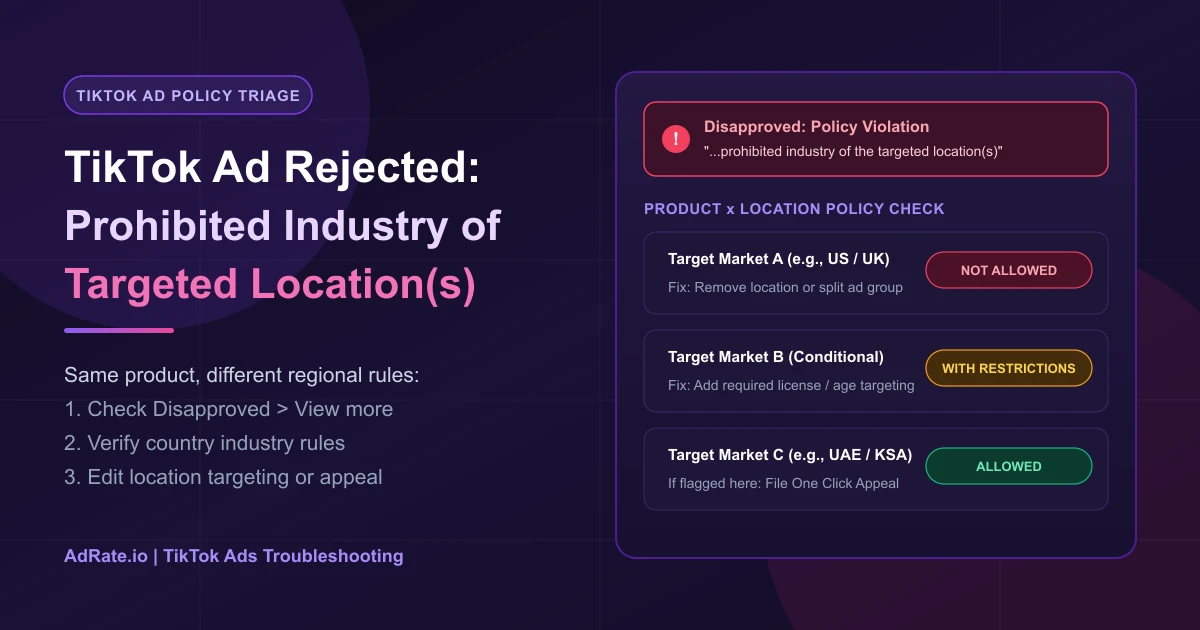
If TikTok rejected your ad for promoting a prohibited industry of the targeted location(s), your product is banned or restricted in at least one country you selected—even if it's legal elsewhere. Check which country triggered the flag, verify that market's industry rules, drop or split the disallowed location, and appeal only true category misreads.
What "Prohibited Industry of the Targeted Location(s)" Means
This rejection is a conflict between your product category and your country targeting, not your video hook or ad text. Media buyers encounter two wording versions in Ads Manager:
| Version | Exact Notice Text |
|---|---|
| Current | "Our review indicates that your advertising content may violate TikTok's Advertising Policies by featuring or promoting a product, service, or material which belongs to a prohibited industry of the targeted location(s). This could include products, services, or materials which are disallowed by advertising policy or local law." |
| Earlier (r/PPC) | "The product/service promoted on the ad/landing page belongs to a prohibited industry of the targeted location(s) in your ad when we take our own business evaluation, user experience and the value of advertisement impact, etc. into consideration." |
Editing video scenes or ad copy will not clear a regional ban. For other rejection reasons, check our TikTok ads rejected troubleshooting overview; if your flag cites exaggerated claims instead of location rules, see our Absolute Claim or Exaggerated Description guide.
Step 1: Check the Rejection Level and Affected Audiences
Per TikTok's guide on what to do if your ad or ad group was rejected, the Ad review FAQ, and the One Click Appeal page, an ad group can be rejected when any ad inside it violates policy, and industry rejections can appear at either the Ad Group or Ad level:
- Inspect both the Ad Group tab and the Ad tab.
- Click Disapproved to read the policy reason.
- Click View more to see which placements and audiences are affected.
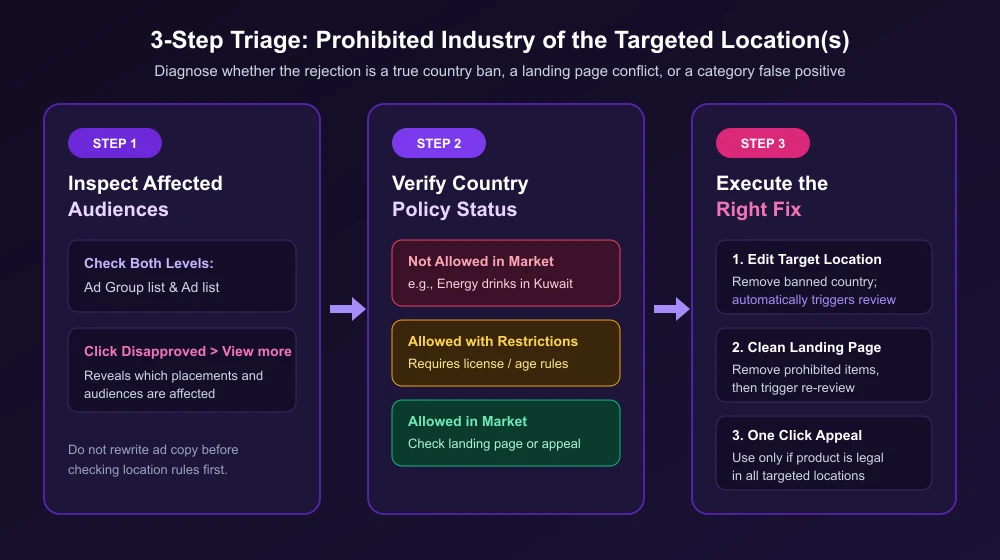
Step 2: Verify Official Country Rules for Your Vertical
TikTok's Ad Review FAQ notes that some products are banned globally while each country or region has its own prohibited or restricted list. Open the TikTok Advertising Policies index and check your vertical—such as Alcohol, Financial Services, Healthcare, or Other Products and Services.
On that policy page, each category lists the markets where it is allowed, allowed with restrictions, or not allowed. For instance, Chemical fertilizers and pesticides are not allowed in the United States and the United Kingdom, yet allowed in the United Arab Emirates, Saudi Arabia, and Kuwait; meanwhile, Energy drinks are not allowed in markets including Kuwait. That's how the same product can run in one market and be prohibited in the next. The policy page tells you which markets ban your category; View more tells you which of your targeted locations TikTok flagged.
Step 3: Action Table by Scenario
Compare the affected audience from View more with the policy page and take the matching action:
| Your Scenario | Fastest Fix |
|---|---|
| Country lists product as Not Allowed | Remove that country from targeting or split compliant countries into a new ad group; editing your ad group's targeting location triggers a new review automatically. |
| Country lists product as Allowed with Restrictions | Meet the policy page rules (such as regulator licenses or age limits) and update targeting. |
| Country allows product, but TikTok misclassified the industry | Submit a One Click Appeal with product details and proof documents. |
| Ad is clean, but landing page displays prohibited products | Remove banned items from the page or use a single-product URL, then edit the ad or open an Advertiser Support ticket to trigger re-review. |
False positives hit legitimate sellers too. On r/TikTokAds, a B2B grain equipment seller reported that "Every single ad element gets rejected as 'Adult Content / Prohibited Industry — Adult Supplies, Services, Entertainment,'" followed by "Multiple appeals — all auto-rejected." Another buyer on r/TikTokAds wrote: "I have already bought credits and for weeks cannot use them to run my ads."
When managing multi-country campaigns across accounts, AdRate lets you save verified country setups as audience templates—applying a template to another ad account automatically drops locations that account cannot target. After splitting clean single-country structures, you can also duplicate campaigns across multiple ad accounts in one step.
How to Use One Click Appeal Properly
Five rules from TikTok's One Click Appeal page decide how you should use your appeal:
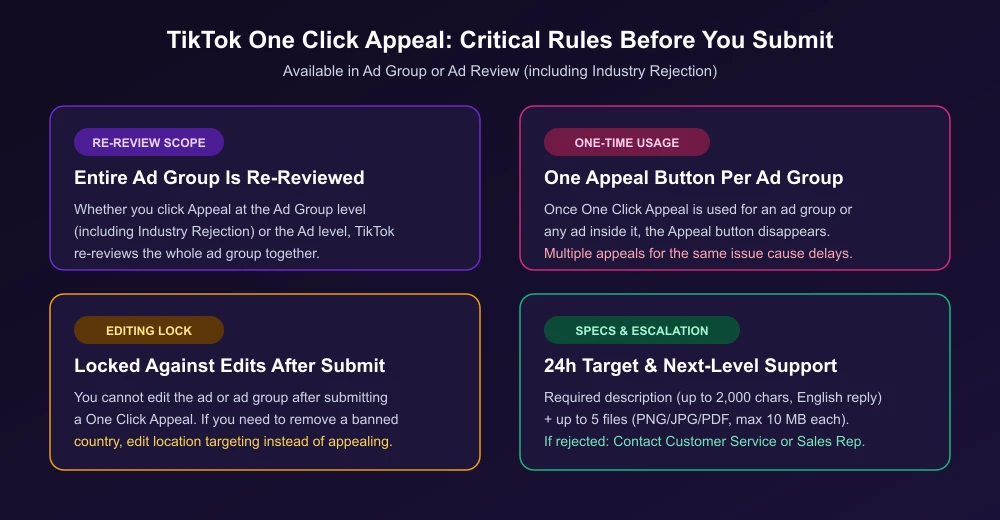
- Entry point: Click Appeal in the rejected Ad Group or Ad Review (including Industry Rejection). Appeals are disabled while an account is suspended.
- Whole-group review: Filing at the ad group or ad level re-reviews the entire ad group.
- One-time limit: The Appeal button works once per ad group; file only one appeal per incident, as submitting multiple appeals in a short period causes processing delays.
- Editing lock: You cannot edit the ad or ad group after submitting an appeal—edit location targeting directly if you need to drop a banned country.
- Specs and escalation: Mandatory description (up to 2,000 characters; English reply) plus up to 5 files (PNG/JPG/PDF, 10 MB max each), with a 24-hour response target. If rejected, self-serve accounts use Contact Customer Service on the notice; managed accounts contact their TikTok sales representative.
Prevent Multi-Country Rejections
Instead of mixing every country into one ad group, group markets by policy tier in your TikTok ads campaign structure and TikTok ad targeting options—keep open markets together, isolate restricted markets, and exclude banned ones. To add a new country later, duplicate the campaign or ad group and update location targeting on the copy.
FAQ
Will adding a disclaimer fix a regional prohibited industry rejection?
No. The Ad review FAQ states: "If promoting alcohol is prohibited in your market, you won't be able to advertise it, not even with a disclaimer in your ad." You must remove the banned location to clear this rejection.
Why can't I select a country in location targeting at all?
Unlike a rejection that arrives after you submit, not being able to add a location means TikTok has not made that region available yet or restricted access to it, per the Location targeting guide.
What if my ad stays in review after editing, or my account is under review?
Editing targeting location or creative triggers re-review automatically. If it stays pending, see our TikTok ads stuck in review guide. If your account itself is restricted, resolve TikTok ads account under review first.
Official TikTok new advertiser program - exclusive benefits for new advertisers
Open a new TikTok ad account and earn official ad credit as you spend
Spend $200 within 30 days of signing up and get $200 in ad credit, rising to $6,000 when you spend $10,000. Credits go straight into your TikTok ad campaigns.
Coupons are issued by TikTok once it confirms you qualify as a new advertiser. Actual issuance and tiers are shown on the Coupon Progress page inside your TikTok Ads account.