How to Connect TikTok Ads to Claude: 3 Ways Compared
Official connector, reporting tool, or Claude Code with AdRate? Compare 3 ways to connect TikTok Ads to Claude, and which keeps watching spend after chat ends.
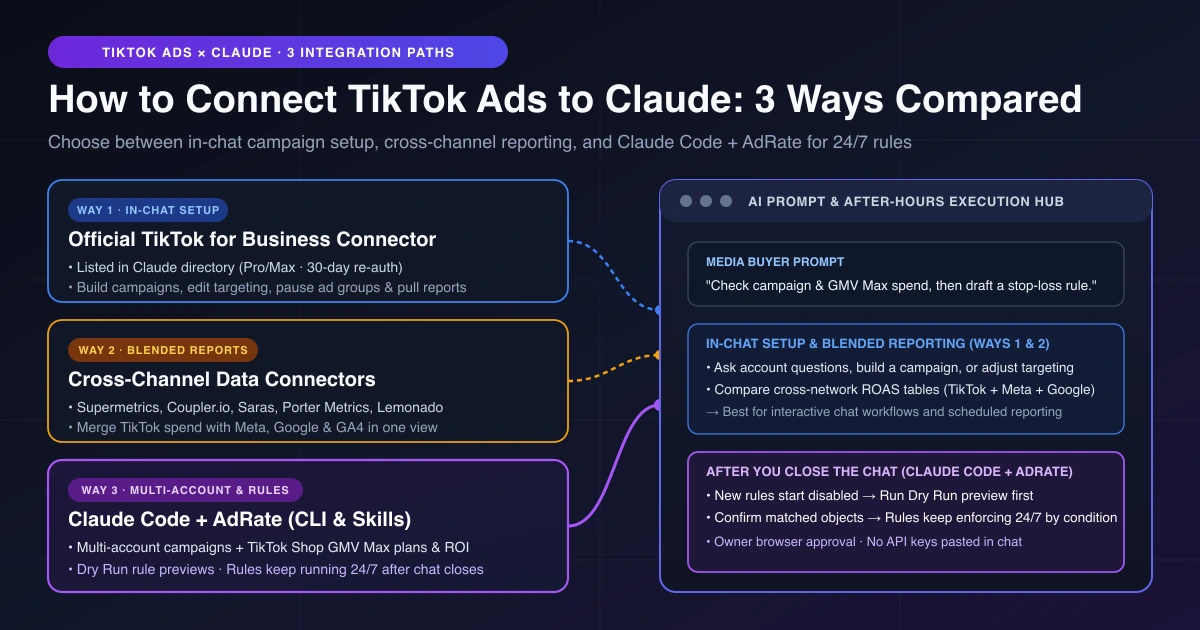
There are three ways to connect TikTok Ads to Claude, and the right choice comes down to what needs to happen after you stop typing. If you just want to ask performance questions in chat, spin up a single campaign, or adjust audience targeting on the spot, TikTok's official connector is enough. If your goal is blending TikTok spend with Meta and Google in one cross-channel report, use a reporting data connector. And if you manage multiple ad accounts, run TikTok Shop GMV Max, and want previewed rules that keep watching your budgets after you close the chat, connect AdRate in Claude Code.
Most setup guides stop the moment your account links up. For media buyers, sellers, and agency leads, linking the account is the easy part. The expensive mistakes happen at 11 p.m. when a campaign burns through daily budget while your chat tab is closed, or when your TikTok Shop GMV Max plans live in a different tool from your standard campaigns. Here is how each path works, who it is built for, and how to combine them safely.
How to Connect TikTok Ads to Claude: The 3 Ways Compared
Search results for this question mix together three very different tool categories: TikTok's first-party connector in Claude's directory, third-party reporting pipes like Supermetrics or Coupler.io, and local coding-agent workflows in Claude Code powered by AdRate. Before authorizing an account, compare where each option runs, what it can change, and what happens between conversations.
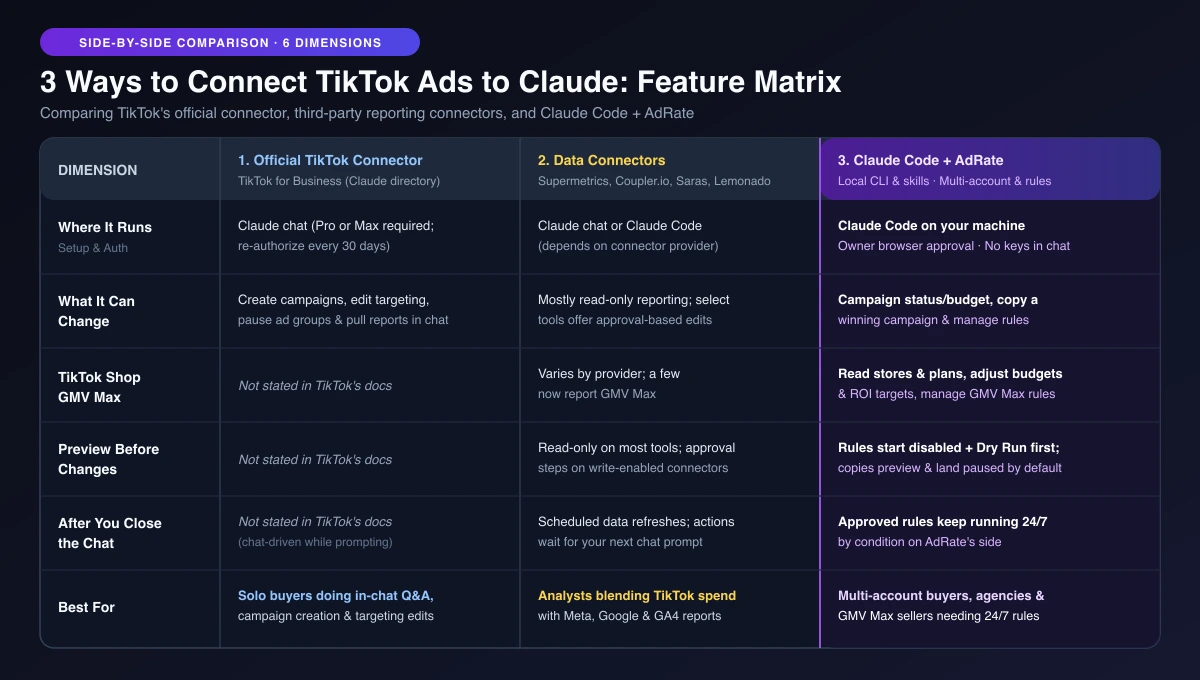
| Dimension | Official TikTok for Business Connector | Cross-Channel Data Connectors (Supermetrics, Coupler.io, Saras, Lemonado) | Claude Code + AdRate |
|---|---|---|---|
| Where It Runs | Claude chat (listed in Anthropic's directory; requires Claude Pro or Max, re-authorize every 30 days) | Claude chat or Claude Code (varies by provider) | Claude Code on your computer (team owner approves login in browser; no API keys pasted in chat) |
| What It Can Change | Create campaigns, update audience targeting, pause ad groups, pull reports, and handle creative operations in chat | Mostly read-only reporting; select providers offer approval-based writes or paused campaign creation | Switch campaigns on or off, adjust campaign budgets, preview and copy a winning campaign to another account, and manage automated rules |
| TikTok Shop GMV Max | Not stated in TikTok's docs | Varies by provider; a few now report GMV Max | Read store and plan metrics, adjust GMV Max budgets and ROI targets, and manage GMV Max guardrail rules |
| Preview Before Changes | Not stated in TikTok's docs | Read-only on most tools; approval steps on write-enabled connectors | New rules start disabled and run a Dry Run preview showing matched objects; campaign copies preview first and land paused by default |
| After You Close the Chat | Not stated in TikTok's docs (works while prompting in chat) | Scheduled data refreshes for reports; actions wait for your next prompt | Approved rules keep running on AdRate's side by condition, independent of your chat session |
| Best For | Solo buyers asking questions, building a campaign, or tweaking targeting in chat | Analysts blending TikTok spend with Meta, Google, or GA4 in one view | Multi-account buyers, agencies, and TikTok Shop GMV Max sellers needing Dry Run previews and 24/7 rules |
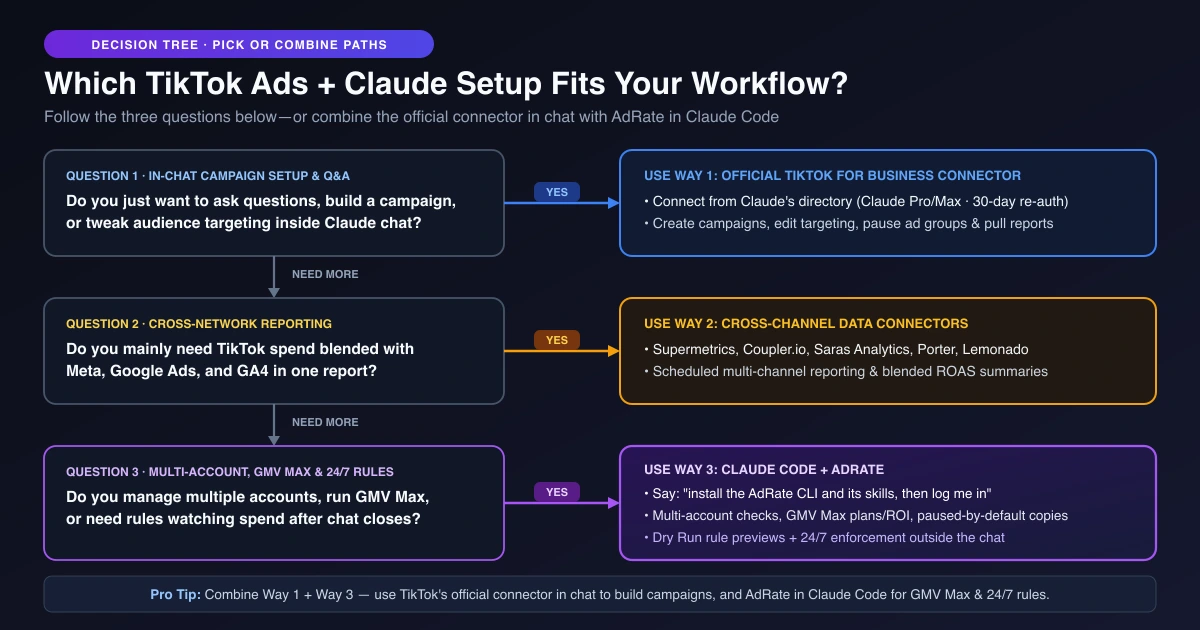
For a quick 30-second filter, ask yourself three questions:
- Do you just want to chat with your account, build a campaign, or tweak targeting at your desk? Use TikTok's official connector.
- Is your main headache merging TikTok numbers with Meta and Google for client decks? Use a cross-channel data connector.
- Do you run multiple accounts or TikTok Shop GMV Max, and need rules watching spend when you step away? Use Claude Code with AdRate.
Way 1: TikTok's Official Connector (Best for In-Chat Campaign Setup and Q&A)
If your workflow is purely conversational, start with TikTok's first-party option. Built by TikTok and listed as "TikTok for Business" with an "Anthropic verified" badge in Claude's connector directory, it is the most direct way to talk to a standard ad account inside Claude.
According to TikTok's official help center documentation, where TikTok marks the integration as "Recommended for Claude," the official MCP connector covers campaign management, performance reporting, audience configuration, and creative operations. In plain media-buying terms, you can ask Claude to pull a performance report, create a campaign, update audience targeting, or pause an ad group right inside the chat window—without developer credentials, API key management, or custom code. (TikTok's broader agentic hub also supports platforms such as Perplexity and Snowflake, as noted on TikTok's business blog.)
One practical detail from The Keyword's coverage of TikTok's connector rollout is worth keeping in mind: using the connector requires a Claude Pro or Max plan, and the authorization expires every 30 days, so you re-authorize once a month.
For a solo buyer managing standard TikTok Ads campaigns during work hours, that setup works well. If all you want to do is ask which ad group drove the lowest CPA yesterday, spin up a campaign in chat, or adjust audience targeting without clicking through Ads Manager menus, the official connector is enough.
Way 2: Cross-Channel Data Connectors (Best for Blended Reporting)
The second path covers third-party reporting tools such as Supermetrics, Coupler.io, Saras Analytics, Porter Metrics, and Lemonado. These show up across search results and MCP directories because paid media teams rarely buy TikTok in isolation.
When a brand director or client asks how TikTok's acquisition cost compares with Meta Reels and Google Performance Max this week, a single-platform connector cannot answer. Cross-channel connectors pull TikTok Ads metrics alongside your other ad networks and analytics tools so Claude can summarize blended ROAS, pacing, and week-over-week shifts in one thread.
Most tools in this group focus on read-only analysis and scheduled data refreshes. Coupler.io and Lemonado center on reading performance data, Saras notes that most integrations are read-only with select approval-based writes, and Supermetrics supports read/write actions where new campaigns start paused. GMV Max coverage varies: a few connectors now report TikTok Shop and GMV Max data, but none of the connector pages we checked describe rules that keep protecting your budgets after the chat ends. If your real bottleneck is clean cross-network tables rather than operating campaigns from chat, first compare Sheets, Looker, and API for TikTok reporting before adding another subscription.
Way 3: Connect TikTok Ads to Claude Code with AdRate (Best for Multi-Account, GMV Max, and 24/7 Rules)
The third path is built for buyers who want AI to help diagnose accounts and draft guardrails, without relying on an open chat tab to keep budgets safe overnight. Instead of running inside the claude.ai web chat box, AdRate plugs into local coding agents like Claude Code through its CLI and skills.
You do not need terminal commands or API keys to connect TikTok Ads to Claude Code. Open Claude Code on your computer and say: "install the AdRate CLI and its skills, then log me in". Claude Code installs the @adrate/cli package and its skills automatically, knows when to use those skills on relevant ad tasks, and automatically upgrades the installed skills when you run future commands. Your AdRate team owner then approves the login in a browser window. No keys or passwords ever enter the chat, each login is scoped to one team, and no change is reported as completed unless execution is confirmed.
After You Close the Chat: Why Scheduled Prompts Are Not Guardrail Rules
Technical buyers often ask whether they can use Claude Code's cloud scheduled tasks (formerly called routines) to wake up every hour and check TikTok ad spend.
First, AdRate's skills and your sign-in stay on your computer, so cloud scheduled tasks and the claude.ai web chat box cannot use them. Second, asking an AI model to re-judge your campaigns on a timer is not the same thing as a fixed rule you have already previewed. A recurring prompt re-evaluates from scratch each time—it might tolerate a $26 CPA at 10 a.m. and cut budget for the same numbers at 2 p.m.
A safer operating model is why AI should draft and rules should enforce. You use Claude Code at your desk to inspect campaign performance, spot wasted spend, and turn repeatable decisions—such as pausing ads when CPA crosses your ceiling or trimming budgets when spend spikes without conversions—into an automated rule. You can start from proven rule templates you can ask Claude to draft and customize the thresholds.
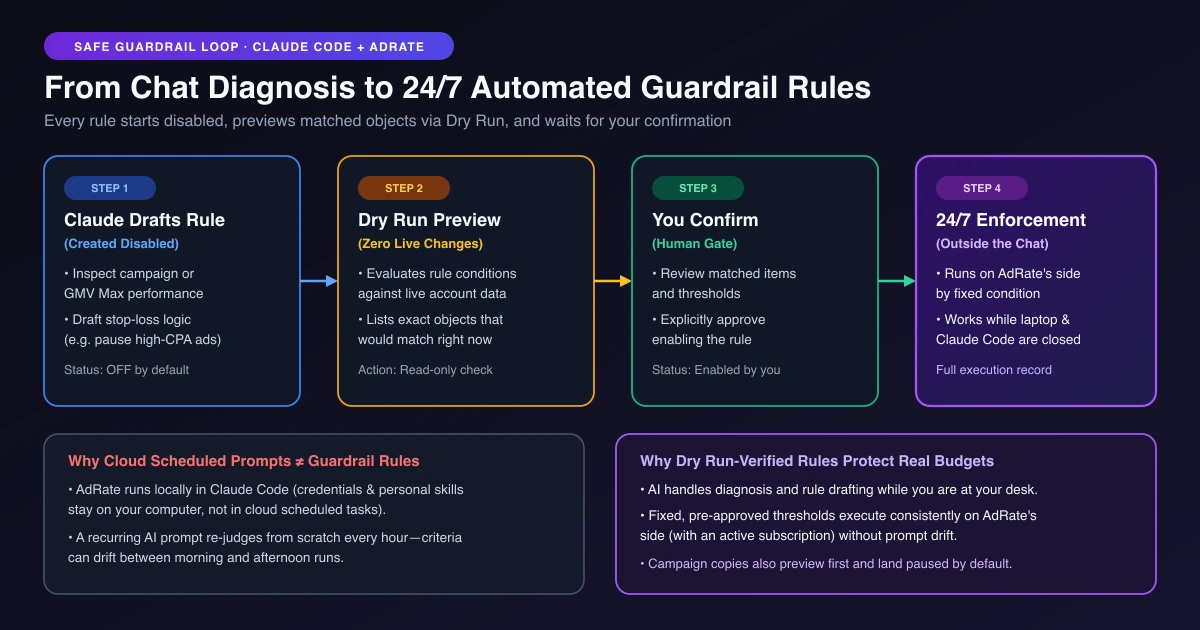
Every rule Claude drafts for you in AdRate follows a four-step safety loop:
- Created disabled by default: A newly drafted rule never fires the moment it is created.
- Dry Run preview first: Claude runs a Dry Run that evaluates your live data without changing anything, showing which objects the rule would match right now.
- Explicit confirmation: You review the Dry Run results and confirm before enabling the rule.
- 24/7 execution outside the chat: Once enabled (with an active AdRate subscription), the rule runs continuously on AdRate's side by condition—even when Claude Code is closed.
See how this fits into daily account reviews in the full AI agent workflow from data check to Dry Run.
When You Run TikTok Shop GMV Max Alongside Standard Ads
For TikTok Shop sellers, standard Ads Manager campaigns are just one of the places your budget goes. When you connect TikTok GMV to Claude Code through AdRate, your store plans sit right alongside your standard campaigns. You can ask Claude to check performance across your TikTok Shop stores and GMV Max plans, switch plans on or off, adjust GMV Max budgets, update ROI targets, and draft automated rules that protect your margins around the clock. Pairing conversational diagnostics with GMV Max ROI guardrails helps catch unprofitable spend spikes before they erode daily profit.
Multi-Account Agencies and Safe Campaign Copying
In Claude Code, AdRate lets you check accounts, campaigns, and campaign-level reports across your connected ad accounts, switch a campaign on or off, and adjust campaign budgets. When a campaign takes off in one account, Claude can copy that winning campaign into another account for you: it shows a preview first, and copied campaigns land paused by default so your team can verify everything before spending. Because each login is locked to a single AdRate team, agencies keep clean client boundaries while managing multiple TikTok ad accounts.
Can You Use the Official Connector and AdRate Together?
Yes—and for many media buyers, combining them is the most practical setup:
- Use TikTok's official connector in Claude chat when building a new campaign from scratch, configuring audience targeting, pausing an ad group during a live review, or asking quick reporting questions in a single account.
- Use AdRate in Claude Code when checking performance across your connected ad accounts and TikTok Shop GMV Max stores, copying a winning campaign into another account with a paused default, or turning optimization logic into previewed rules that watch spend overnight.
Frequently Asked Questions
Can I connect TikTok Ads to the Claude web app instead of Claude Code?
Yes, if you use TikTok's official "TikTok for Business" connector or a cloud reporting connector from Claude's directory. AdRate works inside local coding agents like Claude Code that run tools on your computer, rather than inside the claude.ai web or desktop chat box.
Do I have to paste API keys into Claude?
No on both paths. TikTok's official connector uses a browser authorization flow refreshed every 30 days, and AdRate has your team owner approve the login in a browser window so no API keys or passwords ever enter the conversation.
Will Claude change my ads without asking?
With AdRate in Claude Code, every new rule starts disabled and runs a Dry Run preview first so you see which objects would be affected before confirming activation. Copying a campaign into another account also previews before submission and lands paused by default, and no update is reported as completed until execution is confirmed.
Does this work with TikTok Shop GMV Max?
AdRate in Claude Code supports TikTok Shop GMV Max: you can inspect stores and plans, switch plans on or off, adjust plan budgets and ROI targets, and manage automated GMV Max rules. TikTok's public documentation for the official connector does not state GMV Max coverage.
Can I use the official TikTok connector and AdRate at the same time?
Yes. You can use the official connector in chat when creating a campaign or editing audience targeting, and use AdRate in Claude Code to check and adjust campaign budgets account by account, operate GMV Max plans, and keep previewed rules running after closing the chat.
Which Claude model should I use for TikTok ad diagnostics?
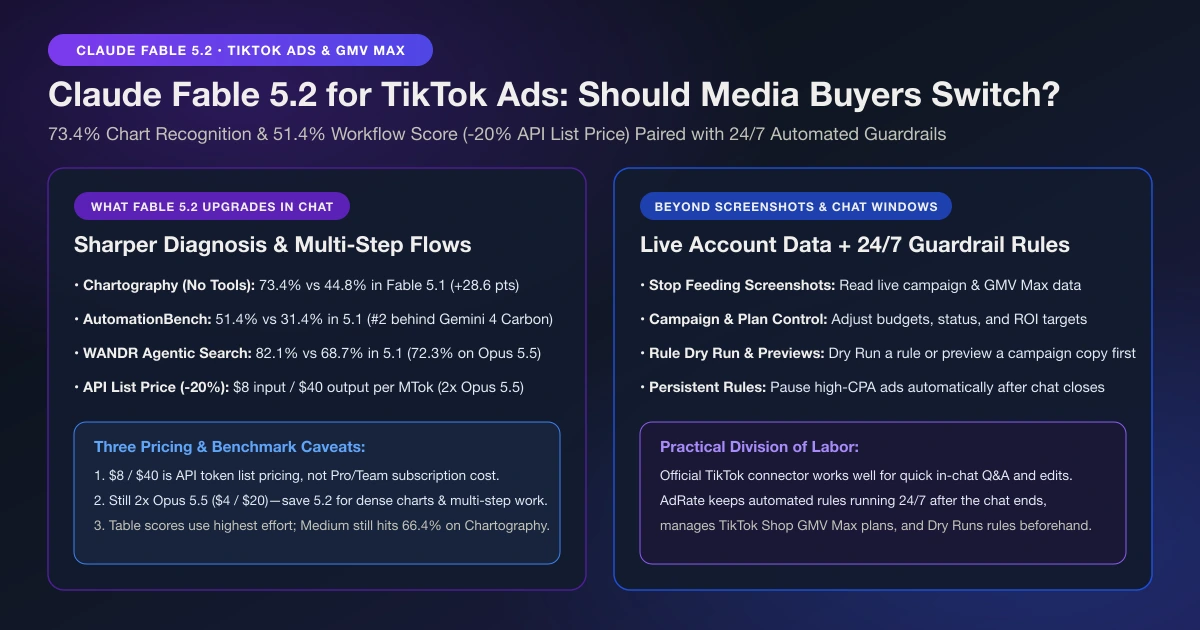
Once connected, your everyday Claude model handles routine spend checks well, while Claude Fable 5.2 pays off when reading dense charts or comparing multi-account performance. Read our breakdown of what Claude Fable 5.2 changes for TikTok media buyers to see when switching models makes sense.
Start With a Read-Only Check and One Dry Run Rule
The part that actually saves budget is the rule still checking your spend at 2 a.m. after your laptop is closed. If you prefer not to install anything on your computer, AdRate is also bringing the same conversational workflow directly into the web product.
To try it today in Claude Code, say "install the AdRate CLI and its skills, then log me in" and have your team owner approve the sign-in in the browser. Ask Claude to read your current campaign and GMV Max numbers, then draft one guardrail rule and run a Dry Run preview to see what it would catch before turning anything on. Explore the TikTok Ads AI Agent for Claude Code or start with AdRate to put 24/7 guardrails around your spend.
Official TikTok new advertiser program - exclusive benefits for new advertisers
Open a new TikTok ad account and earn official ad credit as you spend
Spend $200 within 30 days of signing up and get $200 in ad credit, rising to $6,000 when you spend $10,000. Credits go straight into your TikTok ad campaigns.
Coupons are issued by TikTok once it confirms you qualify as a new advertiser. Actual issuance and tiers are shown on the Coupon Progress page inside your TikTok Ads account.