TikTok Ads Not Sending Verification Code? Fixes Before Lockout
TikTok Ads not sending a verification code or hitting Maximum attempts reached? Fix missing SMS or email codes, recover lost logins, and prevent BC lockouts.
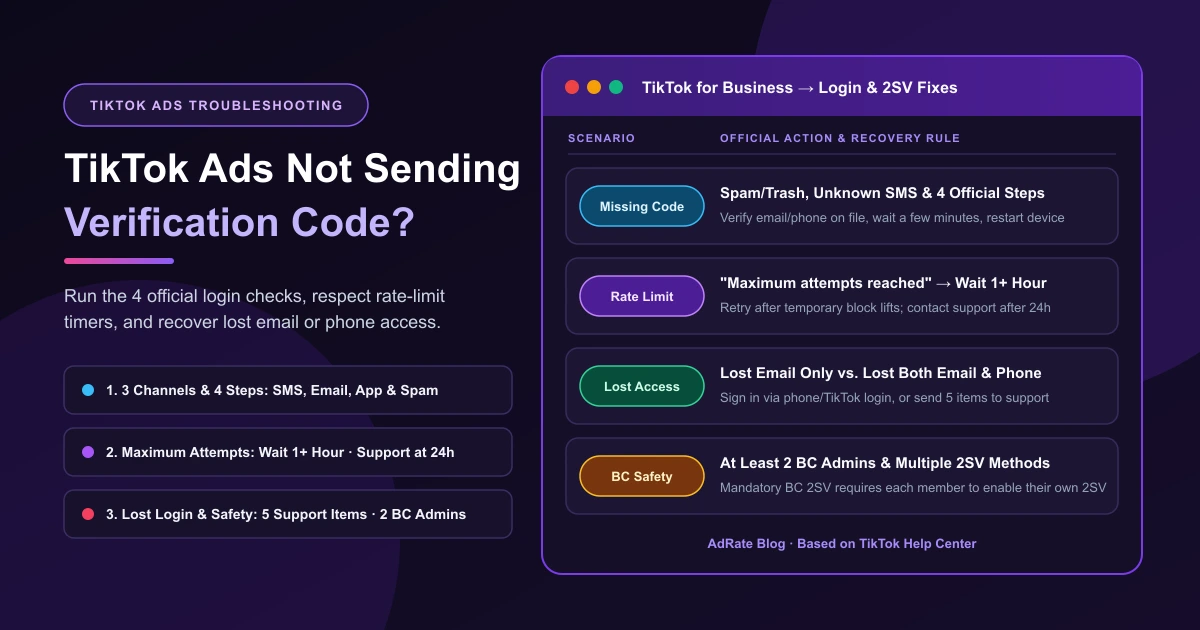
Active campaigns are spending budget, you try to sign in to TikTok Ads Manager or Business Center, and the verification code TikTok Ads is supposed to send never shows up—by email or text. In one r/TikTokAds thread, a two-year advertiser whose login code bounced during a mail server switch wrote, "we fixed mailbox but since then we cannot get a new verification code," even after trying five times a day.
Before clicking resend, make sure you are troubleshooting the right issue:
- Personal TikTok app logins go through the consumer TikTok Help Center.
- Unrequested verification texts arriving when nobody on your team is signing in are not covered here—do not share that code with anyone.
- Full dashboard outages—where desktop and mobile pages fail to load at all, as noted in another r/TikTokAds post—are covered in TikTok Ads Manager not working.
Check Where the Code Goes and Run the 4 Official Fixes
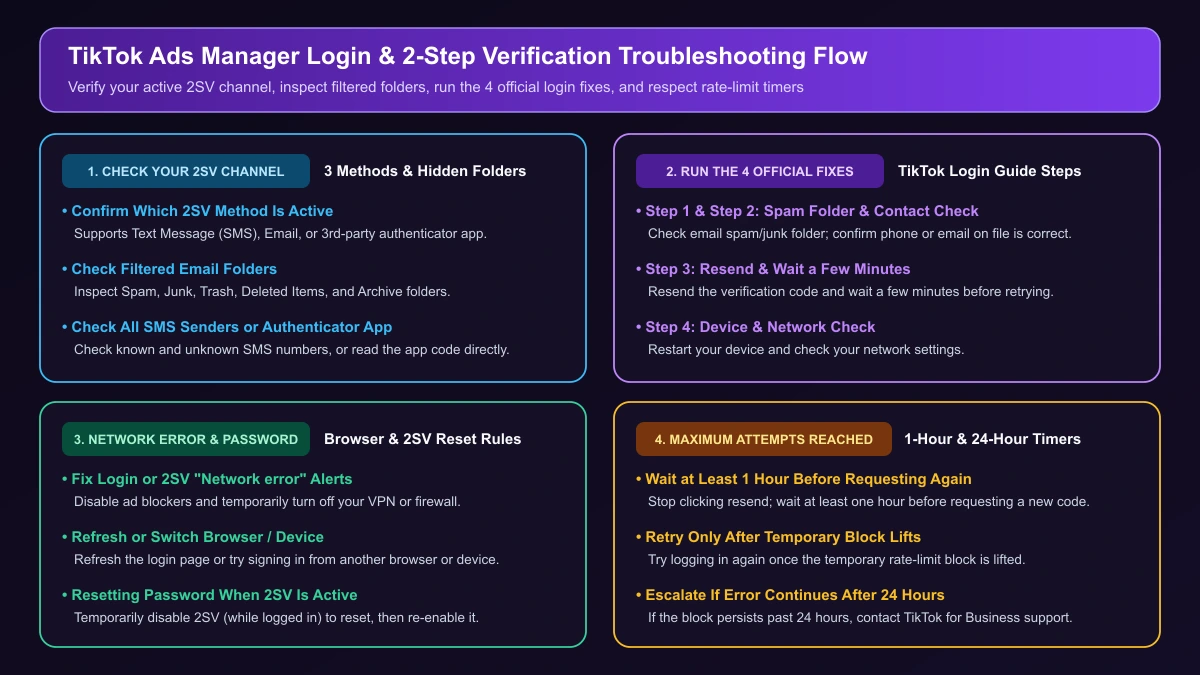
First, check which verification method your account uses. In TikTok Ads Manager, 2-step verification supports Text Message (SMS), Email, and a third-party authentication app (such as Google Authenticator). If your profile uses an authenticator app, open that app on your phone to read the code directly.
Next, check the hidden folders where a 2-step verification code can land:
- Email: Check Spam, Junk, Trash, Deleted Items, or Archive.
- Text Message (SMS): Check texts from both known and unknown numbers.
Still no code? Work through these four steps to troubleshoot TikTok for Business login issues:
- Check your spam or junk folder in email.
- Make sure your phone number or email on file is correct.
- Resend the code and wait a few minutes.
- Restart your device and check network settings.
If the login or 2-step verification screen shows a Network error, disable ad blockers, temporarily turn off your VPN or firewall, refresh the page, or try another browser or device.
Resetting your password? If you have 2-step verification enabled, disable it temporarily to reset your password, then re-enable it for security. Turning it off in How to turn off 2-step verification in TikTok Ads Manager (User settings → Account Security, select the method, and enter your password) requires being logged in first.
What to Do When You Hit "Maximum Attempts Reached"
Stop clicking resend right away when "Maximum attempts reached" appears, and follow these waiting windows:
- Wait at least one hour before requesting another code.
- Try logging in again after the temporary block is lifted.
- If the error continues after 24 hours, contact TikTok for Business support.
Lost Access to Your Email or Phone Number?
When a former employee's inbox is closed or your company switches mail servers, follow the recovery path that matches your remaining access:
1. Lost Email Only
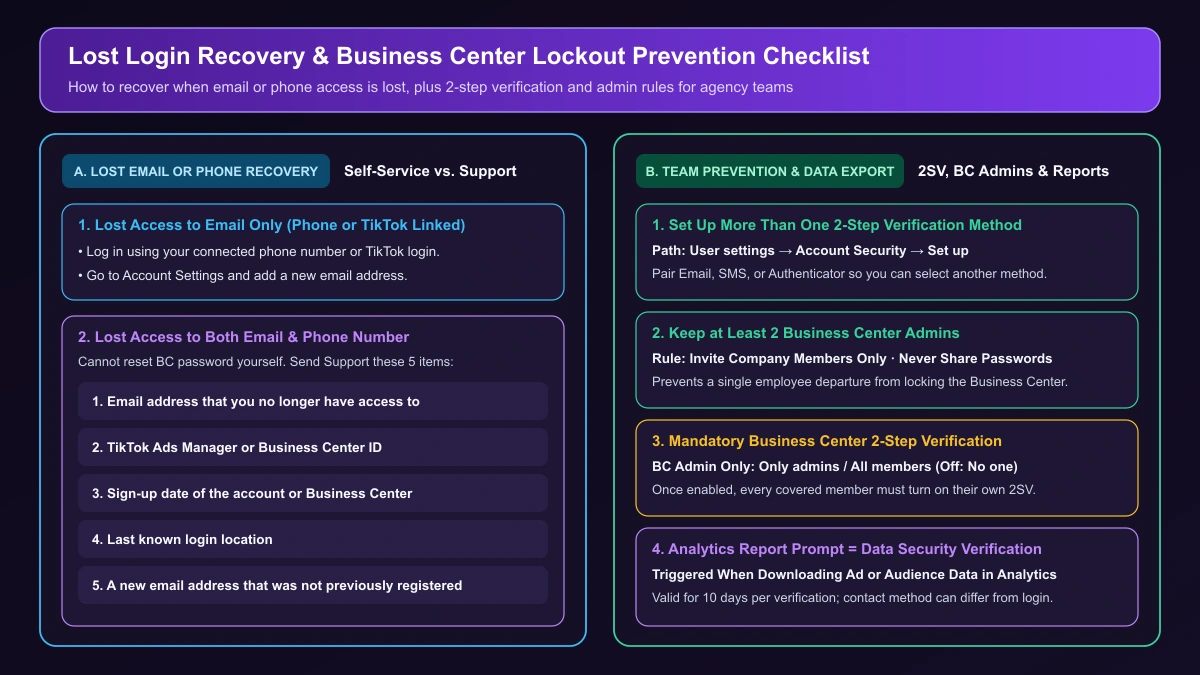
Log in using your linked phone number or TikTok login, then open Account Settings and add a new email address.
2. Lost Both Email and Phone Number
If you do not have access to the email or phone number connected to your Business Center account, you cannot reset your Business Center password yourself.
Reach out to TikTok for Business support and provide these five official items:
| Required Recovery Item | Details to Prepare for TikTok Support |
|---|---|
| 1. Old email address | Email address that you no longer have access to |
| 2. Account or BC ID | TikTok Ads Manager or Business Center ID |
| 3. Sign-up date | Account or Business Center registration date |
| 4. Last login location | Last known login location |
| 5. Unregistered new email | A new email address that was not previously registered |
How Agencies and Teams Prevent Single-Login Lockouts
Configure backup access while you are still logged in so one person's inbox never blocks the whole team:
- Enable multiple 2-step verification methods: Under User settings → Account Security → Set up, TikTok's setup guide notes: "We recommend setting up your 2-step verification with more than one method. This will allow you to select a different method if you have trouble receiving your verification code."
- Assign at least 2 Business Center Admins: To secure your Business Center against loss of access, keep at least two admins, select Invite Company Members Only, and never share passwords among coworkers. See our TikTok agency ad account and Business Center checklist for role planning.
- Know how mandatory BC 2-Step Verification works: Only a Business Center Admin can turn on Business Center 2-Step Verification for Only admins or All members, or turn it off under Business Settings → Settings → Security → No one. Once enabled, every covered admin or member must turn on their own 2-Step Verification to access the Business Center, so hand off accounts before staff departures.
Login Code vs. Data Security Verification
Prompted for a code while exporting ad or audience reports under Analytics? That is Data Security Verification, not a login block. One verification stays valid for 10 days, and the contact method can differ from your registration login.
Next Steps If Your Account Is Locked or Lacks Access
If you received an email stating your account is locked or suspended, follow that notice to request reactivation or read our TikTok ad account suspended appeal guide. Signed in successfully but still blocked from ad accounts? Check TikTok Ads permission error and access denied.
For multi-account teams (see TikTok Ads cross-account management workflow), AdRate lets each member sign in with their own account while keeping TikTok authorizations under the team workspace. That does not replace TikTok's own account safeguards: your team still needs to configure backup 2-step verification methods and keep at least 2 Business Center Admins inside TikTok.
Official TikTok new advertiser program - exclusive benefits for new advertisers
Open a new TikTok ad account and earn official ad credit as you spend
Spend $200 within 30 days of signing up and get $200 in ad credit, rising to $6,000 when you spend $10,000. Credits go straight into your TikTok ad campaigns.
Coupons are issued by TikTok once it confirms you qualify as a new advertiser. Actual issuance and tiers are shown on the Coupon Progress page inside your TikTok Ads account.