TikTok Installs Not Showing in Ads Manager (But Showing in MMP)
Dealing with TikTok installs not showing in Ads Manager while Adjust or AppsFlyer logs them? Check your SAN postback, MMP events, and iOS SKAN delays.
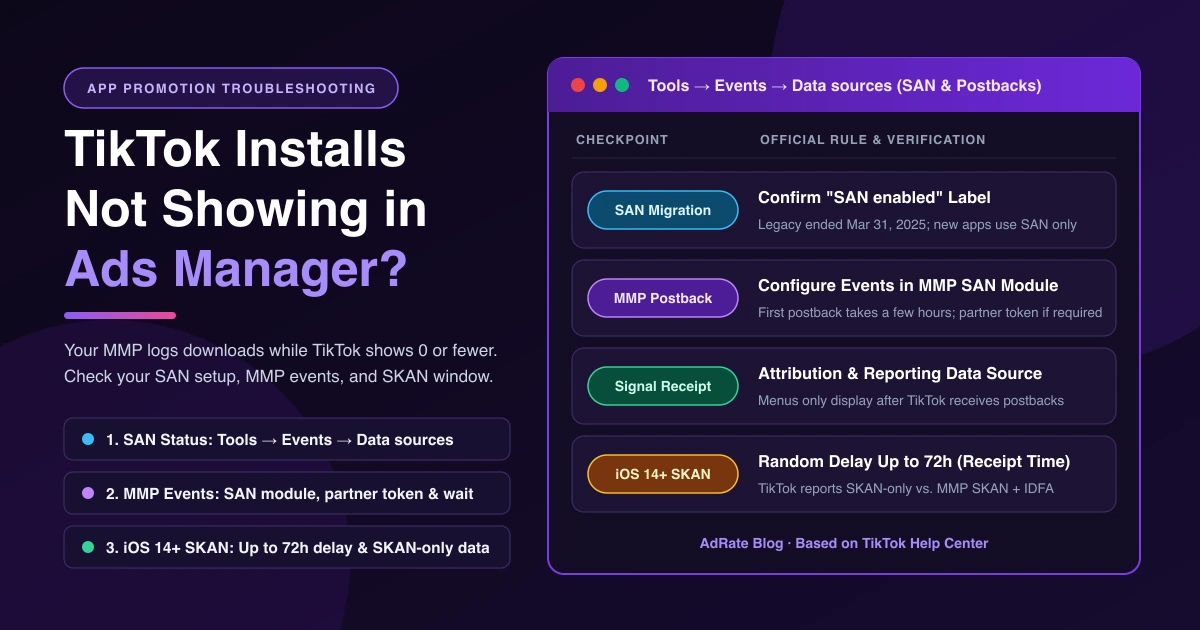
Seeing TikTok installs not showing in Ads Manager while your Mobile Measurement Partner (MMP) logs downloads can stall a launch. Split the symptom in two first: 0 installs points to an unmigrated Self-Attributing Network (SAN) setup, unconfigured MMP events, or an iOS 14+ SKAdNetwork (SKAN) delay, while fewer installs than your MMP comes down to attribution source settings or SKAN-only versus MMP reporting.
This guide covers the app install postback pipeline between your MMP and TikTok. For website Pixel campaigns, see TikTok ads getting clicks but no conversions. If your campaign has zero spend, fix TikTok ads not delivering first.
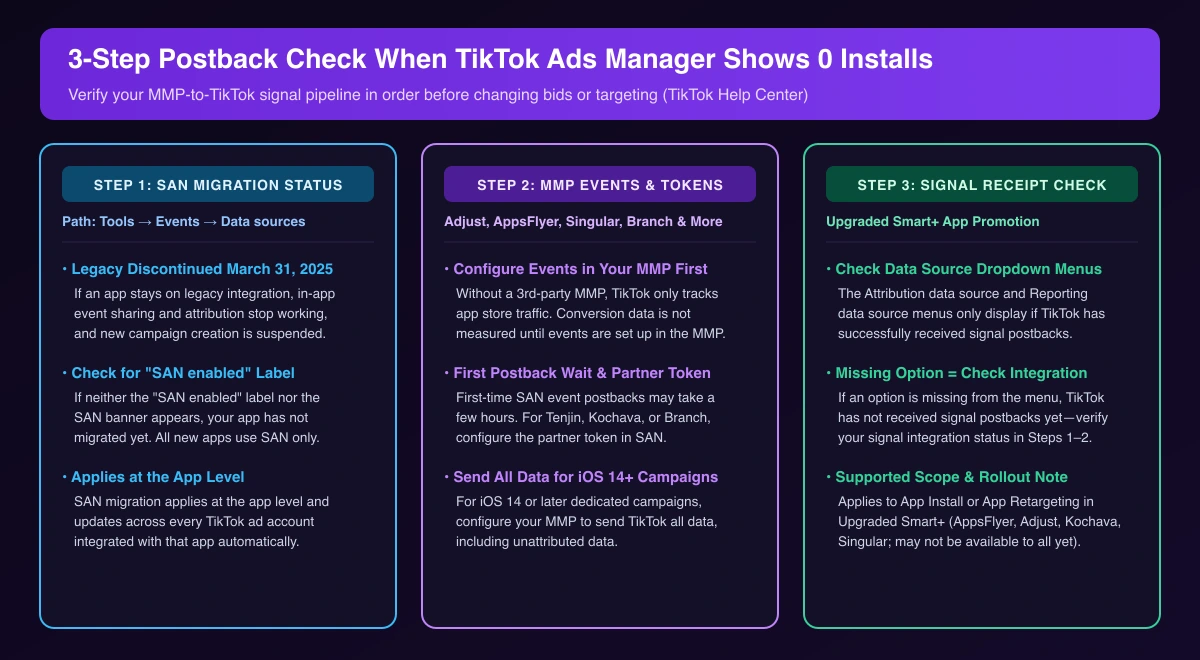
Step 1: Check Whether Your App Migrated to TikTok SAN
TikTok discontinued its legacy MMP integration on March 31, 2025. On legacy integration, "in-app event sharing and attribution for TikTok campaigns will no longer function," and new campaign and ad group creation is suspended until SAN migration completes. All new apps can only use SAN integration.
Open Tools → Events → Data sources to check your SAN status:
- Find your app and look for the SAN enabled label.
- If neither SAN enabled nor the SAN banner appears, your app has not migrated yet.
SAN migration applies at the app level across all linked TikTok ad accounts.
Step 2: Verify MMP Event Postbacks and Partner Tokens
TikTok's App Attribution setup guide supports Adjust, Airbridge, AppsFlyer, Branch, Kochava, Singular, and Tenjin. Without a third-party service, TikTok only measures app store traffic, not conversions. Even with an MMP, "Conversion data will not be measured in TikTok Ads Manager until you configure the events in your MMP."
Use your MMP's SAN integration module and TikTok's migration guide rather than legacy instructions:
- First postback wait: Initial SAN postbacks "may take a few hours" before you click Next.
- Partner token: For Tenjin, Kochava, or Branch, configure the partner token in SAN.
- Unattributed iOS data: For iOS 14+ dedicated campaigns, set your MMP to send TikTok "all data, including unattributed data."
In a r/TikTokAds thread, an advertiser saw Adjust attributing installs while Ads Manager showed "ZERO installs." In their self-reported fix (an individual experience, not a TikTok rule), they updated their app setting from SKAN 3 to SKAN 4 and added their current Adjust link token from TikTok into TikTok for Business (SAN) under Adjust → Partners.
Step 3: Check the Attribution Data Source Menu for Signal Receipt
To check if TikTok installs not showing in Ads Manager stem from missing postbacks, inspect your campaign menus. In TikTok's Attribution Source setup guide, "The Attribution data source and Reporting data source menus will only display if TikTok has successfully received signal postbacks. If an option is missing, verify your signal integration status."
Attribution Source Optimization applies to App Promotion (App Install or App Retargeting) in Upgraded Smart+ campaigns (see our TikTok Smart+ playbook), supports AppsFlyer, Adjust, Kochava, and Singular, and "may not be available to you yet."
Why iOS 14+ Dedicated Campaigns Show Delayed or Lower SKAN Installs
If postbacks work but iOS installs are still 0, or lower than in Adjust, review TikTok's iOS 14+ reporting considerations:
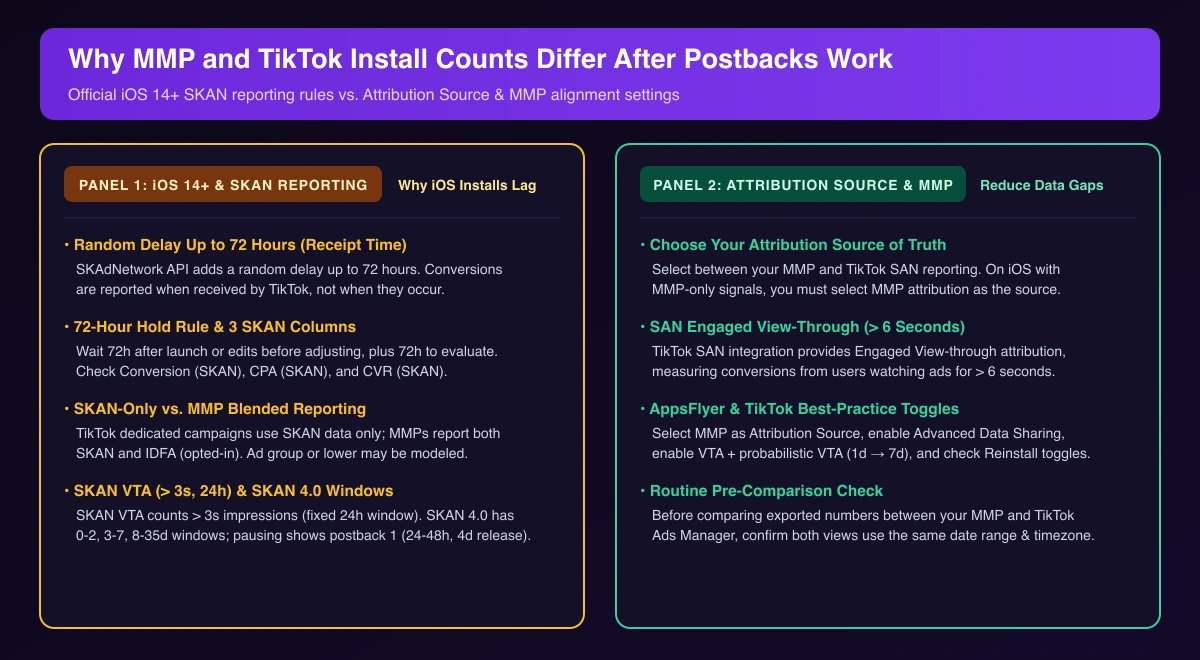
- Random delay up to 72 hours: SKAdNetwork API limits cause "a random delay, up to 72 hours of reporting Conversions (SKAN) to Ad networks." Conversions log when received by TikTok, not when they occur.
- 3 SKAN metrics: Check Conversion (SKAN), CPA (SKAN), and CVR (SKAN) in Ads Reporting.
- 72-hour hold rule: Avoid edits for 72 hours after launch or any change; wait 72 more hours to evaluate.
- SKAN-only vs. MMP reporting: MMPs report SKAN (all iOS 14+ users) and IDFA (opted-in), while TikTok reports SKAN data only. Lower-level SKAN conversions may be modeled from first-party signals.
- SKAN VTA & 4.0 windows: SKAN VTA counts impressions over 3 seconds (24-hour window). Apple SKAN 4.0 uses 0-2, 3-7, and 8-35 day windows; automated-rule pauses with no window chosen keep only postback 1 (24-48 hours) data, released in 4 days.
If you can't create an iOS 14+ dedicated campaign in the first place, start with its setup prerequisites.
Aligning Attribution Source and MMP Settings
When TikTok and AppsFlyer installs don't match (or Adjust, Kochava, or Singular), align both sides:
- Choose your Attribution Source: Pick between your MMP and TikTok SAN reporting. On iOS with MMP-only signals, you must select MMP attribution; if SKAN is your source of truth, keep both attribution source and data source set to your MMP.
- Note SAN Engaged VTA: SAN includes Engaged View-through attribution for users watching ads over 6 seconds.
- AppsFlyer toggles: Per TikTok's AppsFlyer best practices, select MMP as Attribution Source, enable Advanced Data Sharing, enable VTA and VTA via probabilistic modeling (and consider extending the window from 1-day to 7-day—see attribution window setup), and check Reinstall Attribution Toggle, Re-engagement Attribution Toggle, and Purchase Value & Currency Postback.
- Match timezone and dates: Confirm both platforms use the same timezone and date range before comparing exports.
Fixing TikTok Installs Not Showing in Ads Manager by Symptom
| Symptom | Check First | Official Rule & Fix |
|---|---|---|
| 0 installs (existing app) | Tools → Events → Data sources | Legacy ended March 31, 2025. Confirm SAN enabled label. |
| 0 installs (new setup) | MMP SAN module & token | Configure MMP events (takes a few hours). Add partner token for Tenjin, Kochava, or Branch. |
| Missing data source menus | Signal integration status | Upgraded Smart+ menus display only after TikTok receives postbacks. |
| Delayed iOS 14+ installs | Conversion (SKAN) column | Random delay up to 72 hours (logged at receipt); wait 72 hours before editing. |
| Fewer installs than MMP | Attribution Source & toggles | Dedicated iOS uses SKAN only (MMPs also report IDFA). Set source to MMP and align VTA. |
Once SAN postbacks work and the 72-hour SKAN delay passes, AdRate lets you monitor App Promotion campaigns with automated rules by install volume and CPA—adjusting budgets or pausing high-cost ad groups automatically.
Frequently Asked Questions
Why do I get hundreds of App Store clicks, but zero installs in both my MMP and TikTok?
If your MMP also shows zero—like an Airbridge user on r/TikTokAds seeing "hundreds of clicks to destination (appstore), but no actual install of the app"—the issue is upstream: check your MMP SDK install event and store conversion rate (without a third-party MMP, TikTok only tracks store traffic).
How long should I wait before judging install numbers?
Wait a few hours for initial SAN postbacks, and at least 72 hours after launching or editing an iOS 14+ campaign (SKAN has a random delay up to 72 hours). Pausing a SKAN 4.0 campaign keeps your chosen window; automated rules default to postback 1.
Official TikTok new advertiser program - exclusive benefits for new advertisers
Open a new TikTok ad account and earn official ad credit as you spend
Spend $200 within 30 days of signing up and get $200 in ad credit, rising to $6,000 when you spend $10,000. Credits go straight into your TikTok ad campaigns.
Coupons are issued by TikTok once it confirms you qualify as a new advertiser. Actual issuance and tiers are shown on the Coupon Progress page inside your TikTok Ads account.