Can't Create a TikTok iOS 14 Dedicated Campaign? 5 Checks
Can't turn on the TikTok iOS 14 dedicated campaign toggle? Check the objective, app verification, MMP SKAN setup, and the 15-per-placement quota.
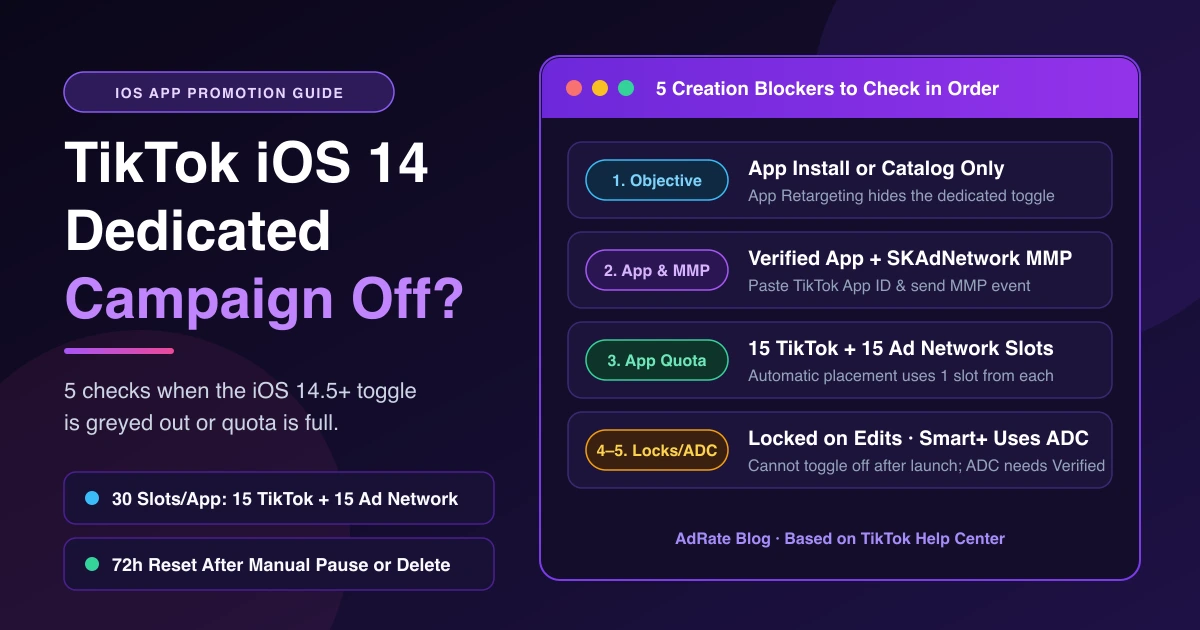
When you cannot turn on a TikTok iOS 14 dedicated campaign, check five prerequisites: objective, app verification and MMP SKAdNetwork setup, quota, editing locks, and Upgraded Smart+ settings. Advertisers keep running into this—see "Can't create iOS 14 dedicated campaign on TikTok Ads" on r/TikTokAds.
Under ATT rules, you must use dedicated campaigns to reach iOS 14.5+ users under App Installs or Catalog Sales; non-dedicated campaigns stop at iOS 14.4. For live campaigns missing downloads, see TikTok Installs Not Showing in Ads Manager.
Check 1: Is the Objective App Install or Catalog?
The iOS 14.5+ dedicated campaign toggle only supports two objectives: App promotion (App install) or Product sales (Catalog). Within App Promotion, dedicated campaigns only work under App Install—picking App Retargeting hides the switch. Open Campaign → Create, choose App promotion (App install) or Product sales (Catalog), turn on the toggle, and select your iOS app.
To reach iOS 14.5+ without a dedicated campaign, choose Traffic (even for an iOS app Promotion Type), though iOS 14 conversion data will be incomplete. Without a partner, MMP tracking rules also recommend Traffic to track clicks.
Check 2: Is the App Verified and Sending MMP Data?
Check app verification next: "You can only turn on dedicated campaigns for iOS apps if your mobile measurement partner supports using SKAdNetwork and the app is verified."
Complete the TikTok App ID setup to clear Pending Verification:
- Copy the TikTok App ID: Have an Admin open Tools → Events Manager → select app → Tracking Settings → Copy the TikTok App ID (distinct from your App Store ID and ad account ID).
- Paste it into your MMP: Enter the iOS TikTok App ID in Adjust, Airbridge, AppsFlyer, Branch, DFINERY (Adbrix), Kochava, Singular, or Tenjin (if several ad accounts promote the same app, paste each account's TikTok App ID into the same field, separated by commas).
- Send an event: MMP, SDK, and Events API connections verify independently. Pending Verification flips to Verified once TikTok receives an attributed or unattributed event. For iOS 15 dedicated campaigns, you may need to enable unattributed events.
Apps on legacy MMP integration have creation suspended until migrating to SAN—check your SAN enabled badge in TikTok Installs Not Showing in Ads Manager.
Check 3: Has the App Used Up Its 30-Campaign Quota?
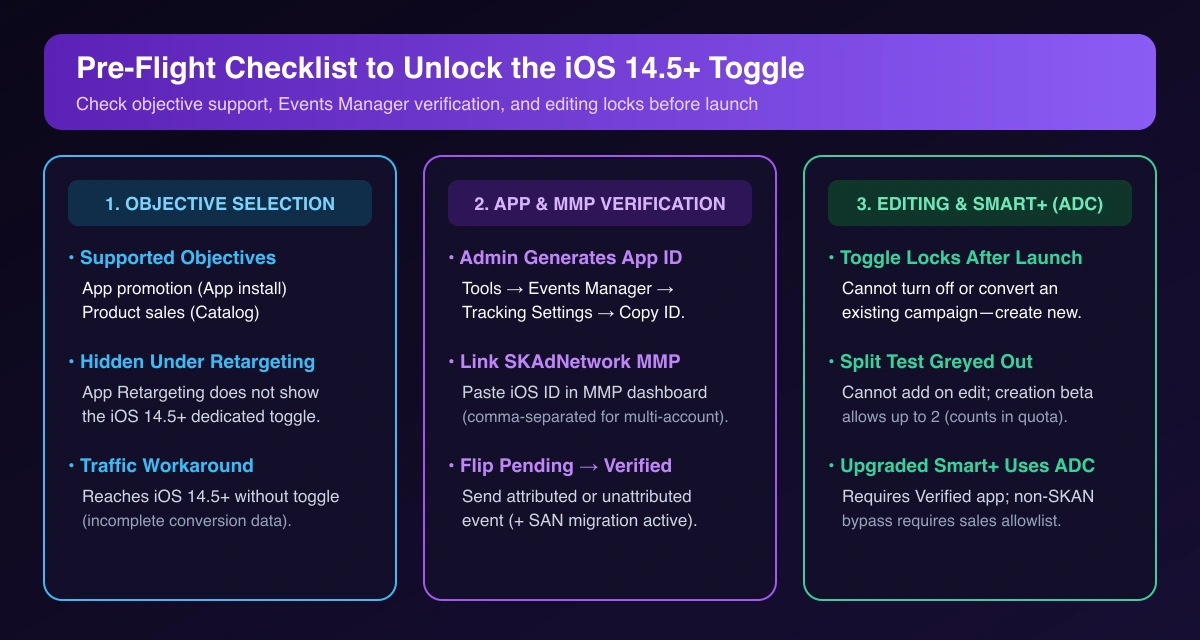
If a verified app blocks a new TikTok iOS 14 dedicated campaign, check your quota. Each iOS app can run up to 30 iOS dedicated campaigns across separate SKAdNetwork IDs (per app): up to 15 on TikTok and up to 15 on TikTok Ad Network (formerly Pangle).
Selecting Automatic placement (or Eligible) consumes 1 quota from TikTok and 1 from TikTok Ad Network at once. Check availability under Tools → Events → In-App Events → Tracking Settings or in the prompt shown when selecting your app at creation.
Slots fall into three states:
| Quota Status | Meaning | How to Release |
|---|---|---|
| Available campaigns | Open slots for new campaigns. | Ready immediately. |
| Campaign in use | Active, scheduled, expired, or out-of-budget campaigns. | Manually pause or delete; expiring or exhausting budget keeps it in use. |
| Available after reset | Recently paused or deleted campaigns. | Wait 72 hours after manual pause or deletion. |
Pause unneeded campaigns, merge similar bids and goals (like UK and US English audiences), and use the "multi-ad group feature which allows 5 ad groups per dedicated campaign" (from TikTok's iOS 14.5+ campaign objective best practices) to conserve slots.
Check 4: Are You Editing an Existing Campaign?
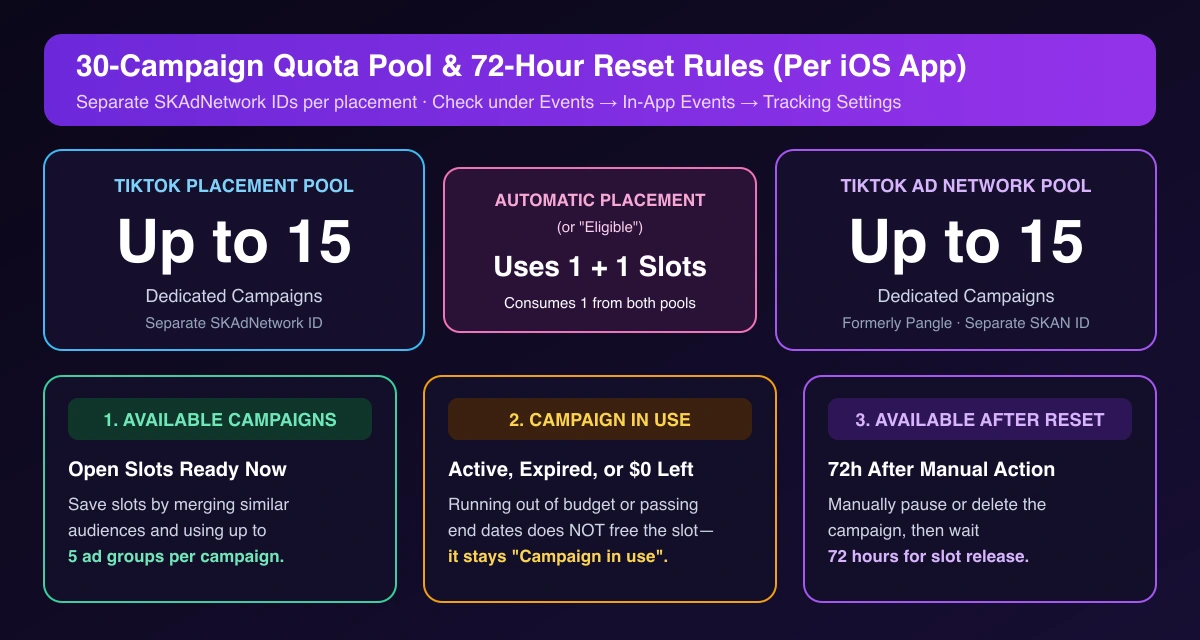
Create a new campaign instead of editing an old one, as two settings lock after creation:
- Ad group level: You cannot turn off the iOS 14.5+ dedicated campaign toggle ("a dedicated campaign cannot be changed to a normal one") or convert a normal campaign into a dedicated one.
- Campaign level: Adding a Split test while editing is greyed out (at creation, split tests require beta access, cap at 2 dedicated campaigns, and count toward quota).
Check 5: Smart+ and Advanced Dedicated Campaigns
Enabling iOS 14 dedicated settings in Upgraded Smart+ (see our TikTok Smart+ playbook) runs an Advanced Dedicated Campaign (ADC) by default.
An ADC captures real-time signals, requires a Verified app in Events Manager, and depends on app eligibility. For eligible apps, disabling SKAN attribution runs a non-SKAN dedicated campaign outside the quota (with SAN metrics only), though this is an allowlist feature—contact your TikTok sales representative.
What the SKAN 4.0 Prompt Means at Creation
Selecting Transition to SKAN 4.0 → Confirm at creation (or Upgrade to SKAN 4.0 in Events Manager) upgrades app-level attribution across linked accounts; it does not replace dedicated campaigns.
Confirm your MMP SDK is SKAN 4.0 ready and configure Fine-Grained plus Coarse-Grained schemas for all three postbacks before transitioning to SKAN 4.0, then expect 4–5 days of volatility. When pausing, pick "Guarantee the 1st postback" for freeze time to free quota faster (see attribution window setup).
If a new dedicated campaign launches without spending, work through our TikTok ads not delivering checklist. Once your iOS setup is live, use AdRate to batch-create and copy Android and non-dedicated App Promotion campaigns while automated rules watch CPI and budgets.
Frequently Asked Questions
Do I still need a TikTok iOS 14 dedicated campaign in 2026?
Yes. App install and Catalog campaigns still require a dedicated campaign to reach iOS 14.5+; non-dedicated campaigns stop at iOS 14.4.
Why is my ended campaign still using quota?
Expired or out-of-budget campaigns stay Campaign in use. Manually pause or delete them and wait 72 hours.
Is IDFA required for an iOS 14.5+ dedicated campaign?
No. IDFA is optional for dedicated campaigns, though encouraged alongside SKAdNetwork.
Official TikTok new advertiser program - exclusive benefits for new advertisers
Open a new TikTok ad account and earn official ad credit as you spend
Spend $200 within 30 days of signing up and get $200 in ad credit, rising to $6,000 when you spend $10,000. Credits go straight into your TikTok ad campaigns.
Coupons are issued by TikTok once it confirms you qualify as a new advertiser. Actual issuance and tiers are shown on the Coupon Progress page inside your TikTok Ads account.