How to Change Your GMV Max Primary Ad Account (And Switch Back)
Switching your GMV Max primary ad account turns off old campaigns—nothing migrates. Pre-switch checks, both handover paths, and how to switch back.
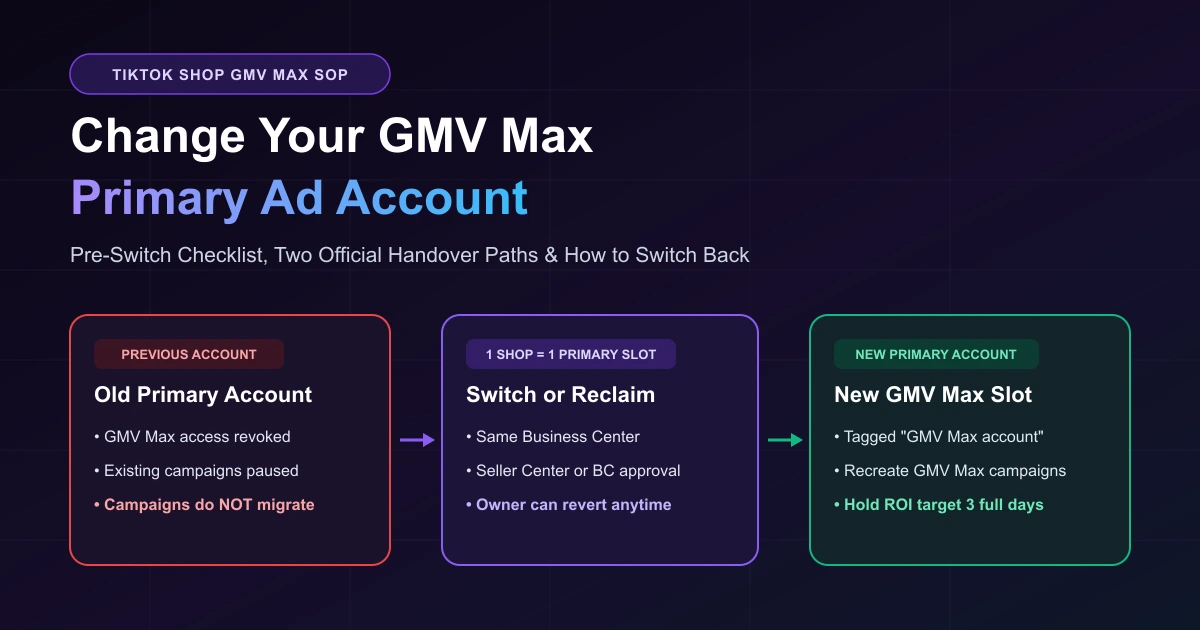
A TikTok Shop can only have one GMV Max primary ad account at a time. Once you switch that primary assignment—or approve an agency authorization request—your previous ad account loses GMV Max access, all active GMV Max campaigns inside it are automatically paused or turned off, and nothing migrates over. You must recreate those campaigns in the new account, though the TikTok Shop owner can change the authorization back at any time in Seller Center or Business Center.
If your campaigns suddenly stopped spending and you are still diagnosing why, check our guide on why TikTok GMV Max stops delivering first. If you are ready to switch accounts—or reclaim your store after another account took over—follow the checklist and paths below.
Which Handover Scenario Matches Your Store?
| Scenario | What Happened | Immediate Action |
|---|---|---|
| A. Planned Switch | Onboarding an agency, consolidating accounts, or moving Business Centers. | Record active settings first, confirm same-BC alignment, and switch during low-traffic hours. |
| B. Accidental Transfer | Someone approved a Business Center request from another ad account, turning off your campaigns. | Rebuild in the newly authorized account or have the Shop owner switch the primary account back. |
| C. Reclaiming Control | Ending an agency engagement and bringing GMV Max back in-house. | Reassign the primary account in Seller Center or Business Center, then recreate campaigns in your own account. |
Where TikTok's Help Center Contradicts Itself
Sellers often get caught off guard during a handover because TikTok's Help Center contradicts itself on the one point that matters here.
The opening line of How to change your primary ad account in Seller Center states: "You can change your primary ad account in Business Center without affecting the ads in any of your ad accounts."
Yet three other official TikTok Help Center articles state the opposite for GMV Max:
- GMV Max guidelines: "Access to the shop's GMV Max ads will be revoked from the previous primary ad account and any existing GMV Max campaigns for the shop in the previous primary ad account will be paused."
- How to create a Product GMV Max campaign in Seller Center: "All existing GMV Max campaigns will be automatically turned off if you change your GMV Max account and you need to recreate them in the new GMV Max account."
- How to request GMV Max authorization in Business Center: "If you authorize a different ad account, any GMV Max campaigns for the original ad account will end."
TikTok doesn't reconcile the two. Our reading: that line likely refers to your non-GMV Max ads—and even those can be paused once GMV Max goes live in the new account (see below). For GMV Max itself, plan for immediate shutoff in the old account and a full rebuild in the new one.
What about learning data and shop-level signals? TikTok does not publicly document whether store-level optimization history carries over to a new ad account. Treat recreated campaigns as fresh launches: TikTok's Best practices for Product GMV Max advises starting with system-recommended ROI targets and budgets when an account lacks recent history, and holding each ROI setting for at least three full days before adjusting.
Pre-Switch Checklist: 5 Checks Before Changing Accounts
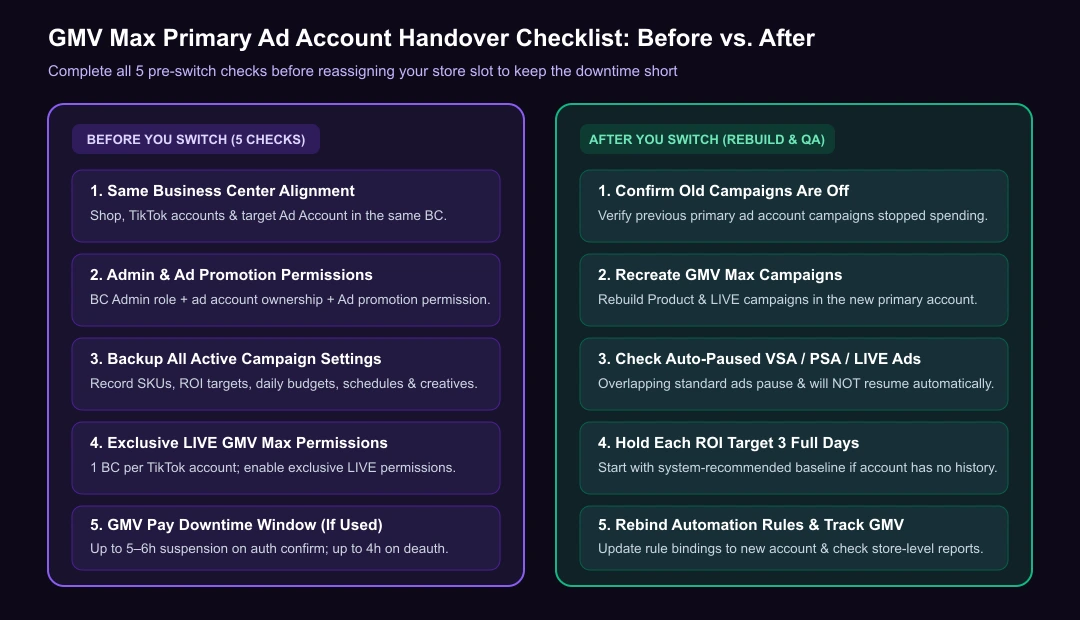
- Same Business Center alignment: The GMV Max ad account, TikTok accounts, and TikTok Shop must belong to the same Business Center (see our TikTok Shop ads authorization guide and Seller Center vs. Ads Manager account mapping).
- Admin and shop permissions: Requesting GMV Max authorization in Business Center requires Business Center Admin access, ownership of the target ad account, and Ad promotion permission for the Shop.
- Backup of active campaign settings: Record every active campaign's products (SKUs), ROI target, daily budget, schedule, and creatives from the old account.
- Exclusive LIVE GMV Max permissions: For LIVE GMV Max campaigns, a TikTok account can only authorize one Business Center at a time. Turn on exclusive LIVE GMV Max permissions before linking the new ad account; disconnecting the shop's official TikTok account from the shop, Business Center, or Business Account can pause LIVE GMV Max ads.
- GMV Pay transition downtime: If you use GMV Pay for agency-managed ad accounts (only in certain regions and seller types), TikTok suspends the ad account for up to 5–6 hours after the agency confirms authorization, and up to 4 hours after deauthorization.
Two Paths to Change (or Reclaim) Your GMV Max Primary Ad Account
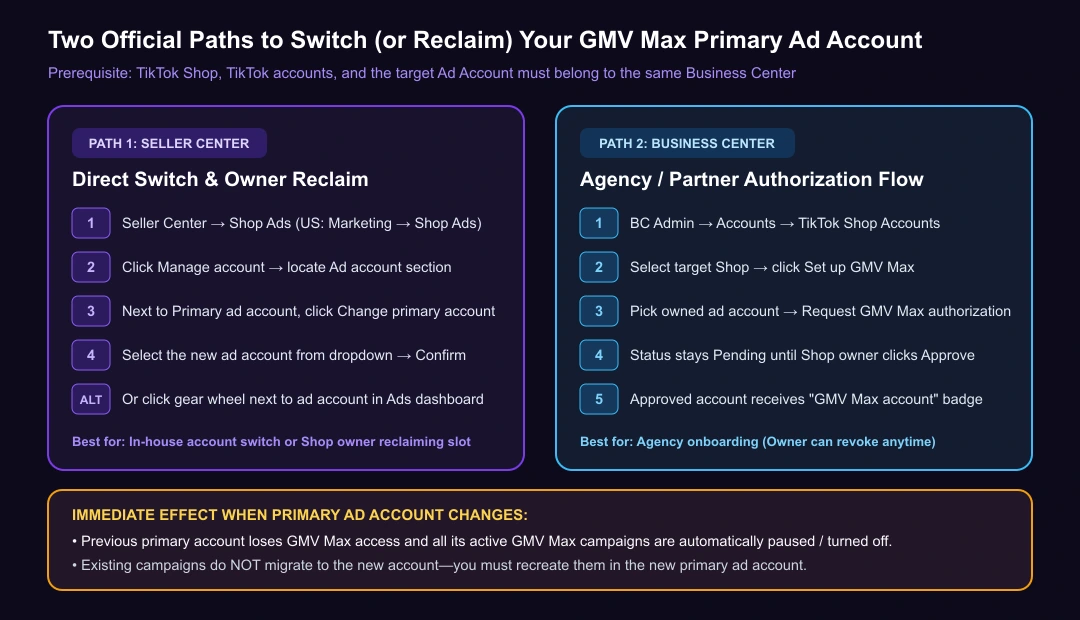
Path 1: Switch in TikTok Seller Center (In-House & Reclaiming Control)
When the target ad account is in the same Business Center as your shop:
- Open TikTok Seller Center → Shop Ads (US: Marketing → Shop Ads).
- Click Manage account and find the Ad account section.
- Next to Primary ad account, click Change primary account, select the new account, and click Confirm.
Other Seller Center entries: Click the gear wheel next to the ad account name at the top of the Product GMV Max Ads dashboard, or go to Shop Ads → Manage account → GMV Max account → Add GMV Max account (under Authorization needed) and set it as primary to view GMV Max data in Seller Center.
Path 2: Request and Approve Authorization in Business Center (Agency Handover)
- In TikTok Business Center (Admin), go to Accounts → TikTok Shop Accounts.
- Select the shop and click Set up GMV Max.
- Pick the owned ad account, click Request GMV Max authorization, and click Confirm.
- Status stays Pending until the Shop owner clicks Approve via email or Business Center notification.
- Once approved, the new account gets a "GMV Max account" tag in Business Center, and all GMV Max campaigns in the previous account turn off.
How to switch back: The TikTok Shop owner can change or revoke authorization anytime in Business Center or Seller Center, and new requests can be sent anytime after removal or rejection. TikTok doesn't say whether paused campaigns restart after a switch-back, so keep your backup either way.
Post-Switch Rebuild & FAQ
Once your new primary account is active, use your backup notes to create your TikTok GMV Max ads in the new account using recommended ROI and budget baselines.
Watch for overlapping standard ads after launch. Active Product or LIVE GMV Max campaigns automatically pause existing Video Shopping Ads (VSA) and Product Shopping Ads (PSA) for the same products, plus LIVE Shopping Ads using the same official TikTok account—and they do not resume automatically after GMV Max ends.
If you manage multiple stores or accounts: only one ad account can access a shop's GMV Max at a time, but one ad account can serve as the primary ad account for multiple TikTok Shops simultaneously.
Rebuild Faster After the Switch
With AdRate, you can use GMV Max batch creation to rebuild multiple campaigns in your new ad account faster, point your GMV Max automation rules at the rebuilt campaigns (and get a Lark alert if a rule's authorization ever loses access to an ad account), and check store-level GMV Max reports to confirm delivery and ROI recover after the switch.
Official TikTok new advertiser program - exclusive benefits for new advertisers
Open a new TikTok ad account and earn official ad credit as you spend
Spend $200 within 30 days of signing up and get $200 in ad credit, rising to $6,000 when you spend $10,000. Credits go straight into your TikTok ad campaigns.
Coupons are issued by TikTok once it confirms you qualify as a new advertiser. Actual issuance and tiers are shown on the Coupon Progress page inside your TikTok Ads account.