Connect TikTok GMV to Claude Code: ROI Rules That Run Overnight
Peak TikTok Shop spend hits while you sleep. Connect TikTok GMV to Claude Code to tune one plan at a time and preview rules that guard ROI 24/7.
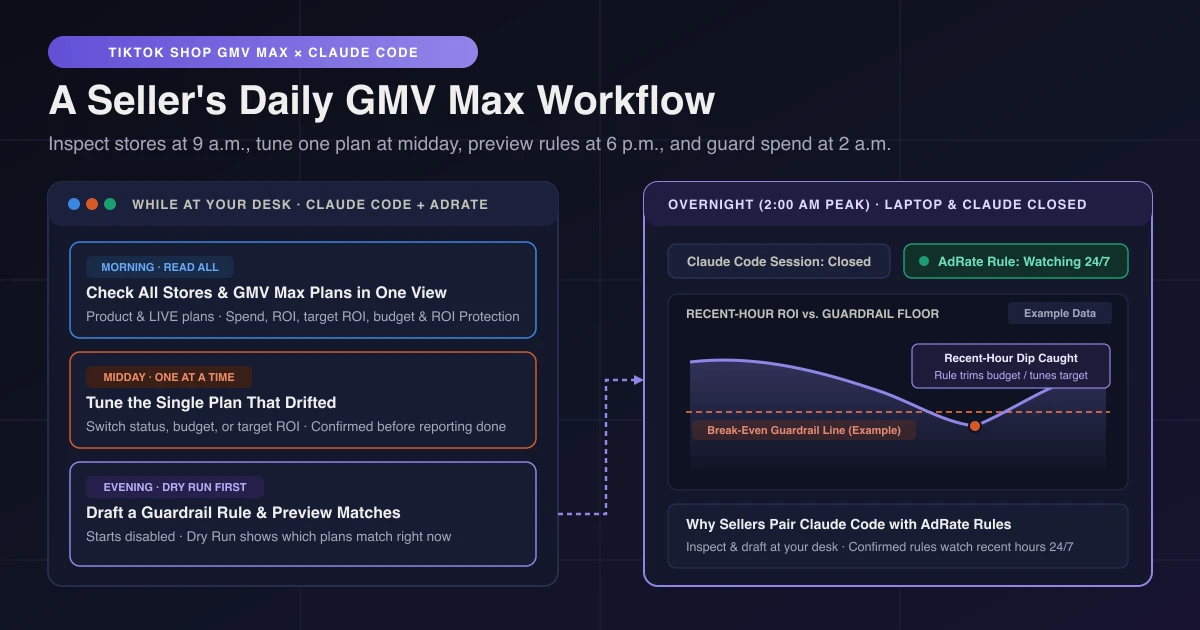
Yes. When you connect TikTok GMV to Claude Code through AdRate, you can inspect GMV Max plans across your TikTok Shop stores, switch a plan on or off, adjust one plan's budget or target ROI, and draft guardrail rules that you preview before enabling. Once confirmed, those rules keep checking recent-hour performance on AdRate's side after you close Claude Code.
If you only want TikTok Shop GMV Max metrics in Claude for reporting, a data connector is enough. Several third-party connectors read GMV Max data, while TikTok's public documentation for the official connector does not state GMV Max coverage. Some third-party connectors also edit GMV Max plans in chat. Where sellers lose margin is at 2 a.m. on Black Friday, when spend accelerates and your laptop is shut.
One Sentence to Set Up Before Your Morning Check
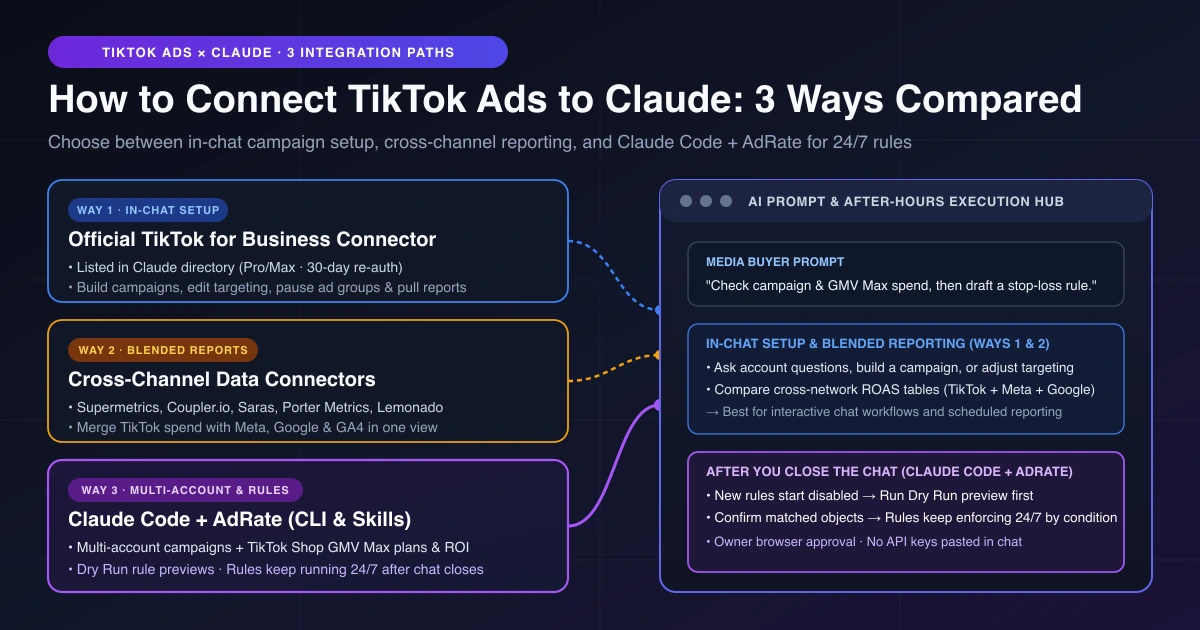
GMV Max is the default way to run TikTok Shop ads. Setup is one prompt in Claude Code: say "install the AdRate CLI and its skills, then log me in", and your team owner approves sign-in from the verification link in a browser (installed skills update automatically on future runs). For the full picture, compare the ways to connect TikTok Ads to Claude or see when to build vs buy a GMV Max automation workflow.
A GMV Max Seller's Day in Claude Code
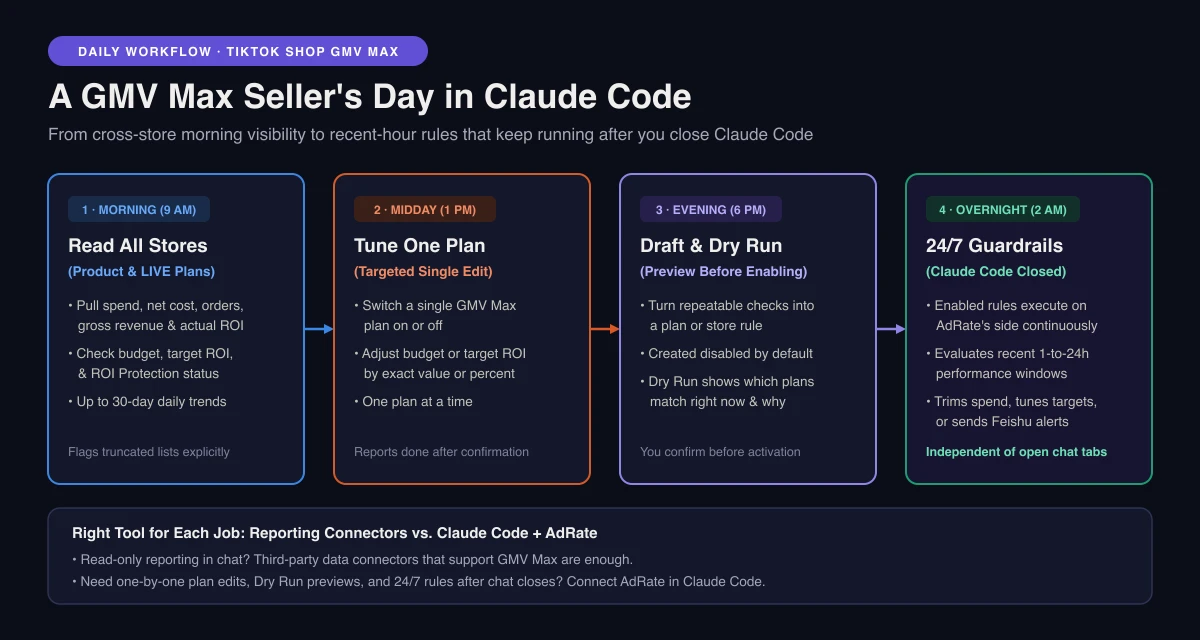
Morning: Put Every Store's GMV Max Plans Side by Side
Instead of jumping between Seller Center tabs, ask Claude to list your TikTok Shop stores and pull your Product and LIVE GMV Max plans.
You can compare spend, orders, and actual ROI next to each plan's budget and target ROI, review up to 30 days of daily trends, and inspect individual plans to see whether ROI Protection is on. When a store has more plans than one list returns, Claude tells you the list is incomplete.
Midday: Adjust Only the Plan That Drifted
By midday, one plan paces well while another hits its budget cap or misses its efficiency floor. Ask Claude to update that single plan by switching it on or off, raising or trimming budget, or adjusting target ROI.
When commissions, discounts, or returns shift margins, raise your target ROI to protect profit or lower it slightly to regain delivery. Calculate where your real break-even ROI sits first. Edits happen one plan at a time, and Claude reports what changed only after confirmation—it won't claim a change it can't confirm.
Evening: Turn Repeatable Checks into a Previewed Rule
Repeatable judgments—checking whether recent-hour ROI dropped below break-even, trimming budget on overspending plans, nudging budget up when efficiency holds, or sending a Feishu/Lark alert when a LIVE session's spend spikes—belong in a rule.
Cloud scheduled tasks in Claude Code cannot use your local skills and sign-in, and asking a model to re-judge from scratch every hour invites drift. Ask Claude to draft a GMV Max rule for a plan or store, covering Product or LIVE GMV Max.
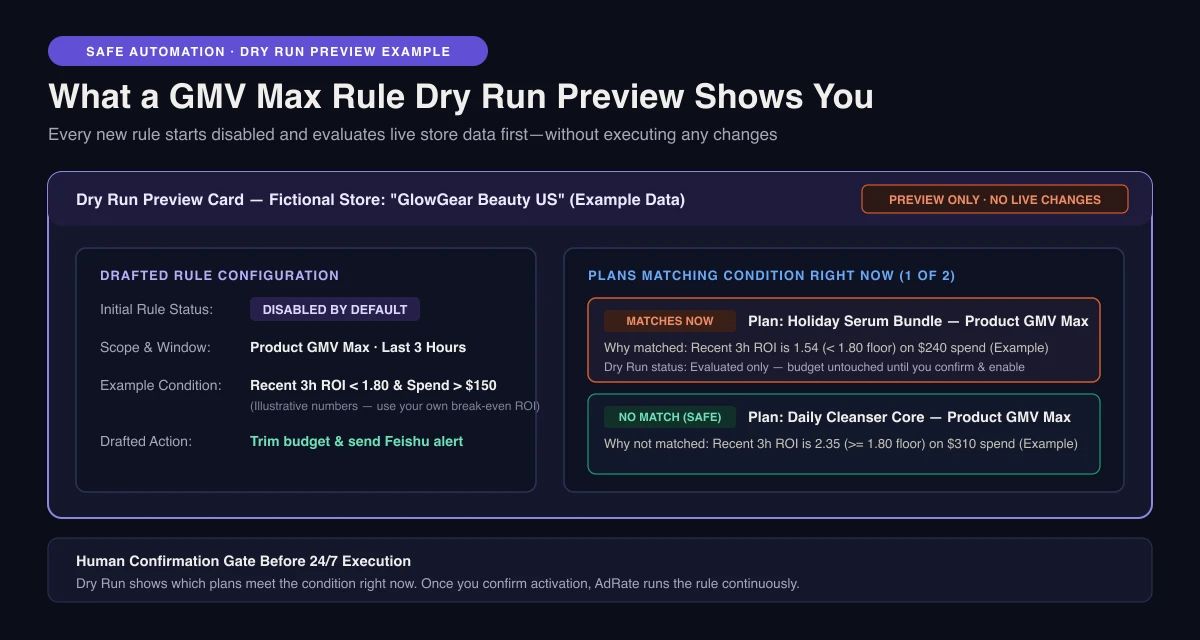
Every new rule starts disabled. Run a Dry Run preview first: Claude checks live data and shows which plans match right now and why, without changing anything. Unsure how to set thresholds? See how to design GMV Max guardrail loops. For livestream rooms, check hourly guardrails for LIVE GMV Max before confirming activation.
Overnight: Guardrails Keep Watching After Claude Code Closes
Once enabled (with an active AdRate subscription), your rule runs on AdRate's side. If a midnight surge pushes spend up while ROI drops below break-even at 2 a.m., a rule watching the last three hours catches it and trims budget, tunes the target, or sends a Feishu/Lark alert while your laptop stays shut. You choose that window, from 1 to 24 hours.
Three Things to Do in Claude Code the Week Before Black Friday
With Thanksgiving on November 26, Black Friday on November 27, and Cyber Monday on November 30, peak spend hits when manual monitoring is hardest. These three checks apply before any major promotion:
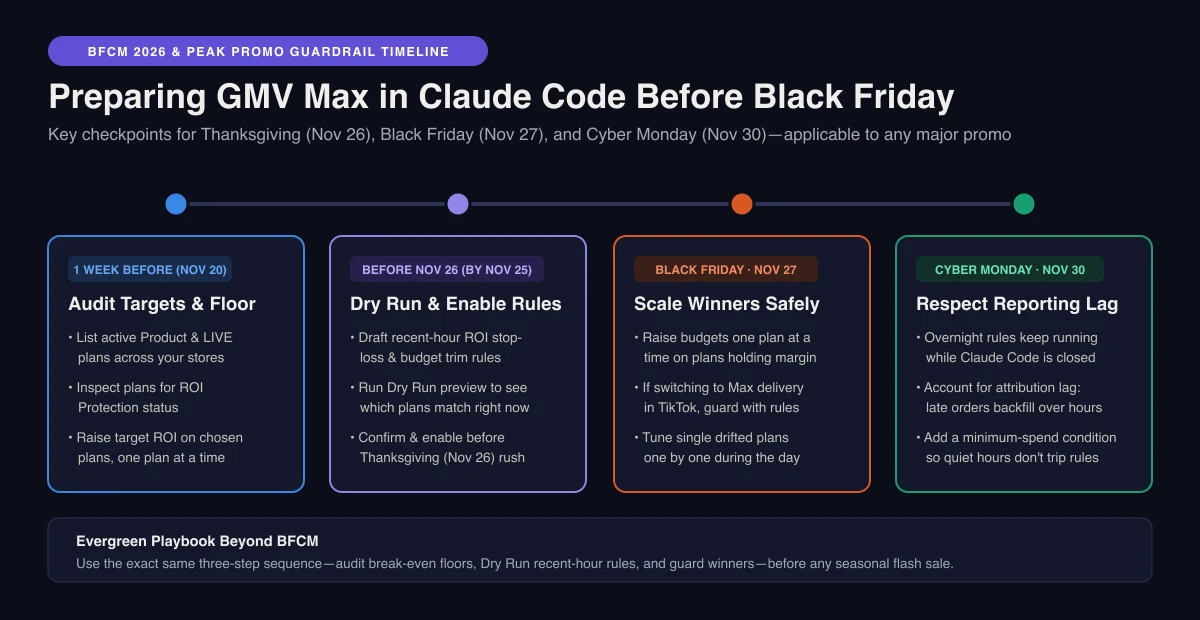
- Audit promo-week ROI targets and budget headroom: Holiday coupons and commissions compress margins. Ask Claude to list active GMV Max plans across stores and inspect which individual plans have ROI Protection on, then raise the target ROI or adjust budget on the plans you choose, one plan at a time.
- Draft and Dry Run a recent-hour stop-loss rule before November 26: Ask Claude to draft a rule that trims budget or adjusts the target when recent-hour ROI falls below break-even, run a Dry Run preview to see which plans match right now, and enable it before Thanksgiving. Remember reporting lag after midnight: GMV Max metrics are not instant, late orders backfill over time, and a quiet overnight hour can look like a collapse, so add a minimum-spend condition to keep a near-empty window from triggering the rule.
- Give budget room only to plans that hold margin: One peak-season guide suggests running Target ROI on normal November days and switching proven plans or LIVE sessions to Max delivery in TikTok during the November 27 and November 30 surges. If you make that switch in TikTok, use Claude Code to keep a recent-hour rule on those plans and raise budgets one plan at a time only on winners holding net margin. For non-Shop ads, pair this with BFCM pacing for your standard campaigns.
Frequently Asked Questions
I only want TikTok Shop GMV Max data in Claude. Do I need this?
No. For read-only reporting, a data connector that supports GMV Max is enough. Use AdRate in Claude Code when you want to adjust budgets or ROI targets one plan at a time and keep previewed rules running overnight.
Does this work for both Product and LIVE GMV Max?
Yes. You can check Product and LIVE GMV Max plans, and draft, Dry Run preview, and enable rules for both.
Will Claude change my ROI target or budget without asking?
Updates happen one plan at a time at your request, and Claude reports the new value only after execution is confirmed. Rules start disabled, show which plans match via Dry Run, and require your confirmation before activation.
Does this work in the Claude web app?
AdRate runs in local agents like Claude Code on your computer, not in the claude.ai web chat box or cloud scheduled tasks, and active rules continue executing on AdRate's side after you close your laptop.
Start With a Store Check and One Previewed Rule
Once AdRate is set up in Claude Code, ask Claude to list your GMV Max plans, draft one rule checking recent-hour ROI against break-even, and run a Dry Run preview before enabling anything. Explore the TikTok Ads AI Agent for Claude Code or create your AdRate account to keep guardrails watching overnight. Prefer the browser? A conversational assistant in the AdRate web app is also rolling out.
Official TikTok new advertiser program - exclusive benefits for new advertisers
Open a new TikTok ad account and earn official ad credit as you spend
Spend $200 within 30 days of signing up and get $200 in ad credit, rising to $6,000 when you spend $10,000. Credits go straight into your TikTok ad campaigns.
Coupons are issued by TikTok once it confirms you qualify as a new advertiser. Actual issuance and tiers are shown on the Coupon Progress page inside your TikTok Ads account.