Spark Ads Code Error? 4013, 4025, 900010 & Who Fixes Each One
Stuck on a TikTok Spark Ads code error like 4013, 4025, or 900010? See all 16 official notifications grouped by whether the creator or your team fixes it.
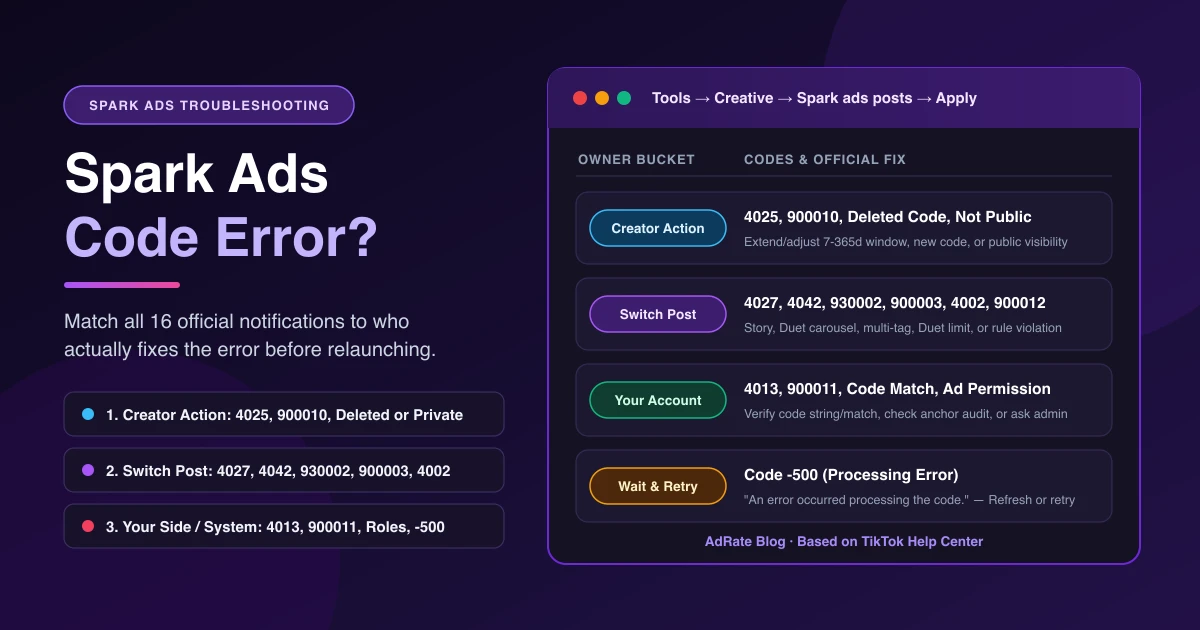
When a TikTok Spark Ads code error blocks your post in Tools → Creative → Creative library → Spark ads posts → Apply for Authorization, most notifications are not caused by a broken ad account. TikTok's error reference calls this string a post code, while its creation guides call it a video code or video authorization code—all three mean the same creator-generated code (if you still need to collect codes, see our Spark Ads UGC authorization SOP).
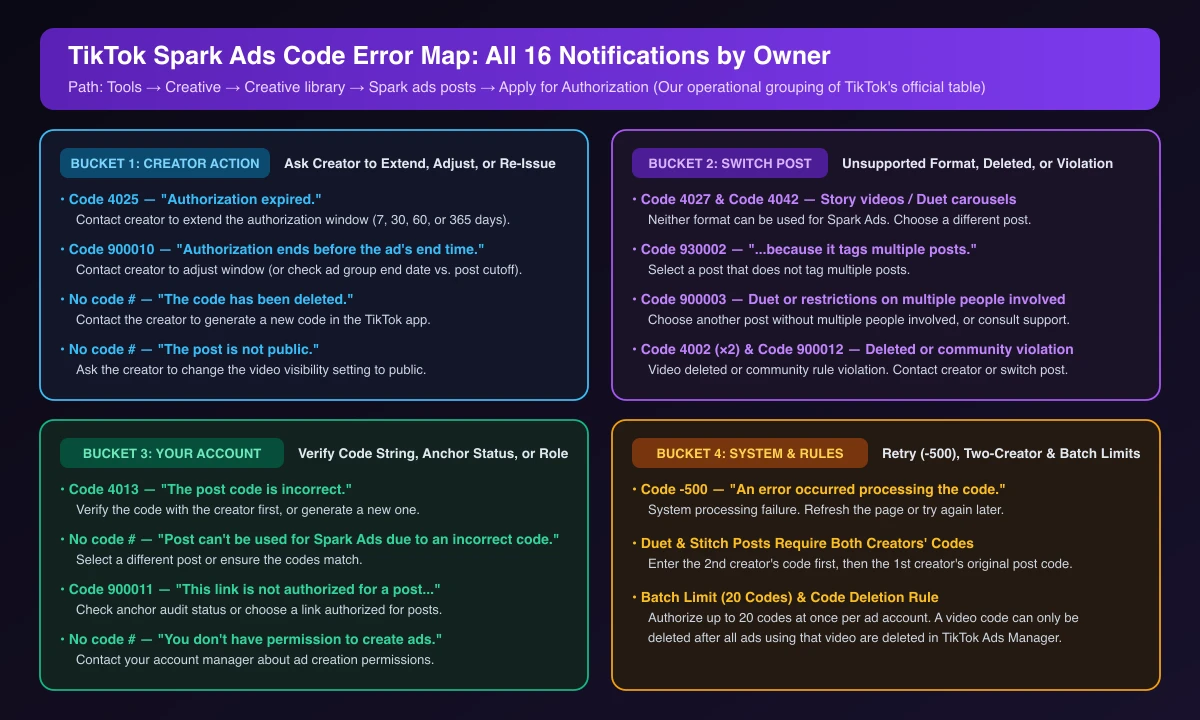
Per TikTok's About Spark Ads code error notifications in TikTok Ads Manager, these prompts help you distinguish a backend failure from a user error or content violation. Based on TikTok's "What you can do" column, we group all 16 notifications into four buckets: ask the creator to act, switch posts, fix a setting in your account, or wait and retry (-500).
All 16 TikTok Spark Ads Code Error Notifications Grouped by Who Fixes Them
Four official notifications do not display a numeric code in TikTok's table—match those by their on-screen text.
| Who Fixes It (Our Grouping) | Code | Official Notification Message | Official Action |
|---|---|---|---|
| Creator Action | 4025 | "Authorization expired." | Contact the creator to extend the authorization. |
| Creator Action | 900010 | "Authorization ends before the ad's end time." | Contact the creator to adjust authorization. |
| Creator Action | No number | "The code has been deleted." | Contact the creator to generate a new code. |
| Creator Action | No number | "The post is not public." | Ask the creator to change visibility to public. |
| Switch Post | 4027 | "Story videos can't be used for Spark Ads." | Choose a different post. |
| Switch Post | 4042 | "Duet carousels can't be used for Spark Ads." | Choose a different post. |
| Switch Post | 930002 | "This post can't be used for ads because it tags multiple posts." | Select a post that doesn't tag multiple posts. |
| Switch Post / Support | 900003 | "This post can't be used for ads due to duet or restrictions on multiple people involved in the post." | Choose another post that doesn't involve multiple people or consult support. |
| Switch Post / Creator | 4002 | "The video is not available due to community guidelines violation." | Contact the creator or select another post that meets community guidelines. |
| Switch Post / Creator | 4002 | "The video has been deleted and cannot be used to create ads." | Contact the creator or choose another post. |
| Switch Post / Creator | 900012 | "The post is unavailable due to a community rule violation." | Contact the creator or choose another post. |
| Your Account / Team | 4013 | "The post code is incorrect." | Verify the code with the creator or generate a new one. |
| Your Account / Team | No number | "Post can't be used for Spark Ads due to an incorrect code." | Select a different post or ensure codes match. |
| Your Account / Team | 900011 | "This link is not authorized for a post. Post's anchor status does not support Spark Ads." | Check anchor audit status or choose a link that is authorized for posts. |
| Your Account / Team | No number | "You don't have permission to create ads." | Contact your account manager about ad permissions. |
| Wait & Retry | -500 | "An error occurred processing the code." | Refresh the page or try again later. |
How to Fix the Most Common Codes: 4013, 4025, and 900010
Most paste-time failures come down to an unverified code string or a mismatch between the creator's authorization window and your campaign schedule.
1. Code 4013 ("The post code is incorrect.") and Mismatched Codes
When a Spark code is not working and returns 4013, check your clipboard before messaging the creator. Make sure you pasted the complete string without extra spaces or missing characters, and confirm you are not pairing a code from one video with a different post (which also triggers "Post can't be used for Spark Ads due to an incorrect code."). If the string matches what the creator sent, ask them to generate a new code in the TikTok app. For account-level permission blocks ("You don't have permission to create ads."), see our guide on TikTok Ads permission errors and access denied.
2. Codes 4025 and 900010: Aligning the 7 / 30 / 60 / 365-Day Window With Your Schedule
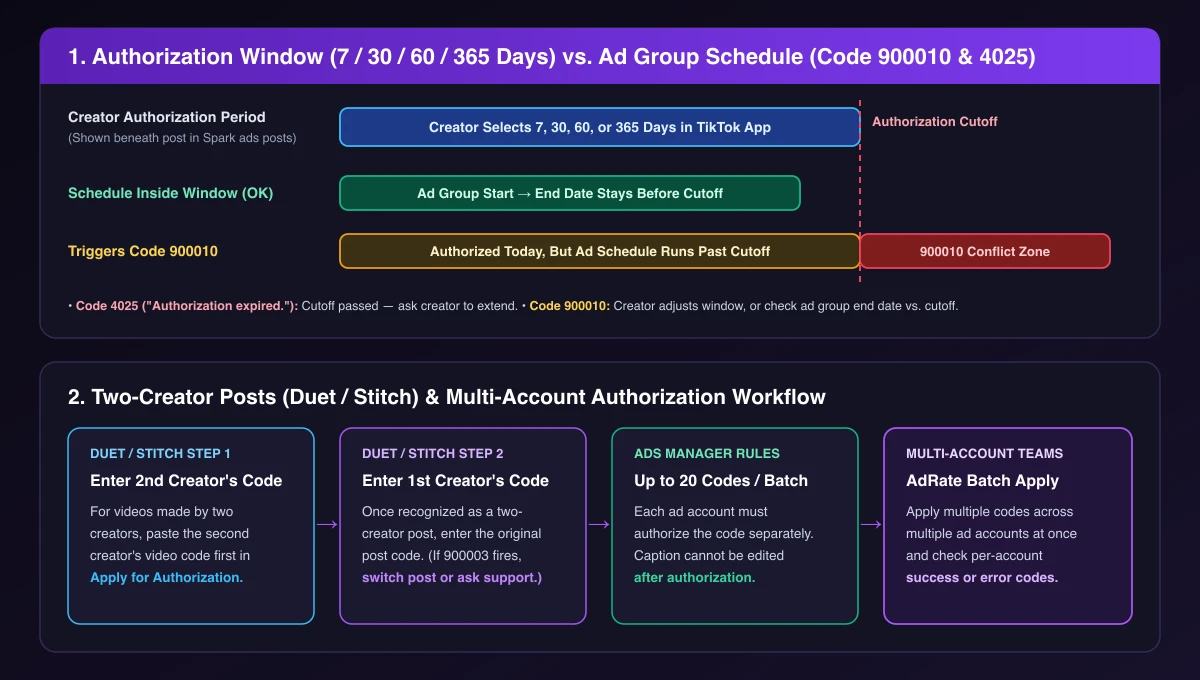
Per TikTok's How to create Spark Ads for Smart+ campaigns, a creator turns on Ad authorization under Ad Settings and selects an authorization duration of 7, 30, 60, or 365 days before copying the code. Both that guide and TikTok's Spark Ads creation guide note that you can review the authorization period beneath each post after you add it.
- Code
4025("Authorization expired."): The creator's selected window has already ended. Contact the creator to extend the authorization before using the post again. - Code
900010("Authorization ends before the ad's end time."): The post is still authorized today, but your ad group's scheduled end time extends past the creator's authorization cutoff. TikTok's official fix is to contact the creator to adjust the authorization. Before you message them, compare the authorization period shown beneath the post with your ad group's end date, so you can tell the creator exactly how long the new window needs to cover.
Duet and Stitch Posts: The Two-Code Rule vs. Error 900003
Trying to boost a Duet or Stitched post involves two separate checks in TikTok Ads Manager:
- You need authorization codes from both creators: Per TikTok's Smart+ campaign Spark Ads guide, creating Spark Ads from videos made by two creators (such as Duets and Stitched posts) requires video authorization codes from both creators featured in the video. In Apply for Authorization, enter the second creator's code first; after the system recognizes the post as a two-creator video, enter the first creator's original post code.
- When Code
900003blocks the post: If Ads Manager returns900003("This post can't be used for ads due to duet or restrictions on multiple people involved in the post."), having a code will not override the restriction. Choose another post that does not involve multiple people or consult TikTok support. Keep in mind that Duet carousels (4042), Story videos (4027), and posts tagging multiple posts (930002) cannot be used for Spark Ads at all.
Authorizing Across Multiple Ad Accounts and Frequently Asked Questions
When an agency or multi-store team runs the same creator video across several ad accounts, that video code must be authorized separately in each ad account. TikTok Ads Manager supports batch authorization of up to 20 video codes at a time per account (if you run TikTok Shop affiliate content, see how bulk authorization for affiliate videos differs from single-video codes).
If your team manages creator posts across multiple accounts as part of a cross-account management workflow, AdRate lets you batch-apply multiple Spark authorization codes across several ad accounts at once and review per-account results—showing which account succeeded and which returned a specific TikTok error code. AdRate does not generate creator codes, extend authorization periods, or bypass TikTok's eligibility checks, so any creator-side or post-level error still follows the fixes above.
Can I edit the post caption after authorizing a Spark Ads code?
No. Per TikTok's Spark Ads creation guide, you cannot edit a post's caption after it has been authorized as an ad. Any caption change requires the creator to post a new video and generate a new code.
Why won't TikTok Ads Manager let me delete an authorized video code?
Per TikTok's creation documentation, a video code can only be deleted when all the ads using that video are deleted in TikTok Ads Manager. Pausing the campaign or ad group is not enough—you must delete every ad referencing that post first.
What if a creator revokes authorization after my Spark Ad is already live?
The 16 notifications above only apply when pasting or binding a code. If an already-authorized post stops delivering mid-flight because the creator turned off authorization or deleted the video later, follow our troubleshooting guide for TikTok Ads asset unavailable or authorization revoked.
Official TikTok new advertiser program - exclusive benefits for new advertisers
Open a new TikTok ad account and earn official ad credit as you spend
Spend $200 within 30 days of signing up and get $200 in ad credit, rising to $6,000 when you spend $10,000. Credits go straight into your TikTok ad campaigns.
Coupons are issued by TikTok once it confirms you qualify as a new advertiser. Actual issuance and tiers are shown on the Coupon Progress page inside your TikTok Ads account.