TikTok Promote Rejected Refund: Where Did Your Money Go?
Paid for a promotion that got rejected? Your TikTok Promote rejected refund lands in Promote Balance. See when you can withdraw it, by device and payment.
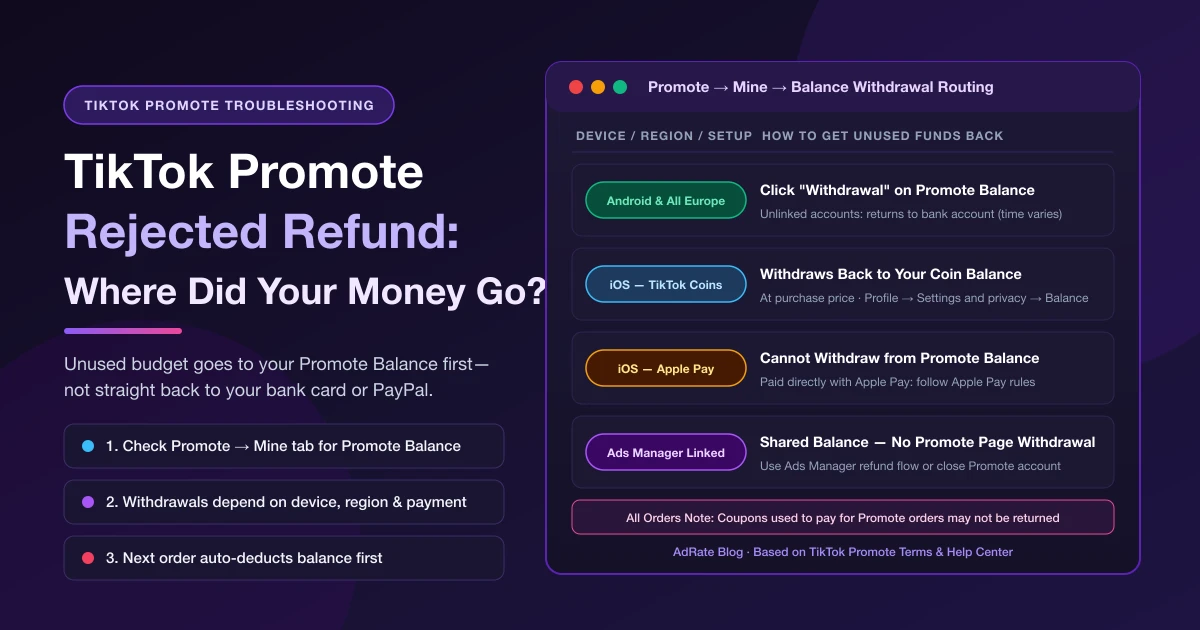
When a promotion fails review after you pay, TikTok displays: "This promotion can't be delivered because it didn't pass our review, so the remaining budget will be refunded to your Promote balance. Tap 'Rejected' to learn more." Your TikTok Promote rejected refund isn't missing. It never went back to your bank statement or PayPal: in Promote, "refunded" means unused funds return to your in-app Promote Balance (under the Mine tab), not straight back to your card.
Whether you can withdraw that balance—and where it goes—depends on your device, region, payment method, and whether your account is linked to TikTok Ads Manager. If you start a new promotion without withdrawing, TikTok spends your available balance first before charging more.
Where Your TikTok Promote Rejected Refund Goes and How to Withdraw
Per TikTok's Supported methods of payment for Promote and the TikTok Promote Terms (the US terms with TikTok Inc.; check your in-app terms outside the US), payment is due upon bid submission, and unused budget from rejected, unfulfilled, or early-closed orders follows these rules:
| Your Device, Region, or Account Setup | Where Unused Funds Go | How Withdrawals & Refunds Work |
|---|---|---|
| Android devices and all European countries (unlinked to Ads Manager) | Promote Balance (in Promote under the Mine tab) | Click Withdrawal on your Promote Balance page. Withdrawals return to your bank account, and processing time "may vary." |
| iOS devices — paid directly with Apple Pay | Promote Balance | You cannot withdraw from Promote Balance if you paid directly with Apple Pay; follow Apple Pay rules for withdrawals. |
| iOS devices — paid with TikTok Coins | Promote Balance (shown in USD under US Apple terms) | Only the amount deducted from your Coin balance can be withdrawn from Promote Balance. Under Apple platform terms, Coins withdraw back to your Coin balance at purchase price (Profile → Settings and privacy → Balance). |
| Integrated with TikTok Ads Manager | Shared account balance reflected in TikTok Ads Manager | The payment help page states integrated Promote Balance cannot be withdrawn on the Promote page—use it for future campaigns or close your Promote account to withdraw. Under the US Promote Terms and About ad account refunds, you can request a refund via the Ads Manager refund process (or your representative). |
| Coupons used to pay for the order (all orders) | Not returned as withdrawable balance | Coupons used to pay for a Promote order may not be returned at the end of the promotion. |
| US pre-purchased Promote balance (unlinked) | Promote Balance (balance capped at US$2,000; no more than US$2,000 drawn from it per day, UTC+0) | Once you pre-purchase balance under the US terms, you cannot obtain a refund of any funds reflected in your Promote account balance unless you cease using Promote. |
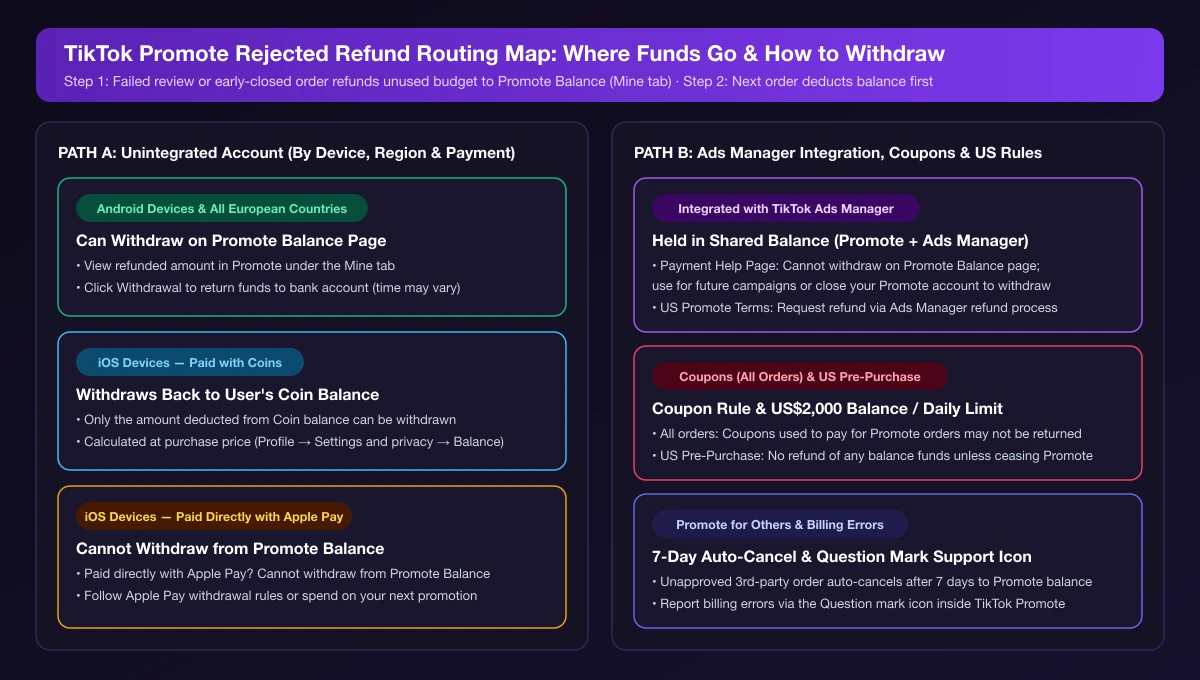
Two rules explain why funds often seem to vanish:
- Next orders deduct balance first. TikTok applies available funds in your balance to your next order before charging additional payment.
- Ads Manager integration shares the fund pool. Per About Promote integration with TikTok Ads Manager, linking merges fund pools across both platforms. See TikTok ads insufficient balance for shared balance issues, or TikTok ad credit not applied if you are troubleshooting an Ads Manager credit instead of a Promote coupon.
What Happens When a TikTok Promote Order Is Partially Rejected?
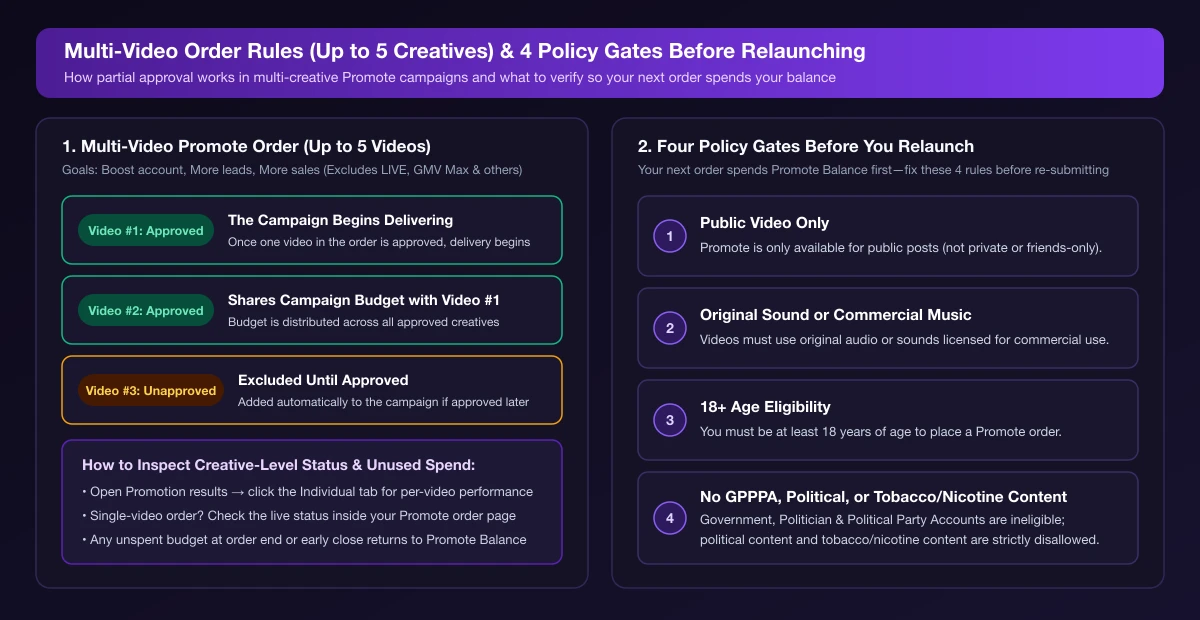
If you promoted multiple videos in one order and some were approved while others weren't, see About multiple creatives in Promote campaigns:
- Up to 5 videos share one budget: Boost account, More leads, and More sales support up to 5 videos per order (Promote for others, GMV Max, and LIVE goals do not).
- One approved video starts delivery: Once one video in the order is approved, the campaign begins and distributes budget across approved creatives.
- Unapproved videos wait: Unapproved creatives are excluded until approved, then added automatically.
- Check per-video status: Open Promotion results → Individual tab for creative-level performance. Unused budget at order end returns to Promote Balance.
Promoted a single video? TikTok only documents partial approval for multi-video orders—not a rejected single video delivering to a restricted audience. Go by the live status on your Promote order page.
How to Fix a Rejected Promotion So Your Balance Gets Used
Because your next order spends Promote Balance first, fixing the rejection and relaunching puts stuck funds to work right away. Tap Rejected on the notice to see the reason or follow any in-app appeal prompt, and check the four core rules in About TikTok Advertising Policies for Promote:
- Public videos only: Only public posts are eligible (not private or friends-only).
- Original or commercial audio: Videos must use original sound or sounds licensed for commercial use. For audio rejections, see This sound is not licensed for commercial use on TikTok ads.
- 18+ age requirement: You must be 18 years of age or older.
- Account and category bans: Government, Politician, and Political Party Accounts (GPPPAs) are ineligible, and political content plus tobacco and nicotine-related content are disallowed alongside TikTok's Terms of Service, Community Guidelines, and Advertising Policies.
If you run ads in TikTok Ads Manager instead of Promote, review and appeal workflows work differently—see TikTok ads rejected or stuck in review.
Frequently Asked Questions
Can I cancel a TikTok Promotion if review takes too long?
Yes—you can close a launched Promote order early, and the unused balance returns to your Promote Balance under the Mine tab, per Supported methods of payment for Promote. TikTok does not publish a fixed Promote review duration.
What if I used "Promote for Others" and the creator didn't approve?
Under the US Promote Terms, if the third party rejects your request or doesn't approve it within 7 days, TikTok automatically cancels the order and deposits your payment into your Promote Balance.
Can TikTok forfeit my balance, and how do I report a billing error?
Under the US Promote Terms, your balance is non-interest-bearing and may be forfeited if TikTok reasonably determines you violated the Terms or Policies. Report billing statement errors to Advertiser Support via the Question mark icon in your TikTok Promote account.
When Repeated Rejections Mean It's Time to Switch
When the same product videos keep getting rejected in Promote or you need separate testing by audience and SKU, check TikTok Promote vs. Ads Manager to see when a full ad account makes sense. Once you run multiple campaigns in TikTok Ads Manager, AdRate helps you monitor delivery status and ad spend with automated rules so you don't have to watch every campaign manually.
Official TikTok new advertiser program - exclusive benefits for new advertisers
Open a new TikTok ad account and earn official ad credit as you spend
Spend $200 within 30 days of signing up and get $200 in ad credit, rising to $6,000 when you spend $10,000. Credits go straight into your TikTok ad campaigns.
Coupons are issued by TikTok once it confirms you qualify as a new advertiser. Actual issuance and tiers are shown on the Coupon Progress page inside your TikTok Ads account.