Can't Promote a TikTok Video? How to Find & Fix the Cause
Can't promote a TikTok video before checkout? Start by tapping the grey Promote icon, then check privacy, commercial music rules, and missing buttons.
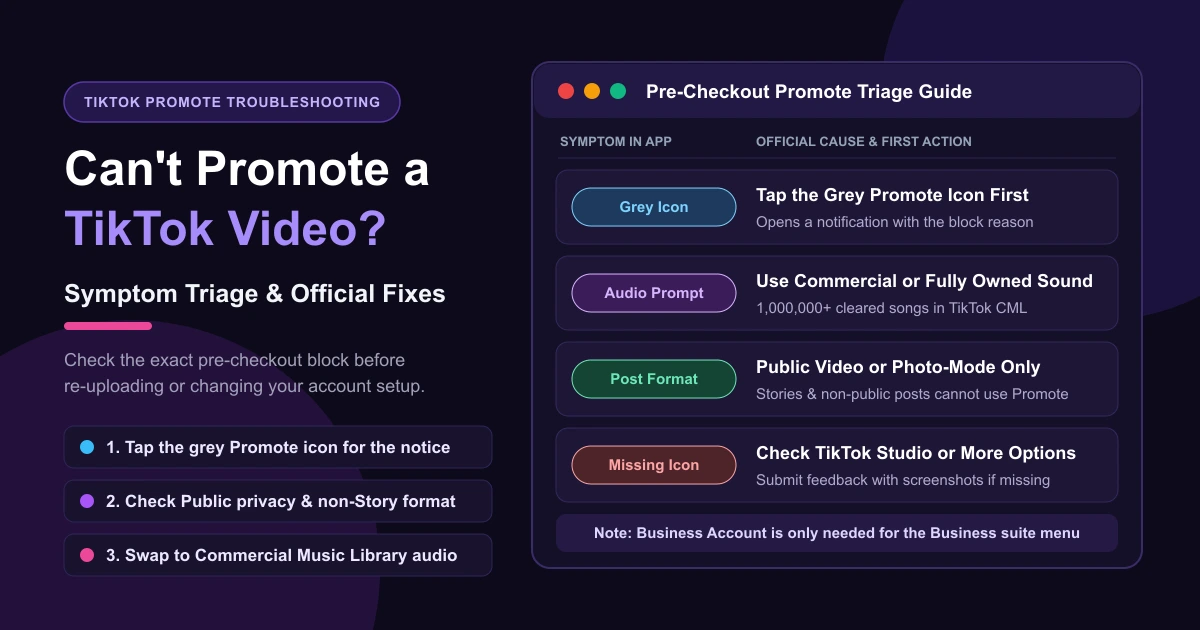
If you can't promote a TikTok video and get stopped before you ever reach the payment screen, the block usually comes down to a greyed-out Promote icon, an audio licensing prompt, an ineligible post format, or checking the wrong menu. Instead of re-uploading your clip blindly, start with the symptom on screen.
If the Promote icon is grey, tap it directly to open a notification explaining why that post is blocked. Already paid? See TikTok promotion under review if your order is waiting, or TikTok Promote rejected refund if a paid order was disapproved.
Why Can't I Promote My TikTok Video? Start With the Grey Icon
TikTok's Use Promote to grow your TikTok audience guide answers this directly: "If the Promote icon turns grey, you can tap it to view details via a notification."
Match what you see in the app to the right fix:
| Symptom in the App | What TikTok Says | First Action to Take |
|---|---|---|
| Promote icon is grey | Visibility, Story format, audio eligibility, or policy restriction | Tap the grey icon to view details via a notification, then fix the item below. |
| Promote asks to change sound | Background sound is not allowed for commercial use or not fully owned | Swap to a Commercial Music Library track or use original audio you fully own. |
| Promote icon is missing | Business suite requires a Business Account; if gone completely, submit feedback with screenshots | Check TikTok Studio or More options (...); if gone everywhere, submit feedback and screenshots. |
| No Promote on another creator's post | Share -> Promote may not be available for all posts or LIVE videos | Try another post—TikTok says this option may not be available for all posts or LIVE videos. |
| Eligible video fails at order step | Network or app issue (TikTok's own troubleshooting steps) | Check your network, close and reopen the TikTok app, or file a ticket via Need more help?. |
Privacy and Post Format: Public Posts vs. TikTok Stories
If the notification points to the post itself, check visibility and format first:
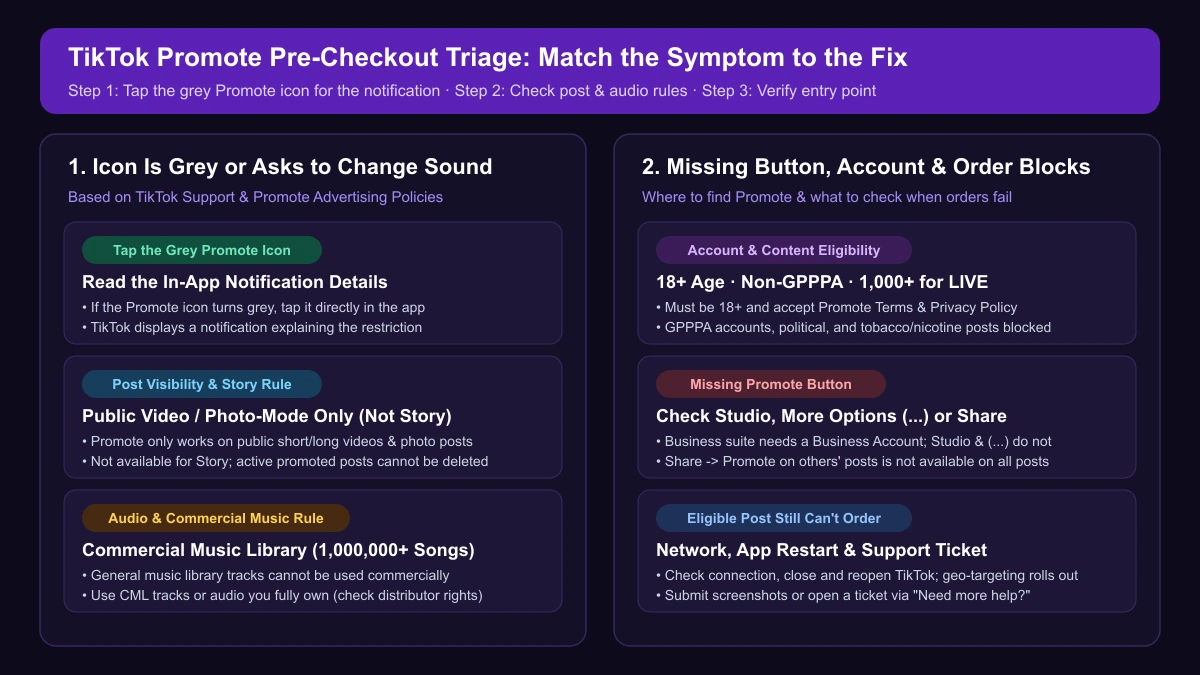
- Not set to Public: Under TikTok's advertising policies for Promote, "Promote is only available for public videos." Posts set to Friends, Only you, or saved in drafts cannot be boosted. Switch privacy to Public first—and note from TikTok's Promote FAQ that "you won't be able to delete your post if the promotion is active."
- Posted as a TikTok Story: Promote supports short videos, long videos, and photo-mode content, but "It is not available for Story." Repost the clip as a standard video or photo-mode post.
"Promote Asks Me to Change the Sound": Copyright and Commercial Music
For a public video, the next thing to check is the sound. TikTok's Promote FAQ explains: "To use Promote, your content must use sounds that are allowed for commercial use or sounds that you fully own. If your background sound does not meet these requirements, Promote may ask you to change it before you can start or continue your campaign."
Songs in TikTok's general music library are cleared for organic posts, not paid boosting. In the Commercial Music Library guide, "Businesses cannot use the general music library for commercial usage"—including commercial duets, reacts, and stitches.
To fix a Promote audio block:
- Pick a Commercial Music Library (CML) track: TikTok offers "more than 1,000,000 commercial sounds that can be used for your Promote video" for free.
- Use your own voiceover or original sound: When using another user's original sound or licensed music, consult your legal team to verify you hold a commercial license.
Swapping the audio removes this block, though promoted posts still undergo policy review. Hitting this in Ads Manager or Spark Ads? See this sound is not licensed for commercial use on TikTok ads.
Why Can't Musicians Promote Videos With Their Own Songs?
On r/musicmarketing, musicians report being "unable to use the 'promote' feature" on videos using their own released tracks, pointing to how their distributor delivered commercial rights to TikTok.
TikTok's rule is that posts must use "sounds that are allowed for commercial use or sounds that you fully own." Confirm commercial licensing with your distributor, and submit a ticket via Need more help? with ownership proof.
Account Checks, Missing Buttons, and Order Failures
If your video is public with cleared audio, check TikTok's Promote advertising policies, About Promote on TikTok, and your entry point:
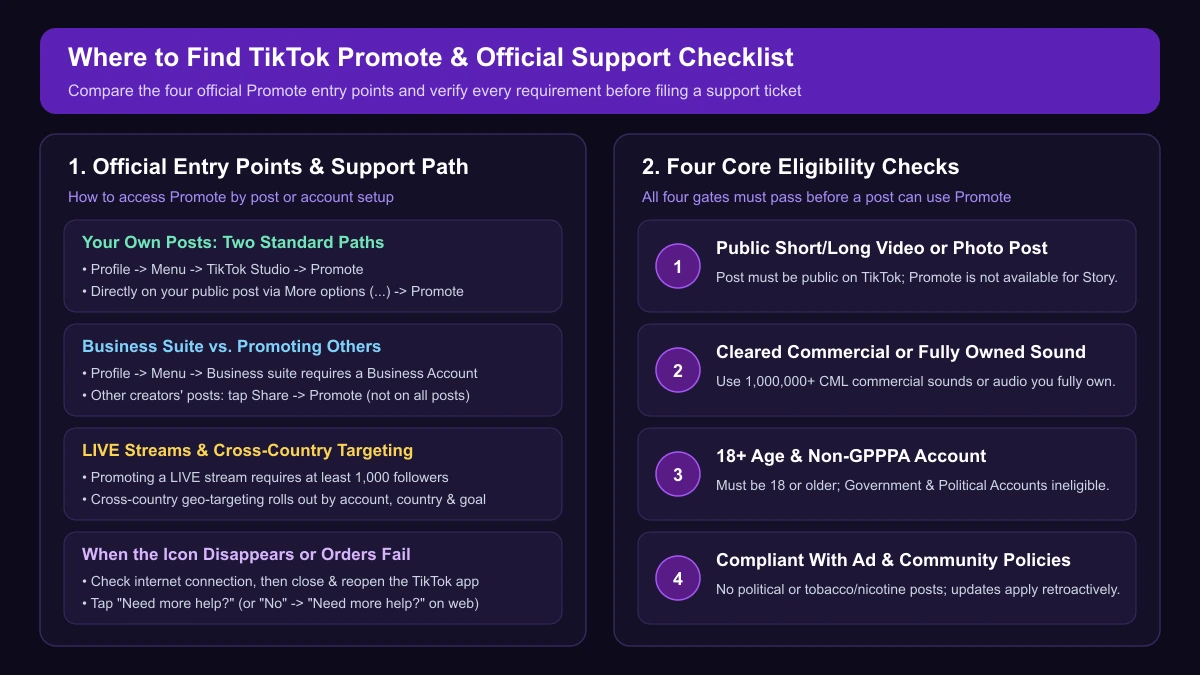
- Age and account rules: You must "be at least 18 years old" and accept the Promote Terms and Privacy Policy. "Government, Politician, and Political Party Accounts (GPPPAs) are not eligible to use Promote."
- Restricted topics and LIVE rule: "Political content and tobacco and nicotine-related content are not allowed," alongside Community Guidelines and Advertising Policies (policy updates may apply to older posts too). Promoting a LIVE requires at least 1,000 followers.
- Missing Promote button: Only Profile -> Menu (☰) -> Business suite requires a Business Account; any eligible account can use TikTok Studio or More options (...). For another creator's post, Share -> Promote "may not be available for all posts or LIVE videos." If the icon disappeared completely, "submit feedback and include screenshots of the issue."
- Still can't place an order: Check your internet connection, close and reopen the TikTok app, and try again. If you still cannot place the order, tap Need more help? in the app (or click No under "Was this helpful?" -> Need more help? on web) to submit a ticket.
If a country you want to target isn't listed during setup, that is separate from order errors: "Cross-country geo-targeting is rolled out gradually, and its availability depends on your account, country, and the ad goal you select."
Frequently Asked Questions
Can other people pay to promote my TikTok videos?
Yes. Viewers and brands can boost another creator's public post or LIVE via Share -> Promote, though this option may not be available for all posts or LIVE videos.
Do I need a Business Account to use TikTok Promote?
No. Only the Business suite menu requires a Business Account. You can start Promote from TikTok Studio or More options (...) on your video.
Can I promote a TikTok LIVE stream?
Yes, if you are at least 18 years old and have at least 1,000 followers.
When Promote Keeps Blocking Your Campaigns
Fixing privacy or swapping to a Commercial Music Library track is quick for a single post. When you need more control over targeting and multi-creative testing beyond the in-app Promote flow, compare TikTok Promote vs. Ads Manager. Once you run campaigns in TikTok Ads Manager, AdRate uses AI to help you launch, monitor, and manage your TikTok ads in one place.
Official TikTok new advertiser program - exclusive benefits for new advertisers
Open a new TikTok ad account and earn official ad credit as you spend
Spend $200 within 30 days of signing up and get $200 in ad credit, rising to $6,000 when you spend $10,000. Credits go straight into your TikTok ad campaigns.
Coupons are issued by TikTok once it confirms you qualify as a new advertiser. Actual issuance and tiers are shown on the Coupon Progress page inside your TikTok Ads account.