TikTok Promotion Under Review? How Long It Takes & What to Do
Is your TikTok promotion under review after paying? Video reviews typically take up to 48 hours. See when to wait, how to end an order, and where funds go.
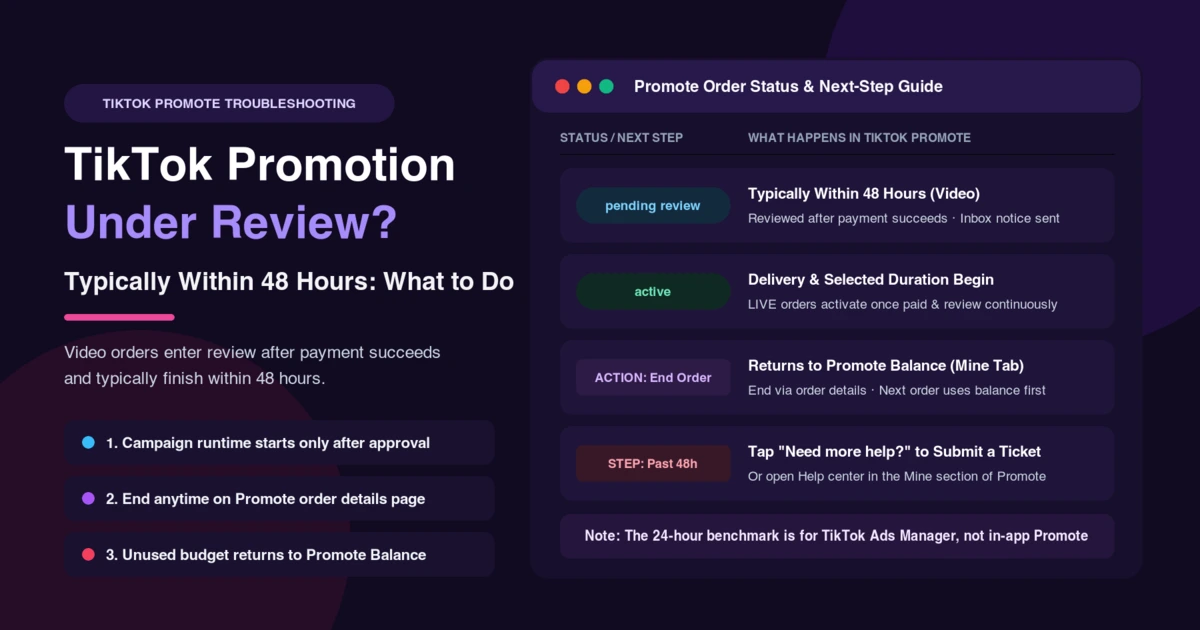
Seeing your TikTok promotion under review right after payment goes through is normal, and the wait does not eat into the runtime you paid for. Video Promote orders enter review once paid successfully and typically finish within 48 hours, followed by an inbox notification.
While your post sits in pending review, your promotion is not delivering—your selected duration starts after approval. If you do not want to wait, you can end the promotion on your Promote order details page, and unused budget returns to your Promote Balance. Running ads in TikTok Ads Manager instead of in-app Promote? See TikTok ads stuck in review.
How Long Does TikTok Promote Take to Review? (48 Hours, Not 24)
TikTok Creator Academy's Answering your Promote FAQs gives the official benchmark for in-app promotions: "For video: All Promote orders will be reviewed once they have been paid successfully. Typically, the review time will be within 48 hours and users will receive an inbox notification when it's finished." Once approved, your ad begins running; if rejected, your Promote order ends.
Many summaries claim reviews finish within 24 hours, which comes from TikTok's Ad review FAQ for TikTok Ads Manager (for ad account checks, see TikTok ads account under review). For in-app Promote video orders, typically within 48 hours is the only official timeframe.
| Promotion Type | When Review Starts | Official Review & Delivery Timing |
|---|---|---|
| In-App Promote (Video) | Once paid successfully | Typically within 48 hours; runtime starts after approval, with an inbox notice. |
| In-App Promote (LIVE) | Once paid successfully | Active once paid; the LIVE stream is continuously reviewed automatically. |
| TikTok Ads Manager | After ad submission | Separate review process (most ads reviewed within 24 hours in Ads Manager). |
Is It Normal for a TikTok Promotion to Still Say "Pending Review"?
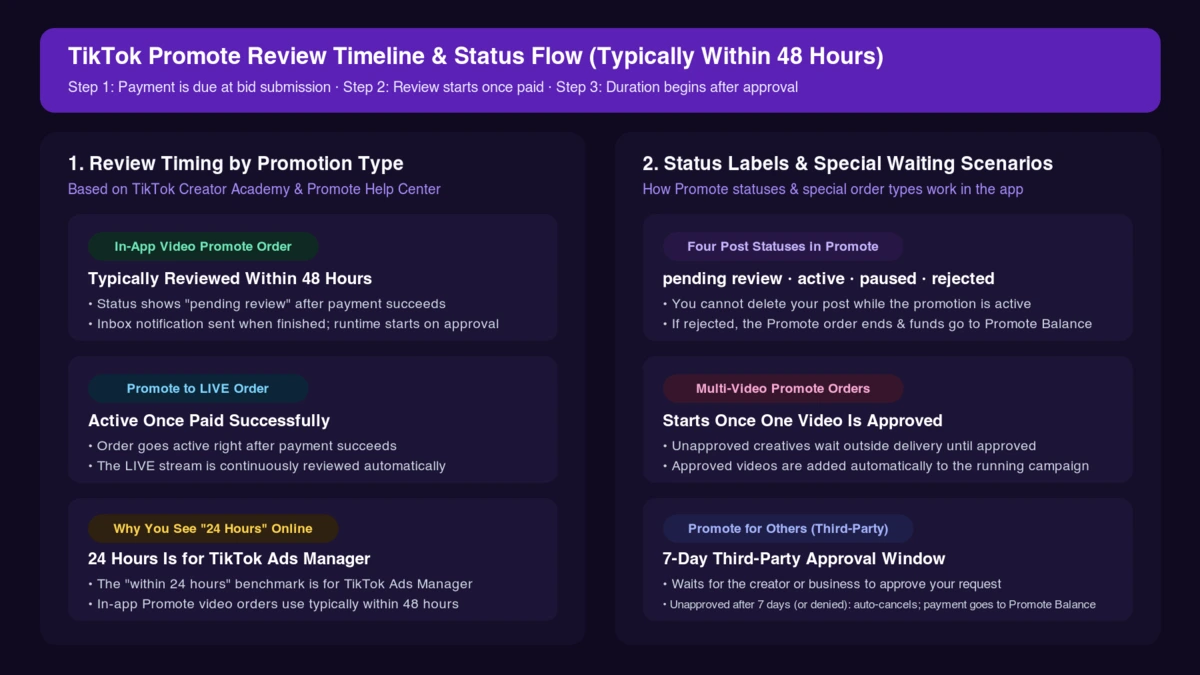
TikTok's guide on how to use Promote to grow your audience lists four statuses in the Promote dashboard: pending review, active, paused, and rejected.
Seeing a charge before approval is expected. In the TikTok Promote Terms (the US terms with TikTok Inc.; check in-app terms outside the US), "Payment of the Order is due immediately upon submission of your Bid." Once TikTok accepts your bid, it confirms the order and starts delivery when inventory becomes available.
Two special setups can look stuck in review when nothing is broken:
- Multi-video Promote orders: In multi-creative Promote campaigns, "When one video in the Promote order is approved, the campaign will begin. Unapproved creatives will not be included until approved. Once approved, the creatives will be added automatically to the campaign."
- Promote for Others orders: When boosting another creator's post under the US terms, if third-party approval is not obtained within 7 days or is denied, TikTok automatically cancels the order and deposits your payment into your Promote Balance.
Can You Cancel or End a TikTok Promotion Under Review?
Once you confirm a Promote order, you cannot cancel it under the US terms ("You may not cancel your order for Promoted Content (the 'Order') to be placed on TikTok's platform once you have confirmed the Order," though you may ask to pause a launched campaign online). Instead, "You can end your promotion at any time through the Promote order details page," and the remaining budget returns to your Promote Balance.
TikTok does not document any way to edit an order while in pending review, and notes that "you won't be able to delete your post if the promotion is active."
Where Does the Money Go When You End a Promotion?
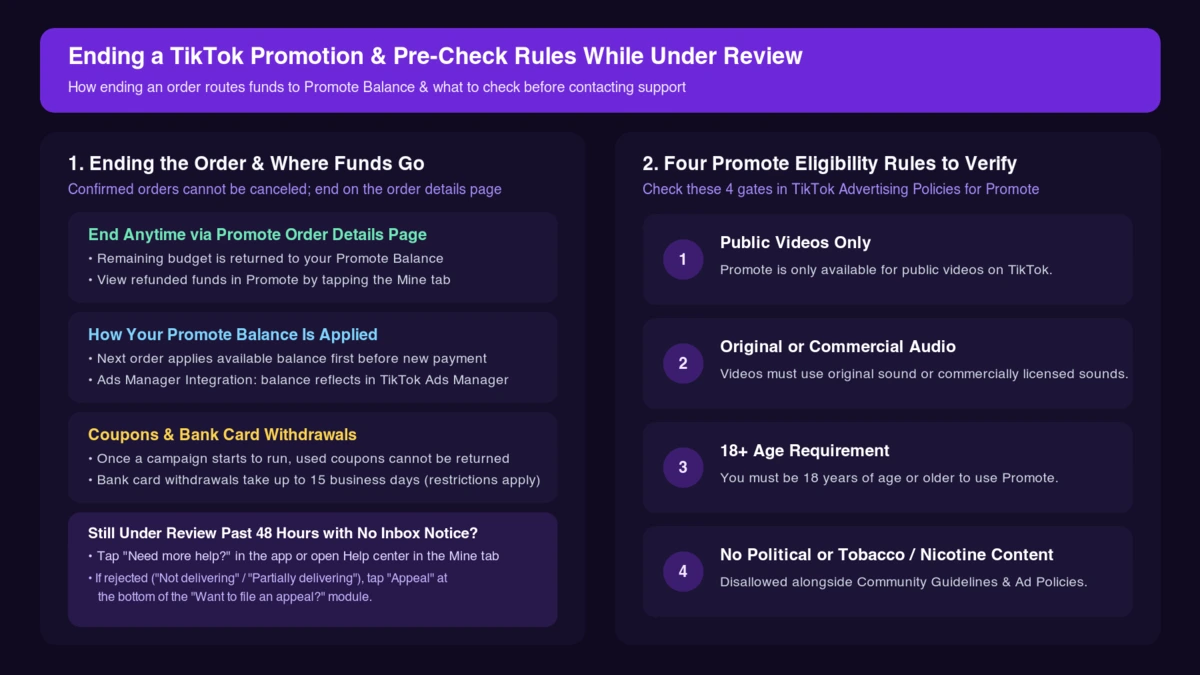
When you end a promotion—or when an order fails review—unused budget returns to your Promote Balance, not straight to your bank card:
- Unused budget goes automatically into your Promote Balance (or coin balance), which you can view in Promote under the Mine tab, as outlined in Supported methods of payment for Promote.
- TikTok applies available funds in your balance to your next Promote order before requiring additional payment.
- If you completed Ad Account Integration, unused funds stay in your account balance and reflect in TikTok Ads Manager.
- Once a Promote campaign starts to run, any coupon used in that order is considered used and cannot be returned even if closed early.
Withdrawing from your Promote Balance can take up to 15 business days to hit your bank card, and users who pay with Apple Pay, Google Pay, or Coins cannot withdraw from Promote directly—see TikTok Promote rejected refund.
When to Worry and How to Contact TikTok Support
If your order stays in pending review past 48 hours with no inbox notification, reach out in the app:
- Tap Need more help? at the bottom of the TikTok app help screen and follow the steps to submit a ticket.
- Open the Help center in the Mine section of the Promote dashboard.
While waiting, verify the four eligibility rules in TikTok Advertising Policies for Promote:
- Public videos only: "Promote is only available for public videos."
- Original or commercial audio: "You can only promote videos that use original sound or sounds that can be used for commercial purposes." For audio blocks, see This sound is not licensed for commercial use on TikTok ads.
- 18+ age requirement: You must "be 18 years of age or older."
- Disallowed categories: "Political content and tobacco and nicotine-related content are not allowed," alongside TikTok's Community Guidelines and Advertising Policies.
Frequently Asked Questions
Does the promotion duration start while my video is under review?
No—your promotion starts after your campaign is approved and ends once your chosen duration is over.
Am I charged while my TikTok promotion is under review?
Yes, payment is due immediately upon bid submission, and video orders enter review only after payment succeeds.
What happens if my promotion gets rejected after review?
Your Promote order ends and unused budget returns to your Promote Balance. If your content status is Not delivering or Partially delivering, tap Appeal at the bottom of the Want to file an appeal? module.
When to Move from Promote to TikTok Ads Manager
For boosting an occasional post, waiting out the 48-hour review window or reusing your Promote Balance is enough. If your promotions keep stalling, get rejected repeatedly, or you need audience and SKU testing, compare TikTok Promote vs. Ads Manager. Once you run multiple campaigns in TikTok Ads Manager, AdRate helps you monitor delivery status and ad spend with automated rules.
Official TikTok new advertiser program - exclusive benefits for new advertisers
Open a new TikTok ad account and earn official ad credit as you spend
Spend $200 within 30 days of signing up and get $200 in ad credit, rising to $6,000 when you spend $10,000. Credits go straight into your TikTok ad campaigns.
Coupons are issued by TikTok once it confirms you qualify as a new advertiser. Actual issuance and tiers are shown on the Coupon Progress page inside your TikTok Ads account.