TikTok Carousel Ads Not Available? 5 Checks If Only Video Shows
Are TikTok Carousel Ads not available when Ads Manager only shows video? Run 5 official checks on objective, placement, Spark identity, and music.
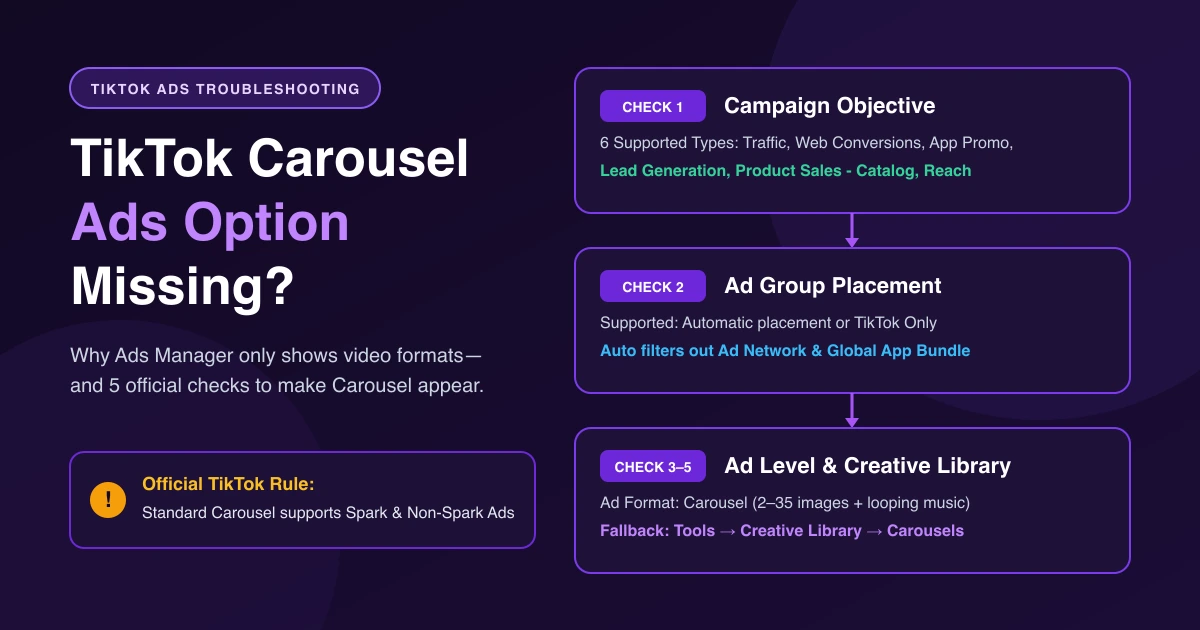
If TikTok Carousel Ads are not available in your ad setup and Ads Manager only shows video formats, check your objective, placement, and campaign type first. Carousel is an ad-level format that only appears where TikTok supports it, and Standard Carousel works with both Spark and Non-Spark Ads.
Why Only Video Shows—and Where Carousel Lives
Advertisers keep running into this when launching product photos. One buyer in r/TikTokAds reported: "When trying to create an ad, the image carousel format doesn't show up at all, and the platform only gives me video format options." Another in r/PPC noted: "When I start creating my AD CREATIVE, the carousel option does not show up to me. In some accounts it does, in others it doesn't."
Carousel Ads are available in all regions where performance auction is available, and the selector sits at the Ad level under Ad creative / Ad Format—not on Campaign or Ad Group screens.
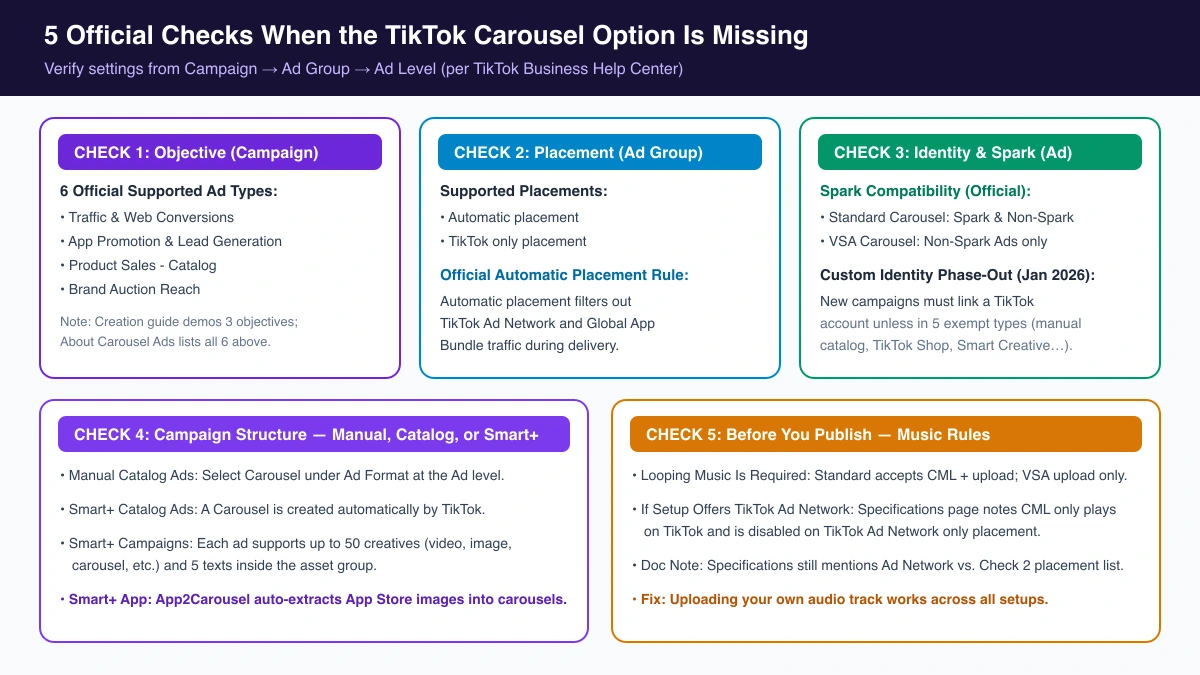
5 Official Checks When the Carousel Option Is Missing
Check 1: Advertising Objective and Ad Type
Confirm your campaign uses one of TikTok's six supported ad types:
- Traffic
- Web Conversions
- App Promotion
- Lead Generation
- Product Sales - Catalog
- Brand Auction Reach
TikTok's two help pages disagree here: About Carousel Ads (September 2026) lists all six types above, while How to create a Carousel Ad in TikTok Ads Manager (April 2026) only lists Traffic, Web Conversions, or App Promotion in Step 1 (and adds Reach (Auction) under "Before you begin"). Use the six-type About Carousel Ads table as your primary reference; the creation tutorial simply demonstrates three objectives. Objectives outside that six-item list—such as Video Views, Community Interaction, or Sales - TikTok Shop (GMV Max)—are not on TikTok's official supported list (see TikTok ad types).
Check 2: Placement Settings
Set your Ad Group placement to Automatic placement or TikTok only placement (Automatic placement filters out TikTok Ad Network and Global App Bundle traffic). If you chose manual placements with only TikTok Ad Network or Global App Bundle selected, carousel is not on the supported placement list in About Carousel Ads. See Automatic vs. Select Placement and turning off Pangle.
Check 3: Identity, Spark Ads, and Custom Identity Changes
Turning on Spark Ads does not hide Carousel: Standard Carousel supports both Spark Ads and Non-Spark Ads, while VSA Carousel supports Non-Spark Ads only. Under Identity, turn Use TikTok account to deliver Spark Ads off for Non-Spark or on for Spark Ads.
- Identity toggle: Enabling Identity restricts you to Spark Ads from a linked account or authorized creator post; disabling it uses Custom Identity, the only way to publish Non-Spark ads (if Identity is missing, it is not available to you at this time).
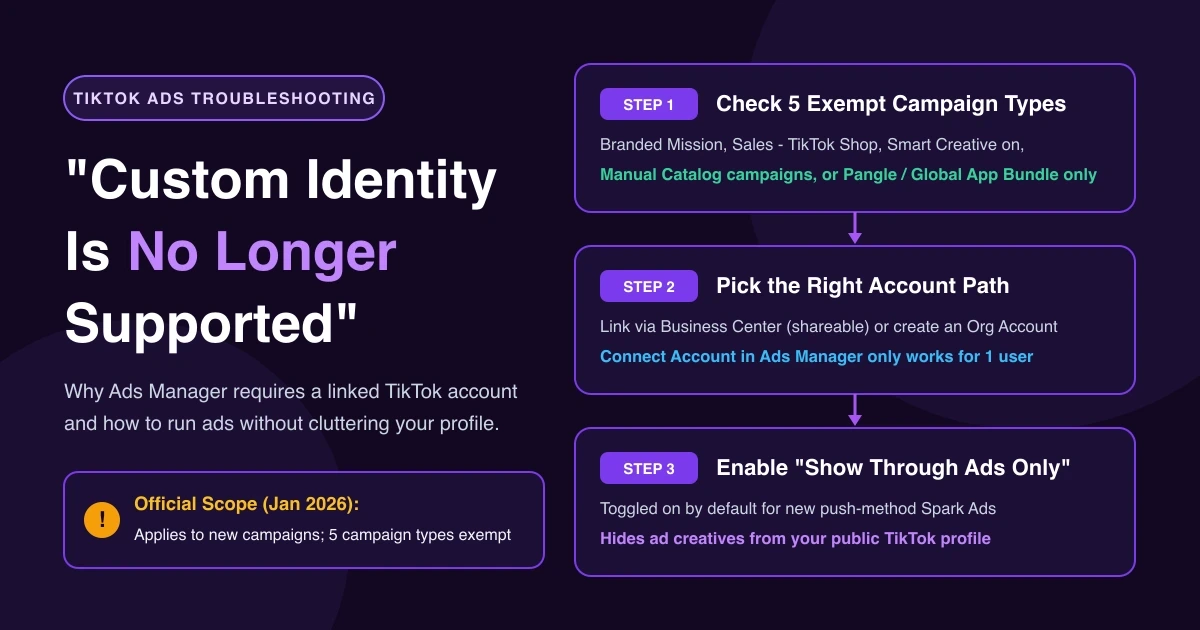
- Custom Identity phase-out: Starting January 2026, new campaigns must link a TikTok account (you can still use your own creatives, linked posts, or authorized creator posts), except five exempt types: "Branded Mission", "Sales - TikTok Shop", "Use Smart Creative to create ads" on, manual campaigns using a catalog, and Pangle/Global App Bundle only placements.
For creator posts, see Spark Ads authorization SOP; for error 4042 ("Duet carousels can't be used for Spark Ads."), see Spark code errors.
Check 4: Campaign Structure—Manual, Catalog, or Smart+
- Catalog Ads: Under Product Sales - Catalog, select Carousel under Ad Format in manual Catalog Ads; Smart+ Catalog Ads create a carousel automatically. (If an auto-generated catalog is stuck, see removing stuck Promoted products.)
- Smart+ Campaigns: Each Smart+ ad accepts up to 50 creatives (video, image, carousel, etc.) and 5 texts rather than a single-format switch. In Smart+ App Campaigns (automatic placement by default), App2Carousel extracts static App Store images into carousels automatically. See Smart+ 30-day playbook.
Check 5: Before You Publish—Music Rules
Carousel Ads require looping background music: Standard Carousel accepts Commercial Music Library (CML) or uploaded music, while VSA Carousel accepts uploaded music only. If your creation screen still offers a TikTok Ad Network placement, TikTok's Specifications for Carousel Ads page says CML tracks play silent on TikTok Ad Network, and when TikTok Ad Network is the only selected placement, the CML option is disabled so only uploaded music is supported. Even though Specifications still mentions Ad Network while About Carousel Ads lists only Automatic and TikTok-only placements, uploading your own audio track works either way.
Fallback Path: Pre-Build in Creative Library → Carousels
You can also pre-build carousels in the Creative Library before opening the ad builder:
- Go to Tools → Creative Library → Creative Assets → Carousels, click Create Carousel (top right), and select at least 2 images.
- At the Ad level under Ad creative, click Add creatives → Creative Library → Carousels to pick your saved asset.
A saved Creative Library carousel can be picked across placements and Smart+ campaigns, though Automatic placement still filters out TikTok Ad Network and Global App Bundle traffic at delivery. See Creative Library workflow.
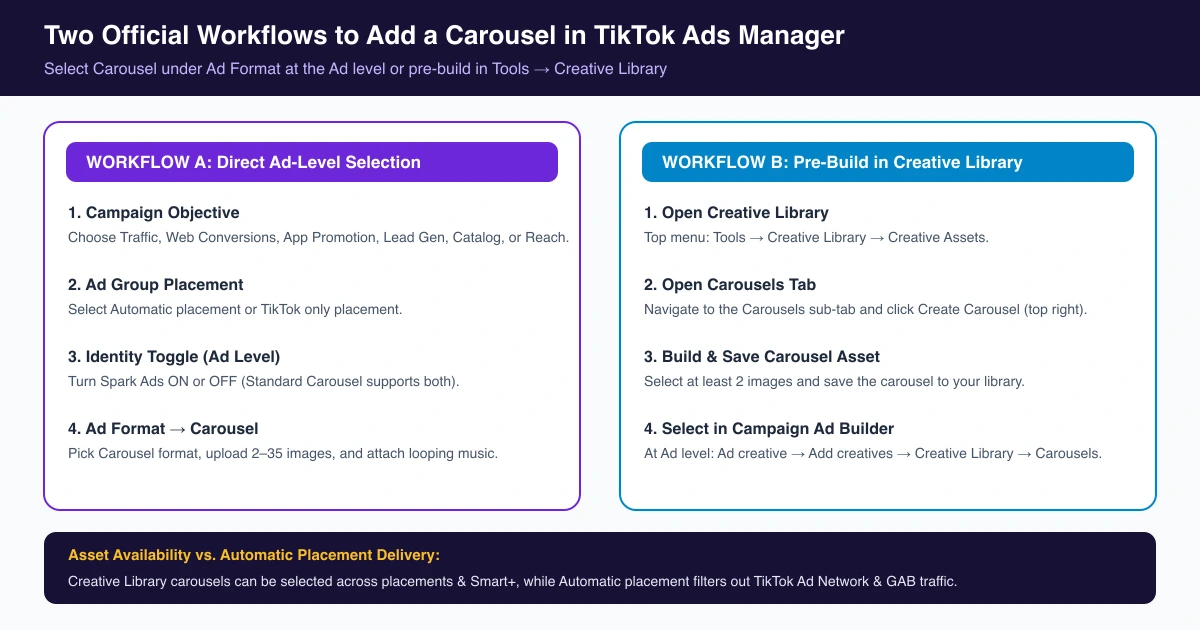
Standard Carousel Ads require 2 to 35 images plus looping audio; for resolution and file-size limits, see TikTok ad specs.
When you launch image carousels regularly, AdRate helps you turn a folder of product photos into ready-to-run carousels with music and catch out-of-spec images with one-click auto-fit before you submit—across both Standard and Smart+ campaigns.
FAQ
Can I run carousel ads as Spark Ads?
Yes, for Standard Carousel ads (both Spark and Non-Spark). VSA Carousel is Non-Spark only.
Why can't I pick library music on some carousel setups?
Commercial Music Library (CML) music is not supported on TikTok Ad Network placements; if your setup includes or restricts delivery to that placement, upload your own audio track instead.
Do Smart+ campaigns support carousels?
Yes. Each Smart+ ad supports up to 50 creatives (video, image, carousel) and 5 texts, Creative Library carousels work across Smart+ campaigns, and Smart+ Catalog Ads generate carousels automatically.
Where do I find Carousel in Ads Manager?
At the Ad level under Ad Format—or, if it isn't listed there, via Ad creative → Add creatives → Creative Library → Carousels.
Source Notes
- About Carousel Ads (Sept 2026)
- How to create a Carousel Ad in TikTok Ads Manager (Apr 2026)
- Specifications for Carousel Ads (Sept 2026)
- About Carousel in Creative Library (Jul 2026)
- About asset groups for Smart+ campaigns (Jan 2026) & About Smart+ App Campaigns (Aug 2026)
- About the Identity feature (Apr 2026) & About changes coming to Custom Identity (Mar 2026)
Official TikTok new advertiser program - exclusive benefits for new advertisers
Open a new TikTok ad account and earn official ad credit as you spend
Spend $200 within 30 days of signing up and get $200 in ad credit, rising to $6,000 when you spend $10,000. Credits go straight into your TikTok ad campaigns.
Coupons are issued by TikTok once it confirms you qualify as a new advertiser. Actual issuance and tiers are shown on the Coupon Progress page inside your TikTok Ads account.