GMV Max Promotion Days: Why Your Budget and ROI Changed
GMV Max Promotion Days raises budgets (default +50%) and cuts ROI goals 10–30% on sale days. How to spot it, adjust it, and what ROI protection covers.
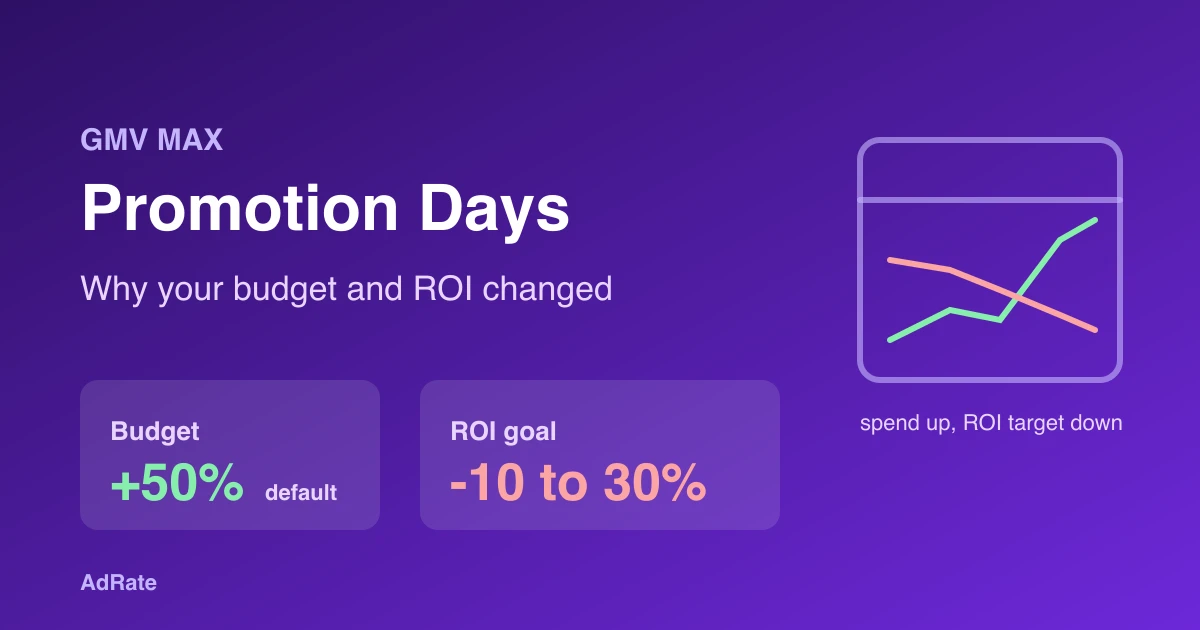
If your GMV Max campaign started spending more and its ROI target dropped the moment a sale began, the usual cause is GMV Max Promotion Days. On promotion days it raises your budget (by 50% by default) and lowers your ROI goal by 10%, 20%, or 30%. It's on by default for new campaigns, including those TikTok auto-creates when you register products for a platform sale. Because the system makes these changes, they don't count as manual ROI edits.
Sellers notice the symptom long before they find the setting. One on r/TikTokShop described ROI of 5 one day "and the next day 0.69 especially since BFCM started." Promotion Days isn't the only possible cause, so rule out the look-alikes first.
Is it Promotion Days or something else?
Three features can raise spend on their own, two by the same 50%, and a fourth surprise is a campaign you never built. The pattern tells them apart.
| What you see | Most likely cause | Where to check |
|---|---|---|
| Budget up and ROI target down, only on sale dates | Promotion Days | Seller Center campaign, Promotion days section, Schedule or See details |
| Budget climbs in 50% steps on an ordinary day, then resets the next day | Auto budget increase | Campaign budget in Reporting; the switch sits under Optimization Goal |
| Extra budget on specific products or LIVE rooms, ROI swinging | Max delivery | Whether those products or LIVE rooms were switched to Max delivery |
| A campaign you never built appears before the sale | One-click auto creation, with Promotion Days on by default | Your campaign list in the days before the event (how to turn off an auto-created campaign) |
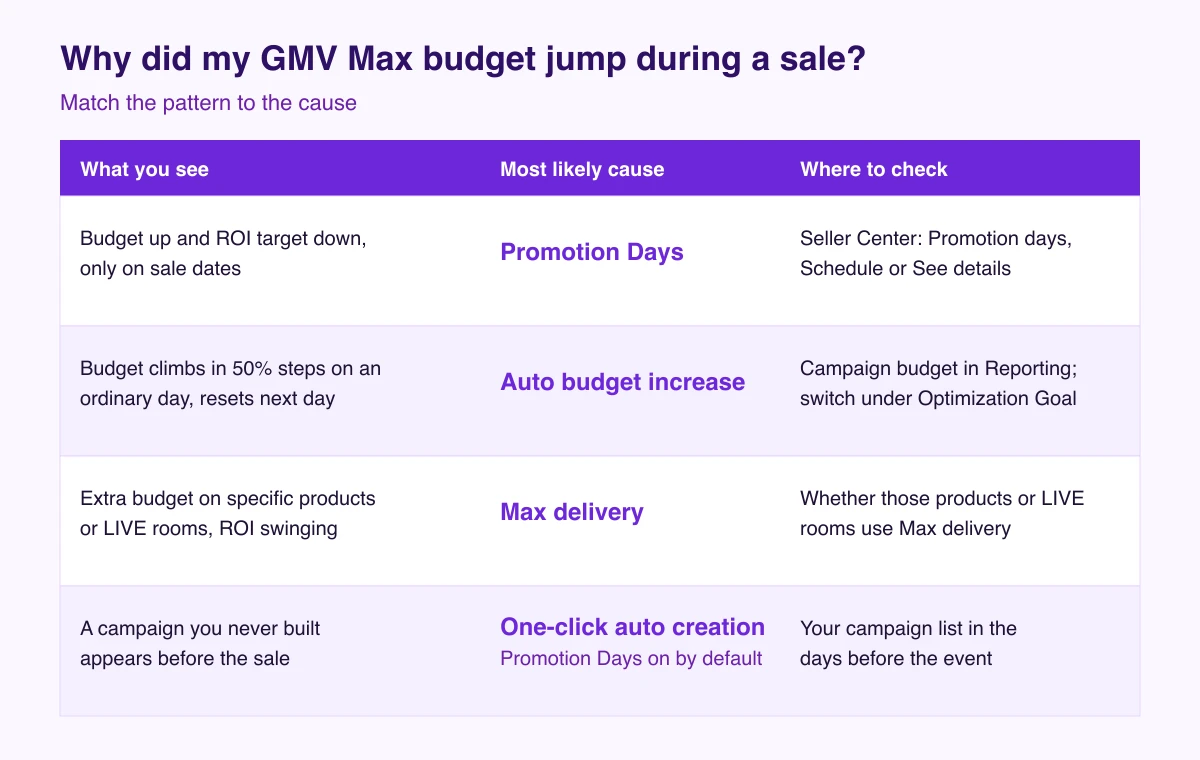
The second row is the usual answer when budget jumps 50% with no sale running. Auto budget increase kicks in when a campaign shows strong ROI and budget usage, adds 50% of the daily budget up to 10 times in a day, and resets the next day. It follows performance, not the sale calendar, and can run alongside Promotion Days. To switch it off, your daily budget must be higher than the current cost × 1.05.
What Promotion Days actually changes
The ROI goal: the lower of two numbers, then a cut
Promotion Days doesn't just discount the ROI you entered, and that's where most expectations go wrong. TikTok bases the promotional ROI goal on whichever is lower: your average ROI over the last 7 non-promotional days, or the ROI you entered. Then the system lowers that by 10%, 20%, or 30%.
An illustration (our numbers, not TikTok's): you entered a target ROI of 4.0, but the last 7 non-promotional days averaged 3.2. The base becomes 3.2. A 10% cut puts the promotion-day goal at about 2.9; a 30% cut puts it at about 2.2.
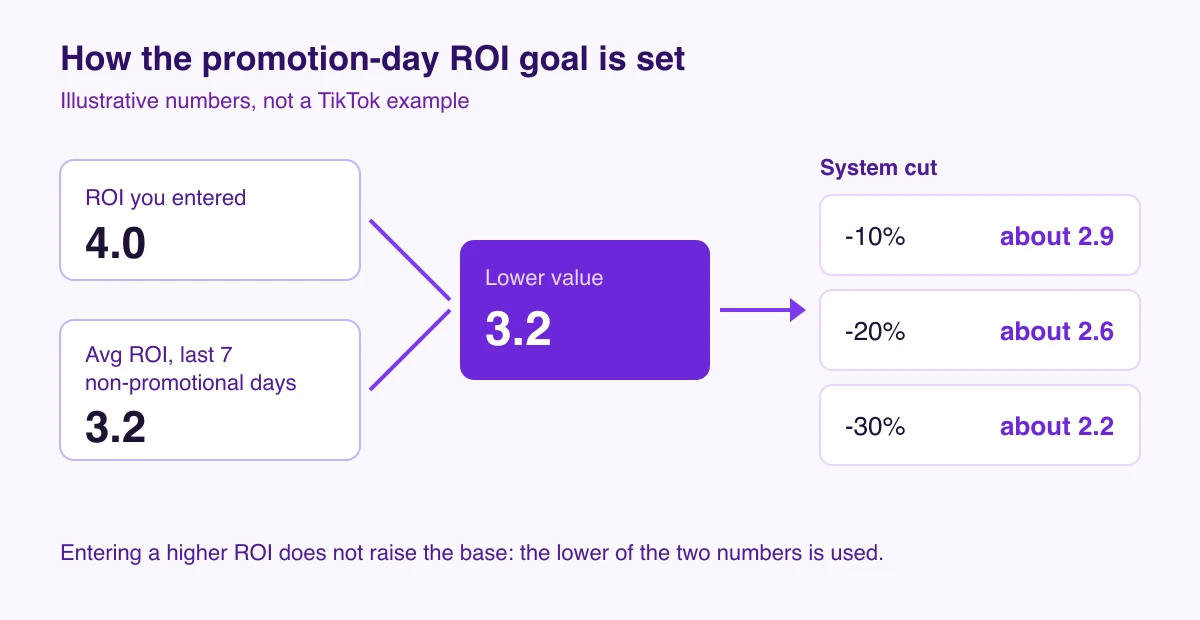
TikTok says the system anchors to recent ROI trends, "so inflated goals won't help." Raising your target the week before a sale won't buy a higher floor.
The budget: +50% is a step, not a ceiling
The help center calls it "default +50%," which sounds like a cap. It isn't. TikTok's developer documentation describes the 50% as a single increase that can be applied several times in one day, up to a daily limit of 10 increases by default. On a strong sale day, spend can end up above one and a half times your normal budget.
How to check and adjust Promotion Days in Seller Center
TikTok only documents these settings in Seller Center. You switch Promotion days on while creating a Product or LIVE GMV Max campaign (see setting up a GMV Max campaign). After that:
- Hover on Schedule to edit the dates, or click See details to check which season is covered. The default calendar covers key shopping festivals (TikTok names Double Days, Paydays and seasonal campaigns) but there's no published date list, so confirm your sale is in it.
- Use Add custom dates for sales outside the default calendar.
- Set your own Promotion days target ROI or Promotion days budget.
- Use 1-click apply to add promotion settings to existing campaigns.
Auto-created sale campaigns stay editable the same way. TikTok hasn't published separate steps for turning the feature off; you change it in the same Promotion days settings. The help center doesn't say whether Ads Manager has an equivalent. It works for LIVE GMV Max too, so if you stream on sale days, pair it with LIVE GMV Max guardrails.
TikTok recommends turning it on at least 3–5 days before the event so the system can learn. Turning it on mid-sale just gives it less learning time.
Keep it or tighten it? (our take)
Keep the defaults if your margin can absorb the lower ROI and you have stock to sell. Platform benefits matter too: TikTok says campaigns must stay active and record ad spend to keep basic benefits such as TikTok Shop-subsidized discounts.
Tighten it if your margin is thin, your net ROI already sits near breakeven, or inventory is limited. Lower the Promotion days budget rather than pausing: a paused day loses ROI protection and the spend those benefits depend on. If you run rules, recheck your net ROI thresholds, since the floor just moved under them.
Does Promotion Days affect GMV Max ROI protection?
Not in the way sellers fear. ROI target changes made automatically by Promotion Day activation don't count as manual modifications, and on that day the promotional ROI is the one TikTok guarantees and calculates compensation against.
Three limits still apply:
- Your own edits during the sale are still manual edits. On Product GMV Max, raising the target ROI, or lowering it more than once in a day, removes protection for that day.
- Campaigns with products or LIVE rooms using Max delivery aren't covered, and neither are Creative boost budgets.
- The usual eligibility conditions don't go away just because Promotion Days is on.
For the full eligibility list and the compensation math, see our breakdown of GMV Max ROI protection rules.
Guard the spend, not the ROI target
During TikTok Shop promotion days, the budget climbs on its own and the ROI floor is already lower. What's left to protect is two lines: spend outrunning sales, and ROI falling below what your margin can carry. Pull back budget at a stop-loss you set in advance, and leave the ROI target alone so you don't trip the manual-edit rules.
AdRate's GMV Max rules can do that watching for you: they track ROI and spend through the sale, pull back budget or pause when a campaign crosses your line, and alert you, so you aren't refreshing Seller Center all weekend. Set the line where you'd genuinely want to stop, since a paused day falls outside ROI protection.
Official TikTok new advertiser program - exclusive benefits for new advertisers
Open a new TikTok ad account and earn official ad credit as you spend
Spend $200 within 30 days of signing up and get $200 in ad credit, rising to $6,000 when you spend $10,000. Credits go straight into your TikTok ad campaigns.
Coupons are issued by TikTok once it confirms you qualify as a new advertiser. Actual issuance and tiers are shown on the Coupon Progress page inside your TikTok Ads account.