TikTok Ads Account Under Review? How Long It Takes & 4 Fixes
TikTok ads account under review past 24 hours? Separate account vs ad holds, check approval timelines, fix 4 onboarding triggers, and escalate with a ticket.

You register a new TikTok advertiser profile, submit company details, add a billing method, and prepare your first campaign. Instead of an active dashboard, you hit a persistent banner: "Account Under Review." When your TikTok ads account under review status refuses to clear, your launch stalls before spending a dollar.
Account Under Review vs Ad Under Review: Check Which Hold You Have
Quick Triage: Account Review vs. Ad Review
- Account Under Review (This Guide): A top dashboard banner or Account Info / Account Setup notice says Account Under Review (or Not Delivering (Account not approved)), blocking all campaign publishing. Official review typically takes under 24 hours. Stay here to clear onboarding holds.
- Ad Under Review (Single Campaign / Video): Your account is active, but the Campaign > Ad Group / Ad status column shows Pending or Under Review (usually under 24 hours). Read our TikTok ads stuck in review guide to fix stalled creatives.
- Ad Rejected (Review not approved): The ad's status shows Rejected or Not Delivering (Review not approved) with a policy notice. See our TikTok ads rejected guide for edit and appeal steps.
- Promotion Under Review (TikTok app Promote): You boosted a post in the TikTok app, not Ads Manager. That review covers one order and typically ends within 48 hours; see our TikTok promotion under review guide.
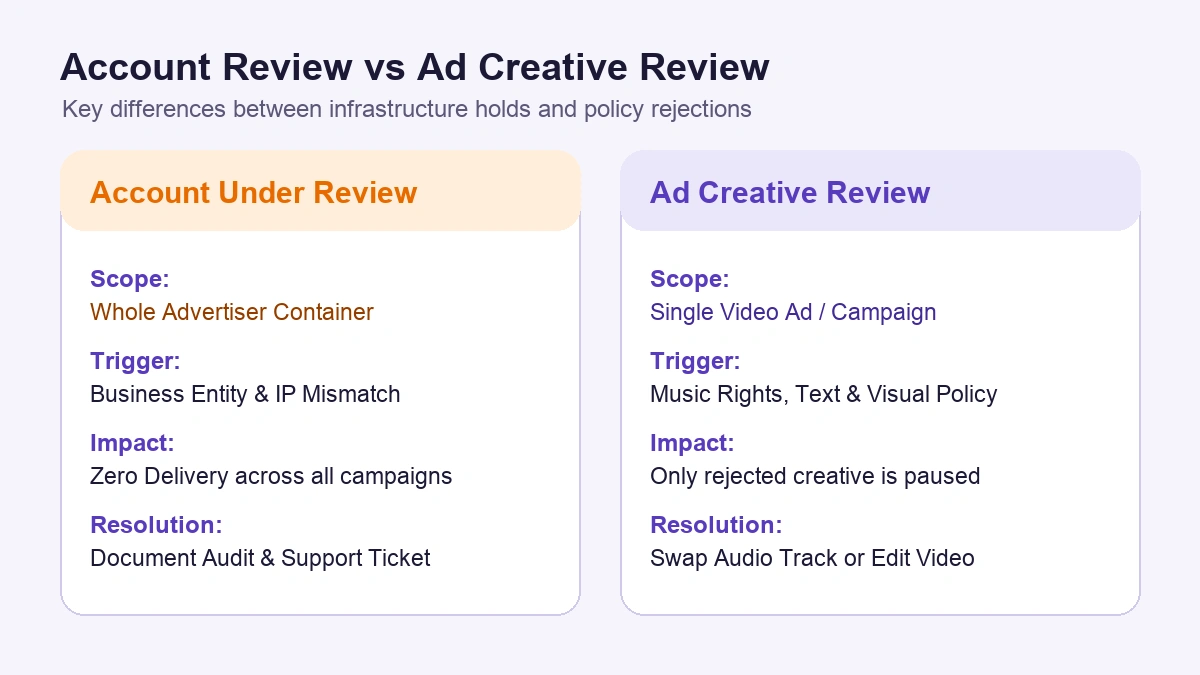
While ad-level moderation only checks submitted video creatives and rejects individual ads, having your TikTok ads manager account under review puts your whole ad account on hold at onboarding. This gate verifies your corporate identity, registration network, legal documents, official website, and billing profile before enabling delivery. Editing videos will not clear an account hold.
How Long Does TikTok Ads Account Review Take?
TikTok's Account Approval FAQs state that most account reviews take less than 24 hours, an official website is required, and updating your promotion link can trigger another review of up to 24 hours. Use this timeline to gauge where your account hold stands:
| Review Stage | Typical Window | System Status | What to Do Now |
|---|---|---|---|
| Fast Track | 15 min - 2 hours | Entity, local IP, billing country, and website pass automated checks | Wait; do not edit business info or promotion links, which restarts the 24h clock |
| Manual Check | 2 - 24 hours | Entity details, website footers, or domain records routed for manual review | Keep your website live until the 24-hour window finishes |
| Delayed Queue | 24 - 48 hours | Review exceeds 24 hours, or a link edit started a new 24h check | If you edited the link, recheck that URL first; otherwise run the 4 checks below |
| Stalled / Disapproved | Over 48 hours (or Disapproved) | Mismatch or silent stall needing support intervention | Update details and request review; if still disapproved or stuck >48h, file an Account Review ticket within 3 working days |
Once a TikTok ads pending account under review status crosses 48 hours without updates, complete the checks below and escalate via support.
The 4 Automated Triggers Holding New TikTok Ad Accounts
1. Proxy, VPN, and Geolocation Mismatches
TikTok compares your login session against your declared business country. Registering a US account through a VPN, datacenter proxy, or an IP linked to prior enforcement routes the profile to manual review.
2. Business Entity vs Official Website Discrepancies
TikTok requires an official website during onboarding and checks whether its corporate name, address, contact email, and policy pages match your Ads Manager profile. If your account lists a Delaware LLC while your store footer shows a different name or lacks privacy and refund terms, approval stalls. See our TikTok business verification documents guide to align your filings.
3. WHOIS and Newly Registered Domain Signals
Submitting a domain registered under 72 hours ago, using high-risk registrars, or launching without valid SSL and live product pages raises trust flags. Link an active domain with working product pages and clear contact details.
4. Unclear or Mismatched Business License Uploads
Uploading blurry scans, cropped registration numbers, or state certificates conflicting with tax records stops verification. For scaling brands needing pre-vetted billing lines, our TikTok ad account agency account checklist outlines agency options.
4 Checks to Run Before You Contact Support
Before escalating a TikTok ads manager account not approved or stuck pending hold, complete these four checks:
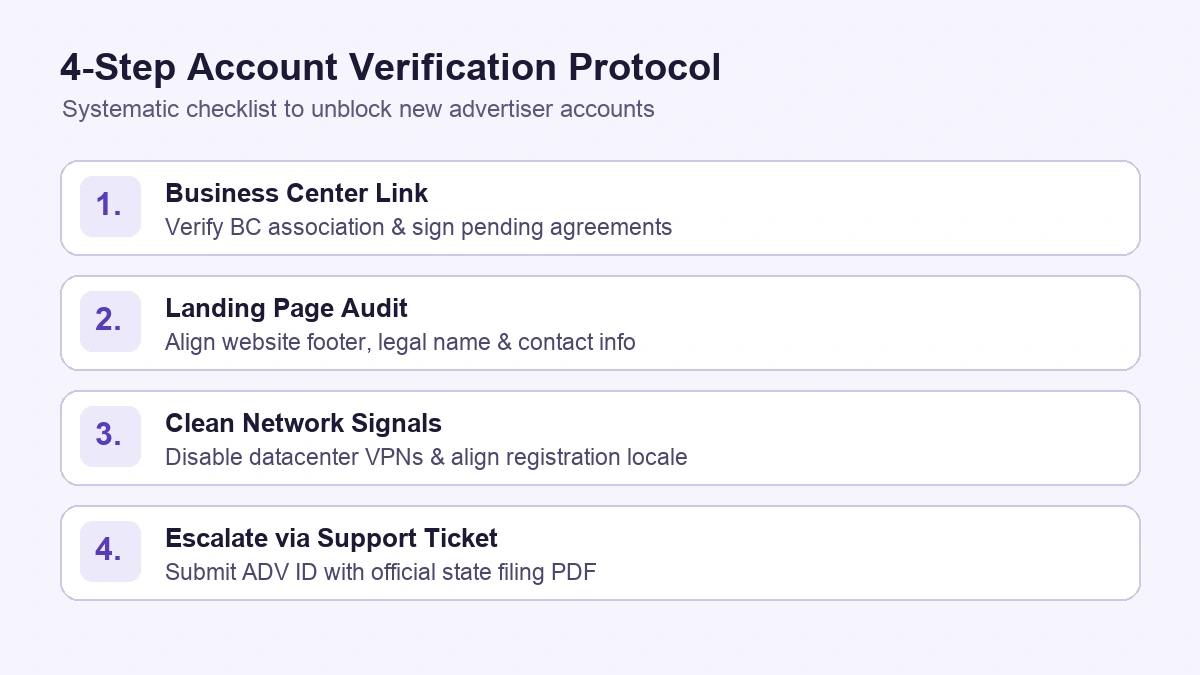
- Verify Business Center Association: Check whether your account sits under a Business Center with unaccepted agreements. If a contract is pending, resolve the TikTok ads contract has not taken effect blocker.
- Audit Website Legal Footers: Ensure your store footer displays the exact legal business name, address, contact email, privacy policy, and refund policy submitted in Ads Manager.
- Log In From a Clean Local Network: Turn off VPNs or proxies and log in from a local connection matching your billing country.
- Check Payment Card Consistency: Use a valid business card issued in the country matching your account currency rather than an anonymous virtual card.
Support Ticket Template for Accounts Stuck Over 48 Hours
If your TikTok ads account under review banner remains past 48 hours after the checks above, escalate via TikTok Business Support. If your account is disapproved, TikTok's FAQ advises updating your information and requesting a review first; if it stays disapproved, submit a ticket under Account Review within three working days. For policy suspensions rather than onboarding holds, use our TikTok ad account suspended appeal guide.
Ticket Subject: [Account Review Request] Advertiser Account Pending >48 Hours - ADV ID: [19-Digit Ad Account ID]
Issue Category: Account Review
Message Body: Dear TikTok Advertiser Support Team,
Our advertiser account (ADV ID: [Insert ADV ID]), submitted on [Insert Date], remains in "Account Under Review" past 48 hours.
We verified our onboarding details:
- Legal Entity: Registered as [Legal Business Name], matching the attached registration certificate.
- Official Website: [Insert Store URL], displaying matching corporate contact details, privacy policy, and refund terms.
- Billing & Business Center: Payment credentials and Business Center permissions are confirmed.
Please review the attached registration PDF and complete our account verification.
Best regards,
[Contact Name], [Title, Company Name]
Attach your business registration document (such as an IRS 147C letter or state certificate) as a PDF.
Frequently Asked Questions
How long does TikTok account review take?
TikTok's Account Approval FAQs state that most ad account reviews finish in under 24 hours. Clean profiles often clear in 15 minutes to 2 hours, while manual checks take up to 24 hours. Updating your promotion link can also trigger a new review of up to 24 hours. Always check your TikTok Ads Manager notifications for exact status updates.
Why is my TikTok Ads account still under review after 24 hours?
Reviews lasting past 24 hours usually indicate a mismatch between your business entity, website footer, domain age, or login network. Do not repeatedly edit your profile or open duplicate accounts while pending, as edits can restart the review queue. Audit your website footers and Business Center status first, then submit an Account Review ticket after 48 hours.
Streamline Multi-Account Operations with AdRate
Once your ad accounts pass review, managing permissions and budgets across multiple TikTok Business Centers becomes a daily task. AdRate lets your team manage multi-account permissions, track connection status, and run automated budget and stop-loss rules from one workspace.
Official TikTok new advertiser program - exclusive benefits for new advertisers
Open a new TikTok ad account and earn official ad credit as you spend
Spend $200 within 30 days of signing up and get $200 in ad credit, rising to $6,000 when you spend $10,000. Credits go straight into your TikTok ad campaigns.
Coupons are issued by TikTok once it confirms you qualify as a new advertiser. Actual issuance and tiers are shown on the Coupon Progress page inside your TikTok Ads account.