Can You Change TikTok Ads Currency or Time Zone? What to Do
You cannot change a TikTok ad account currency or time zone after setup. Learn how to open a new account, handle remaining balances, and schedule ads.
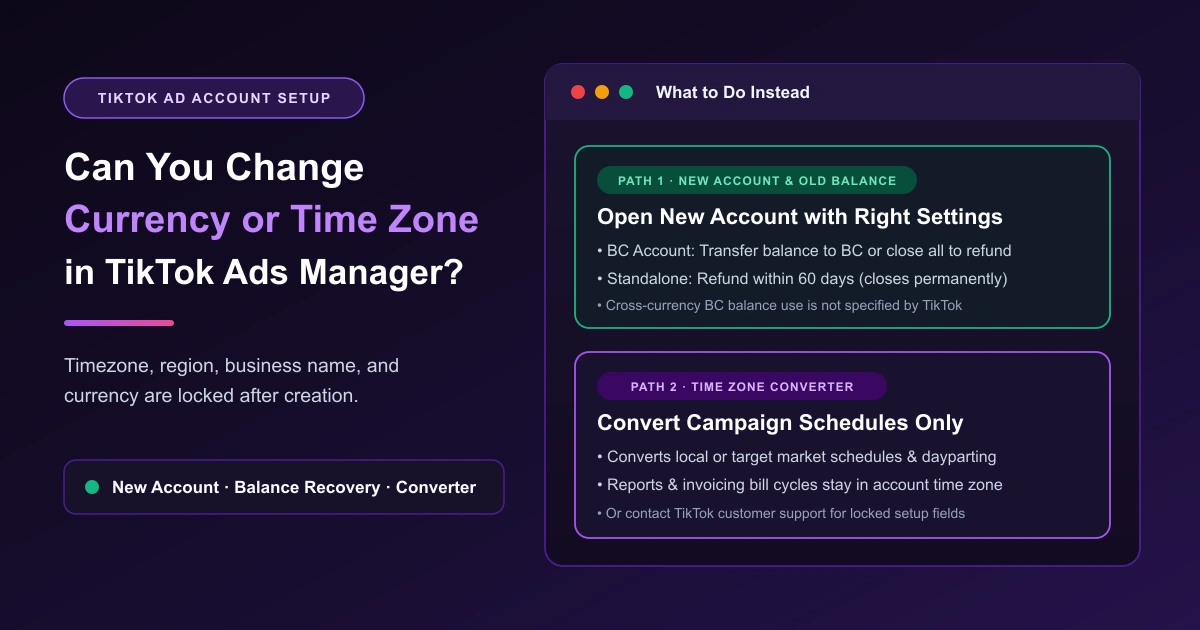
No—you cannot change TikTok Ads currency or time zone yourself once an ad account is created. Both settings are locked at registration in TikTok Ads Manager alongside your country or region and business name. Instead of looking for a setting to change currency or time zone, you can either open a new ad account with the right settings or contact TikTok customer support. If you open a new account, recover any remaining balance from the old account through a Business Center balance transfer or an account closure refund. TikTok does not state whether a transferred balance can fund an account in a different currency.
If only your time zone is off and you want to keep the account, TikTok Ads Manager's time zone converter aligns campaign schedules and dayparting, though reports and billing cycles still follow the registered time zone.
Can You Change a TikTok Ad Account's Currency or Time Zone?
TikTok locks four setup fields after registration. The TikTok account setup FAQ states: "You won't be able to edit the timezone, region, business name, and currency of your ad account once it's been created." The TikTok time zone guide confirms: "You will be unable to change your time zone after selecting it during account registration."
For changes to those four fields, the FAQ gives one instruction: "Contact customer support for help with changes to the aforementioned."
| Locked Field | Editable? | What It Controls | What to Do Instead |
|---|---|---|---|
| Currency | No | Billing currency and Business Center transfer match | Contact support or open a new account. |
| Time zone | No | Report timestamps, delivery times, and bill cycles | Use the time zone converter for schedules only (reports and bills keep the account time zone), contact support, or open a new account. |
| Country or region | No | Set at registration | Contact support or open a new account in the right region. |
| Business name | No | Set at registration | Contact customer support for help. |
What to Do Instead: Open a New Ad Account With the Right Settings
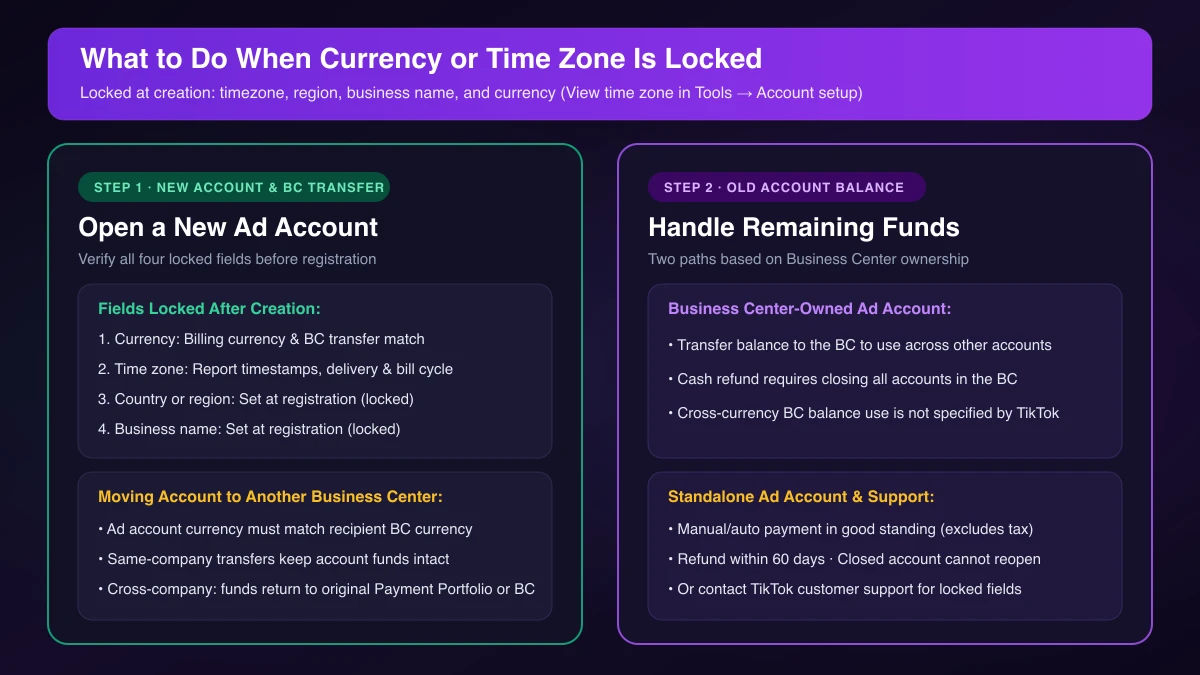
A wrong billing currency has no workaround inside the existing account, while a wrong time zone permanently shifts daily report cutoffs. Opening a new ad account is the cleanest fix when either setting is wrong. Before registering, verify all four locked fields with our TikTok ad account setup checklist:
- Billing currency: Match how finance pays bills and your target Business Center's currency.
- Time zone: Match your reporting midnight cutoff and invoicing cycle.
- Country or region: Set at registration and locked once the account is created.
- Business name: Set at registration and locked once the account is created; TikTok points you to customer support for help with changes.
What Happens to the Balance in Your Old Ad Account
How you recover unspent funds from the old account depends on Business Center ownership. See how to close a TikTok ad account and refund the balance for full steps.
- Business Center ad accounts: You can transfer the remaining balance back to the Business Center that owns the account and use it across other ad accounts, or close all ad accounts linked to the Business Center to request a cash refund to your original payment method (TikTok Business Center refund rules). TikTok does not state whether a balance returned to a Business Center can fund an ad account in a different currency.
- Standalone ad accounts: Manual or automatic payment accounts in good standing can refund remaining balances (excluding taxes paid) to the original payment method within 60 days (TikTok standalone refund rules). Closing is permanent: "Once you close your ad account, you will be unable to reopen it."
Wrong Time Zone: What It Affects and How the Time Zone Converter Helps
View your registered time zone in TikTok Ads Manager under Tools → Account setup. Per the official time zone rules, it governs three areas:
- "The time your data is displayed on the platform, including in reports."
- "Your ad delivery settings, including start and end times."
- "Your bill cycle dates for invoicing when calculating your total ad costs."
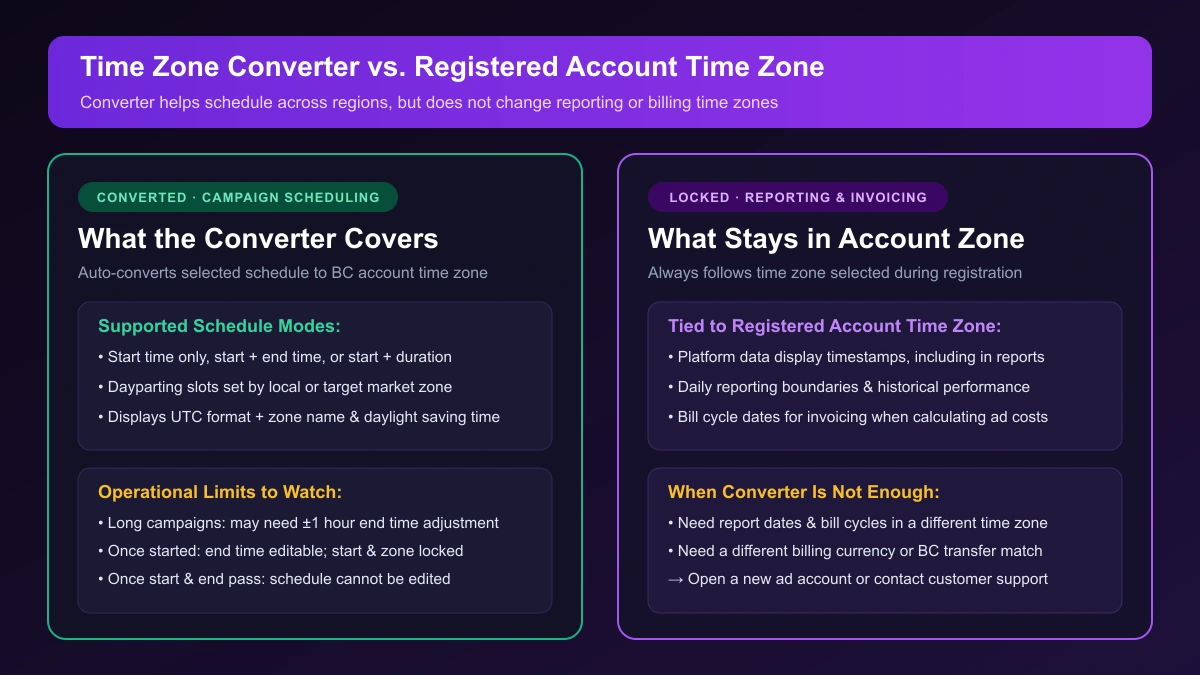
If you keep the account, TikTok's time zone converter lets you schedule campaigns by your local or target market time zone. The selected schedule automatically converts to the Business Center account time zone, showing UTC format, the time zone name, and daylight saving time.
Keep three boundaries in mind:
- Scheduling and dayparting only: Covers start-time-only, start-and-end-time, start-time-and-duration schedules, and dayparting. See best time to run TikTok ads with dayparting and TikTok ads dayparting and budget pacing.
- Editing limits: For long campaigns across time zones, you may need to adjust the end time by 1 hour forward or backward. Once started, you can edit the end time, while the time zone and start time stay locked. Once start and end times pass, the schedule is locked.
- Reports and bills stay locked: Reporting cutoffs and invoicing bill cycles follow the registered account time zone.
Why Currency Matters When Moving an Ad Account to Another Business Center
Currency also determines whether you can transfer an ad account to another Business Center. TikTok's Business Center transfer rules state: "The ad account currency must match the recipient Business Center currency."
Same-company transfers keep account funds intact, whereas cross-company transfers return funds to the original Payment Portfolio or Business Center. If the currencies differ, the account cannot be transferred in. If you need an account under that Business Center, our suggestion is to open a new ad account there in the matching currency.
Frequently Asked Questions
Can TikTok support change my ad account currency or time zone?
TikTok's FAQ only advises contacting customer support for help with locked setup fields. If you need the right currency or reporting time zone right away, our recommendation is to open a new ad account with the correct settings.
Where do I see my time zone in TikTok Ads Manager?
Go to Tools → Account setup in TikTok Ads Manager.
Does the time zone converter change my reports or billing cycle?
No. It only converts campaign delivery schedules and dayparting; reports and bill cycles follow the registered account time zone.
Managing Campaigns Across Time Zones and Currencies
Running separate accounts for different currencies or time zones means managing multiple workspaces. See our TikTok ads cross-account management workflow for multi-account operations. With AdRate, you can manage multi-currency and multi-time-zone TikTok ad accounts in one place, run automated rules and schedules in each account's time zone, and copy campaigns into a new account.
Official TikTok new advertiser program - exclusive benefits for new advertisers
Open a new TikTok ad account and earn official ad credit as you spend
Spend $200 within 30 days of signing up and get $200 in ad credit, rising to $6,000 when you spend $10,000. Credits go straight into your TikTok ad campaigns.
Coupons are issued by TikTok once it confirms you qualify as a new advertiser. Actual issuance and tiers are shown on the Coupon Progress page inside your TikTok Ads account.