TikTok Ads MCP Server Explained: Official vs Third-Party
What can the official TikTok Ads MCP server do in Claude, ChatGPT, or Cursor? Compare TikTok's official MCP, third-party connectors, and 24/7 ad rules.
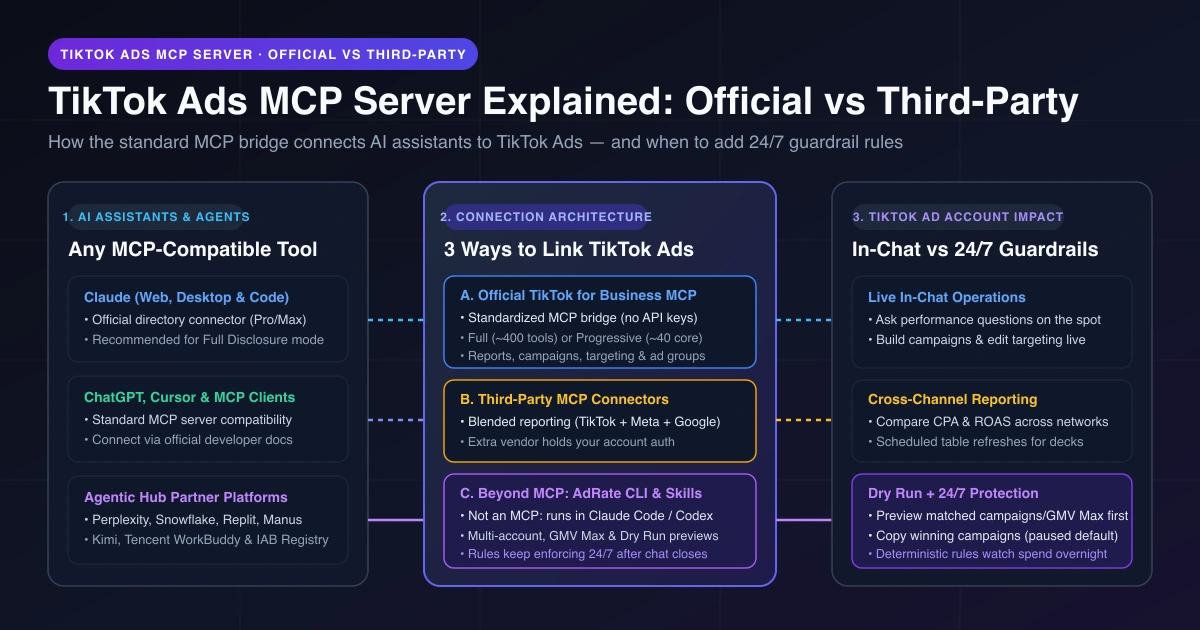
When media buyers search for TikTok Ads MCP, they usually mean TikTok's official TikTok for Business MCP Server—a standardized bridge announced in May 2026 that lets AI assistants read and operate TikTok ad accounts. Once connected to the official server, an AI agent can pull performance reports, create campaigns, update audience targeting, pause ad groups, and adjust budgets or bids in chat. Because it uses the open Model Context Protocol standard, you can connect it to Claude, ChatGPT, Cursor, or any other compatible AI client.
For buyers, agencies, and TikTok Shop sellers, knowing a bridge exists is only step one. Most guides paste a URL or pitch a hosted wrapper without explaining what TikTok's first-party server covers. Your choice comes down to direct in-chat campaign actions, cross-channel reporting with Meta and Google, or multi-account and TikTok Shop GMV Max workflows where previewed rules watch spend after chat closes. Here is what TikTok's official server covers as of November 2026, where public docs stop, and how to choose.
What Is the Official TikTok Ads MCP Server?
TikTok unveiled the server at TikTok World on May 13, 2026 as a new interface for developers and advertisers. It lets AI agents automate campaign creation and optimization—setting up creatives, tweaking targeting, shifting budgets, and adjusting bids.
TikTok's August 2026 help center overview explains that advertisers can connect a compatible agent directly to TikTok Ads without developer credentials, API keys, or custom code. The bridge covers campaign management, performance reporting, audience configuration, and creative operations.
That same server powers the TikTok Agentic Hub, a centralized marketplace where advertisers use reviewed first-party and third-party AI Skills for campaign management, creative optimization, performance diagnostics, audience insights, and catalog management.
Two Tool-Loading Modes: Full Disclosure vs Progressive Disclosure
Pick between two tool-loading modes based on your AI client's context window:
- Full Disclosure: Loads around 400 tools at once for large context windows; marked Recommended for Claude.
- Progressive Disclosure: Loads around 40 core tools first and discovers others on demand for token-conscious setups or smaller context windows.
For manual setup steps and the full tool catalog, check TikTok's developer guide and available tools list.
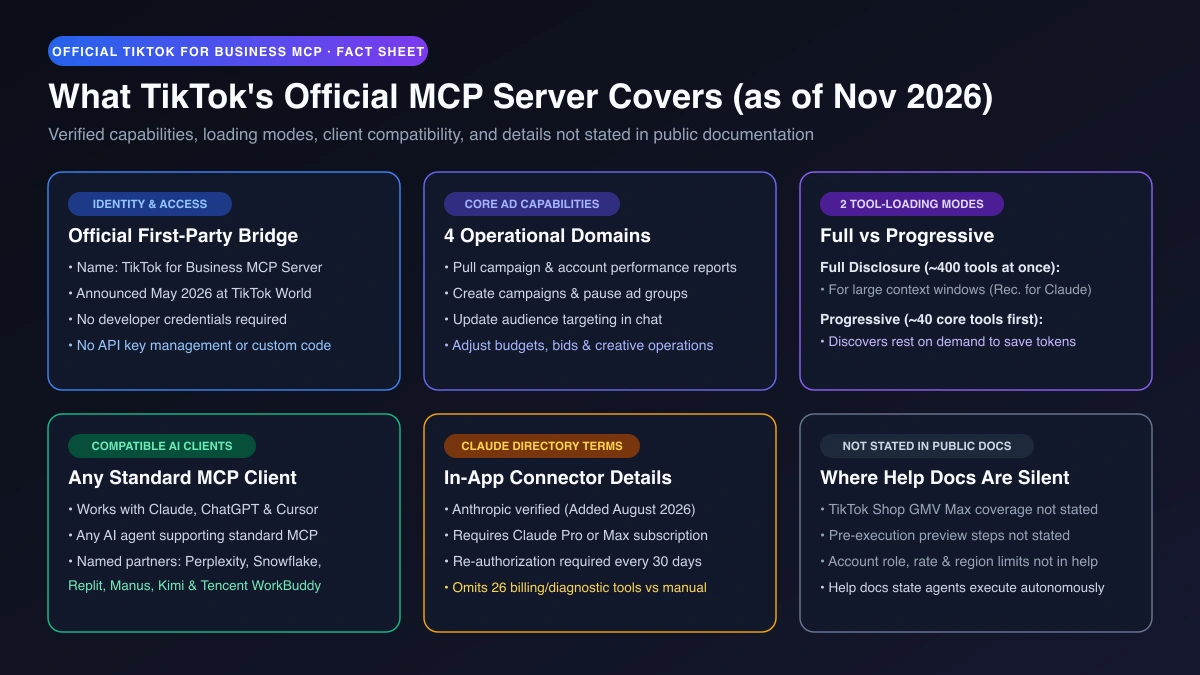
| Item | Official Documentation Summary (as of November 2026) |
|---|---|
| Official Name | TikTok for Business MCP Server (announced May 2026 at TikTok World) |
| Capabilities | Pull reports, create campaigns, update targeting, pause ad groups, edit budgets/bids, creative ops |
| Credentials | No developer credential, API key, or custom code required |
| Loading Modes | Full Disclosure (around 400 tools; Recommended for Claude) or Progressive (around 40 core tools) |
| AI Clients | Any MCP tool (Claude, ChatGPT, Cursor); blog names Claude, Kimi, Manus, Perplexity, Replit, Snowflake, Tencent WorkBuddy, IAB Registry |
| Claude Directory | TikTok for Business (Anthropic verified); Pro/Max required, 30-day re-auth, omits 26 finance/diagnostic tools vs manual |
| Not in Help Docs | GMV Max, pre-execution previews, required TikTok roles, account/rate/region limits, TikTok-side pricing |
Which AI Tools Work with TikTok's Official MCP Server?
Because the TikTok for Business MCP Server is a standard MCP server, any AI assistant or agent supporting MCP can connect to it via a directory shortcut or manual setup.
Claude (Web, Desktop, and Claude Code)
To link an account in Claude chat, open Claude's connector directory and select TikTok for Business, which carries an Anthropic verified badge (added August 2026).
Plan around three operational rules reported in The Keyword's coverage of the October 2026 connector rollout at Advertising Week New York:
- Plan requirement: Requires Claude Pro or Max.
- 30-day re-authorization: Authorization expires every 30 days.
- Directory vs manual scope: The directory version omits 26 tools compared with the full server—mostly finance tools (invoices, balances, billing groups, fund transfers, payment portfolios) plus TikTok's diagnostic agent. Configure the connection manually if you need those tools.
If your team works in Claude or Claude Code, compare the three ways to connect TikTok Ads to Claude across official, reporting, and local CLI setups.
ChatGPT, Cursor, and Other MCP-Compatible Agents
You can connect ChatGPT, Cursor, or any MCP-capable client to TikTok's official server because it is a standard MCP server that accepts any compatible agent—even though TikTok's public help pages and blog posts do not name ChatGPT or Cursor. Follow TikTok's developer docs for connection parameters.
Be careful when searching for ChatGPT or Cursor tutorials: most ranking guides are written by third-party MCP hosts pitching intermediary endpoints rather than TikTok's first-party server. Check whether a guide connects directly to TikTok or routes ad authorization through an outside vendor.
Other Platforms Named by TikTok
You can also use native integrations across Kimi, Manus, Perplexity, Replit, Snowflake, Tencent WorkBuddy, and the IAB Tech Lab Agent Registry, listed alongside Claude in TikTok's June 2026 Agentic Hub post.
Official TikTok Ads MCP vs Third-Party MCP vs Beyond MCP
Your options fall into three buckets: TikTok's official MCP server, third-party TikTok MCP servers, and a non-MCP workflow using AdRate's local CLI and skills.
1. Official TikTok for Business MCP Server
Use TikTok's official server when working in chat during the day to pull reports, create campaigns, update targeting, or pause ad groups directly without a middleman vendor.
2. Third-Party MCP Connectors and Wrappers
Third-party options split into three groups:
- Cross-channel reporting connectors: Tools such as Supermetrics, Coupler.io, Saras Analytics, and Lemonado blend TikTok Ads metrics with Meta, Google Ads, and GA4. Coupler.io and Lemonado focus on read-only reporting, Saras is mostly read-only with select approval writes, and Supermetrics supports read/write actions where new campaigns start paused.
- Hosted operational MCP wrappers: Third-party endpoints with OAuth flows for ChatGPT or Cursor that require sharing ad authorization with an outside vendor.
- Open-source servers: Community GitHub implementations requiring self-hosting and developer credentials.
3. Beyond MCP: AdRate CLI and Agent Skills in Claude Code, Codex, and Gemini CLI
First, a clear boundary: AdRate is not an MCP server and does not provide an MCP connector. AdRate provides the official @adrate/cli tool and two agent skills running in local coding agents on your computer—such as Claude Code, Codex, and Gemini CLI (not in the claude.ai web chat box or cloud scheduled tasks).
Buyers managing multiple ad accounts or TikTok Shop stores use AdRate alongside or instead of MCP for three jobs:
- Multi-account checks and campaign copying: Read connected accounts, campaigns, and campaign-level reports, switch campaigns on or off, and edit budgets. Copy a winning campaign to another account with a preview first—copied campaigns land paused by default.
- TikTok Shop GMV Max operations: TikTok's public MCP docs do not mention GMV Max. With AdRate, sellers inspect TikTok Shop stores and GMV Max plans, switch plans on or off, edit budgets and ROI targets, and manage GMV Max rules. See our guide on running GMV Max from Claude Code.
- Dry Run previews and 24/7 rules: Every new rule starts disabled, runs a Dry Run preview showing which live campaigns or plans match, and activates only after your confirmation. Once enabled (with an active AdRate subscription), rules run 24/7 by condition on AdRate's side after chat closes. See what an AI agent workflow with Dry Run looks like.
AdRate's scope is explicit: the CLI and skills work at the ad account and campaign level only. They do not read or write individual ad groups or ads, create or delete campaigns from scratch, edit bids or targeting, or run bulk writes. Your AdRate team owner approves login in a browser window (scoped to one team), no keys enter chat, and no write is reported complete until confirmed. You can pair the official MCP server in chat with AdRate in Claude Code.
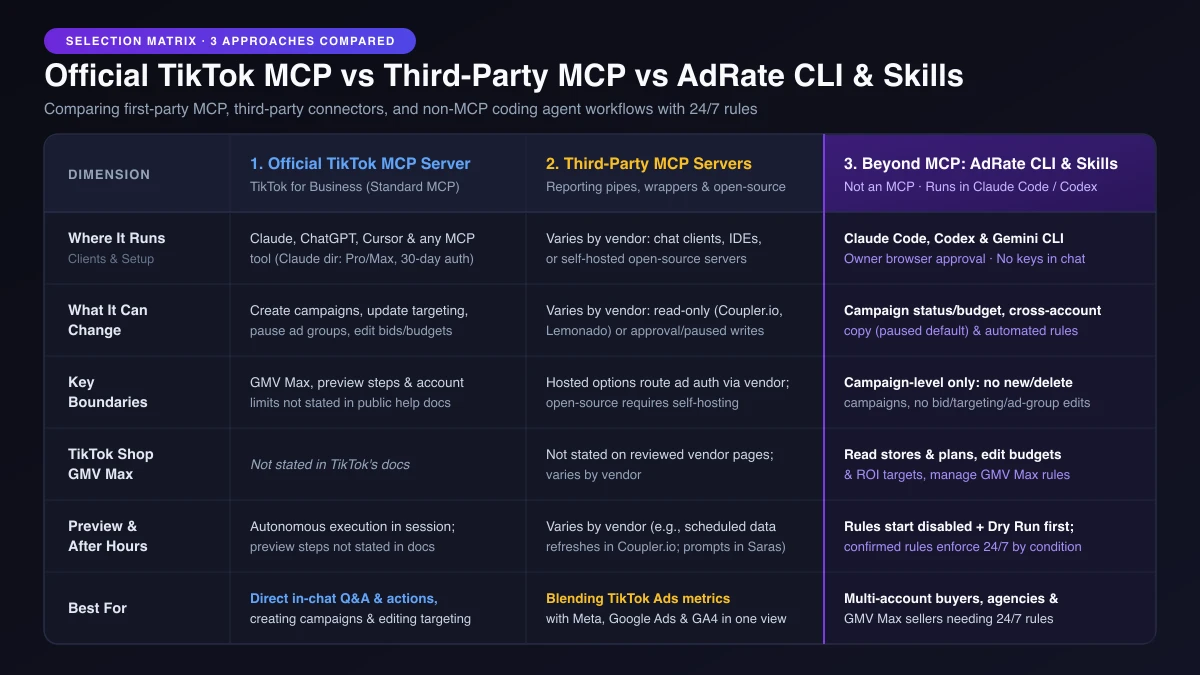
| Dimension | Official TikTok MCP Server | Third-Party MCP Servers | Beyond MCP: AdRate CLI + Skills |
|---|---|---|---|
| What It Is | First-party standard MCP server | Reporting connectors, hosted wrappers, or open-source servers | Official CLI and two skills (not an MCP) |
| Where It Runs | Any MCP tool (Claude, ChatGPT, Cursor) | Varies by vendor (chat clients, IDEs, or self-hosted) | Local coding agents (Claude Code, Codex, Gemini CLI) |
| What It Changes | Create campaigns, edit targeting, pause ad groups, edit bids/budgets | Varies by vendor: read-only reports (Coupler.io, Lemonado) or approval/paused writes (Saras, Supermetrics) | Campaign status/budget, cross-account copy (paused default), automated rules |
| Boundaries | GMV Max, previews, and account limits not stated in help docs | Hosted options route ad auth through a vendor; open-source requires self-hosting | Campaign-level only: no new/delete campaigns, no bid/targeting/ad-group edits, no bulk writes |
| GMV Max | Not stated in TikTok's docs | Not stated on reviewed vendor pages; varies by vendor | Read stores/plans, switch on/off, edit budgets/ROI, GMV Max rules |
| Preview Step | Autonomous execution; previews not stated | Varies by vendor (read-only or approval writes) | Rules start disabled + Dry Run first; copies preview and land paused |
| After Chat Ends | Works while prompting in session | Varies by vendor (for example, scheduled data refreshes in Coupler.io or repeated prompts in Saras) | Confirmed rules run 24/7 by condition (active subscription) |
Who Sets the Boundaries When an MCP Agent Can Change Spend?
TikTok's help article notes that a connected AI agent executes decisions autonomously without human intervention at every step.
Autonomous execution is convenient when pulling reports or building drafts while you watch, but risky when an agent can modify live budgets or when CPA spikes at 2 a.m. while your laptop is shut. Even cloud scheduled prompts that wake an LLM on a timer re-judge metrics from scratch each run and may react differently to identical numbers.
Separating conversational analysis from 24/7 enforcement solves this. Use your AI assistant at your desk to spot wasted spend and draft a rule with fixed thresholds—starting from automated rule templates to cut wasted spend if helpful. Run a Dry Run preview first to see which campaigns or GMV Max plans match right now, confirm activation, and let deterministic rules guard spend overnight. Read our breakdown of guardrails for AI agents that can change spend.
Frequently Asked Questions
Is there an official TikTok Ads MCP server?
Yes. TikTok launched the official TikTok for Business MCP Server at TikTok World in May 2026—a first-party Model Context Protocol bridge letting compatible AI assistants pull reports, create campaigns, update targeting, and pause ad groups without custom code or API keys.
Is the official MCP server free to use?
TikTok's public help docs do not state a TikTok-side fee. However, your AI client may require a paid plan—for example, the official TikTok for Business connector in Claude's directory requires Claude Pro or Max.
Can I use TikTok Ads MCP with ChatGPT or Cursor?
Yes. Because TikTok's official TikTok for Business MCP Server is a standard MCP server, any AI tool supporting MCP—including ChatGPT, Cursor, and Claude—can connect via TikTok's developer docs. Note that many search results for ChatGPT or Cursor tutorials pitch third-party hosted MCP services rather than TikTok's official server.
Does the official TikTok MCP server support TikTok Shop GMV Max?
TikTok's public MCP help pages and Agentic Hub blog posts do not mention GMV Max. To inspect TikTok Shop stores and GMV Max plans, edit budgets and ROI targets, and run automated GMV Max rules from a coding agent, use AdRate's CLI and skills in Claude Code, Codex, or Gemini CLI.
Will an AI agent change my TikTok ads without asking?
TikTok's help guide states that connected agents execute decisions autonomously and does not detail built-in preview steps. With AdRate in Claude Code, every new rule starts disabled and runs a Dry Run preview first so you verify matched objects before enabling, and copied campaigns preview and land paused.
Is AdRate an MCP server?
No. AdRate does not provide an MCP server; it provides an official CLI and two agent skills for local coding agents like Claude Code, Codex, and Gemini CLI. You can use the official server for in-chat campaign creation and targeting edits, and run AdRate alongside it for multi-account checks, GMV Max operations, Dry Run previews, and 24/7 rules.
Combine Official MCP in Chat with 24/7 Rules After Hours
If you want to query performance, create a campaign from scratch, or edit targeting directly in chat, connect TikTok's official TikTok for Business MCP Server in your AI client.
When you need multi-account visibility, TikTok Shop GMV Max management, Dry Run previews before rules go live, and 24/7 enforcement after chat closes, open Claude Code and say "install the AdRate CLI and its skills, then log me in". Have your team owner approve sign-in in the browser, ask Claude to read your campaign and GMV Max data, and draft one disabled guardrail rule to test with a Dry Run. (If you prefer not to install anything locally, AdRate is bringing the same conversational workflow into the web product.) Explore the TikTok Ads AI Agent for Claude Code and Codex or sign up for AdRate to get started.
Official TikTok new advertiser program - exclusive benefits for new advertisers
Open a new TikTok ad account and earn official ad credit as you spend
Spend $200 within 30 days of signing up and get $200 in ad credit, rising to $6,000 when you spend $10,000. Credits go straight into your TikTok ad campaigns.
Coupons are issued by TikTok once it confirms you qualify as a new advertiser. Actual issuance and tiers are shown on the Coupon Progress page inside your TikTok Ads account.