TikTok Ads Monthly Invoicing: Who Qualifies and Where to Apply
Who qualifies for TikTok Ads monthly invoicing, where the credit line option appears, why you may not see it, and how approved credit reaches ad accounts.
Your finance team wants one bill a month instead of card charges. You open the payment page to switch, and there is nothing to click. One advertiser described exactly this on r/TikTokAds: they believed they met the conditions, finance was pushing for the change, and still, "I just don't have the option."
This guide covers TikTok Ads monthly invoicing from the eligibility side: who qualifies, where the application appears, and how approved credit reaches your ad accounts.
Short answer: who qualifies for TikTok monthly invoicing
TikTok's credit line help page lists four conditions:
- An active TikTok Ads account in good standing for a minimum of six months, including a positive payment history.
- Continuous activity that meets regional spending criteria.
- Valid business certifications.
- A finance manager or admin role to apply for the credit line in Business Center or TikTok Ads Manager.
There is no published spend figure. The bar is set by region, and TikTok states that the credit limit "is determined on a case-by-case basis."
Monthly invoicing vs. manual vs. automatic payment
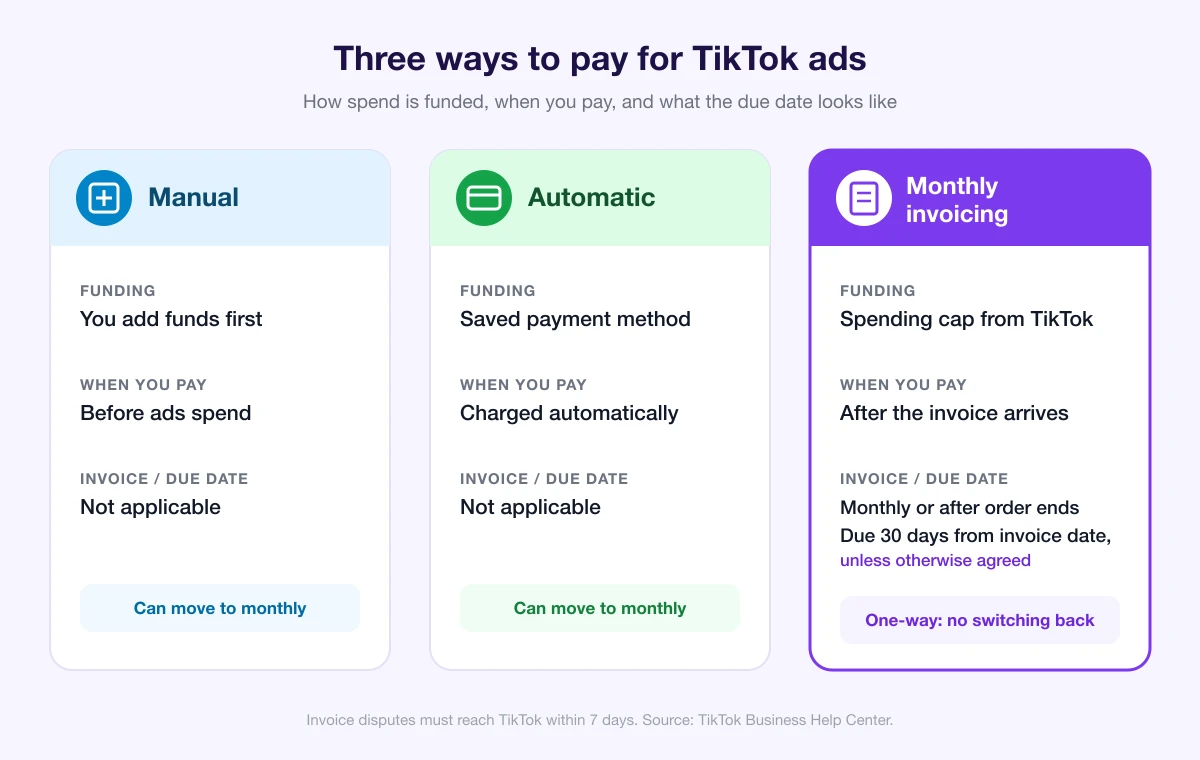
Monthly invoicing lets you spend against "a spending cap extended by TikTok." TikTok is explicit that this is not "a credit, advance, or financing option." Every amount you spend reduces the available cap, and paying your invoice restores the credit line by the amount paid.
| Manual payment | Automatic payment | Monthly invoicing | |
|---|---|---|---|
| How spend is funded | You add funds first | Charged to a saved payment method | Spending cap extended by TikTok |
| When you pay | Before ads spend | Automatically, as TikTok charges you | After you receive the invoice |
| Invoice and due date | Not applicable | Not applicable | Monthly or after the order ends; due 30 days from the invoice date unless otherwise agreed |
| Switch to monthly invoicing? | Yes, if eligible | Yes, if eligible | One-way, no return |
Where to apply: Business Center or Ads Manager
You can apply in either place. If you qualify, TikTok shows an "Apply for a Monthly Invoicing" pop-up window or an upgrade banner on your payment page.
Switching also upgrades your account to Payment Portfolio, where credit lines, cash balance, and payment methods are managed together.
If you have a dedicated TikTok representative, go through them. Otherwise, eligible advertisers on automatic or manual payment can apply themselves, subject to approval. TikTok doesn't publish a document list, review timeline, or rejection reasons.
Don't see the "Apply for a Monthly Invoicing" option? A checklist
The entry only appears for qualified accounts, so a missing pop-up or banner usually means a condition isn't met yet or you're signed in under the wrong role. Check:
- Your role. Are you signed in with a finance manager or admin role?
- Account age. Has the TikTok Ads account been active for at least six months?
- Payment history. If automatic charges have been bouncing, fix that first with our guide on why TikTok Ads payments fail.
- Continuous activity. Has spend been steady and in line with your region's criteria?
- Business certifications. Are your business certifications valid and current?
TikTok doesn't say which condition blocks the option, so treat this as a checklist, not a diagnosis.
"How much do I need to spend?"
"How much did you spend to qualify for monthly invoicing?" is the question that opened that Reddit thread, and TikTok doesn't answer it with a number. The official wording is "regional spending criteria," and the limit you're offered is assessed account by account.
Nobody outside TikTok can give you a reliable threshold. What you control is the rest of the list: continuous spend, a clean payment record, and valid certifications.
After approval: how credit line funds reach your ad accounts
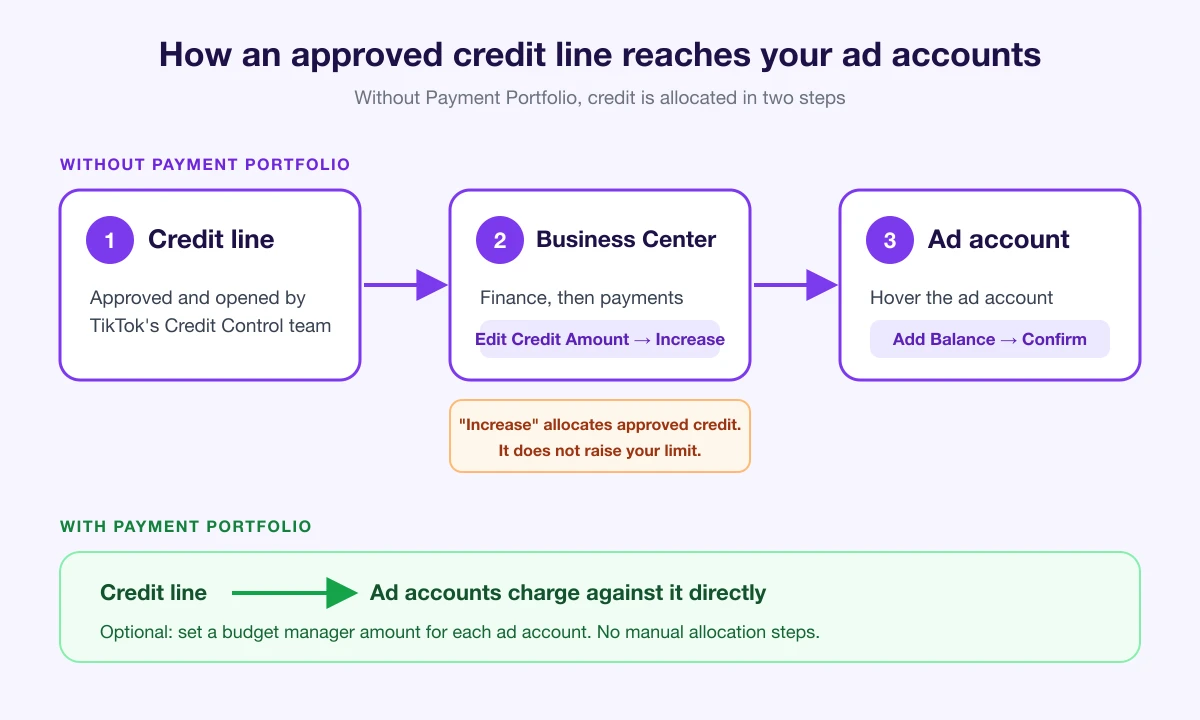
TikTok's Credit Control team opens the credit line. What happens next depends on whether your account runs on Payment Portfolio.
If you're on Payment Portfolio
Ad accounts can incur charges against the credit line directly, and you can set a budget manager amount for each ad account.
If you're not on Payment Portfolio
The credit has to be allocated in two steps:
- Credit line to Business Center. Go to Finance, then payments, click Edit Credit Amount, choose Increase, enter the amount, and confirm.
- Business Center to ad account. Hover over the ad account, click Add Balance, and confirm.
That "Increase" button trips people up: it moves already-approved credit into Business Center. It is not a request for a higher limit.
Only Business Center admins and ad account admins can view and operate credit line functions. If the money sits in Business Center but an ad account still can't spend, see TikTok Ads insufficient balance.
Invoices, due dates, and autopay
You receive an invoice for ad buying monthly or after the order ends. Payment is due 30 days from the invoice date unless otherwise agreed between you and TikTok. Invoice frequency can't be changed.
Disputes about an invoice amount must reach TikTok within 7 days, and a missing invoice doesn't cancel your obligation to pay.
For autopay, open Business Center, go to Finance, then Invoices, and select Set automatic bill payment rule under the unbilled amount. Only online payment methods that support automatic payment are accepted. For finding the PDFs themselves, see how to download TikTok Ads invoices.
Before you switch: it's one-way
You can move from manual or automatic payment to monthly invoicing. You can't move from monthly invoicing back to either of them. If you might wind accounts down later, read closing a TikTok ad account and refunding the balance first.
FAQ
Is a TikTok Ads credit line a loan?
No. TikTok calls it a spending cap, not a financing option.
Can I increase my credit limit?
TikTok sets limits case by case and doesn't describe a self-serve way to raise one. If you have a dedicated representative, that's the conversation to have.
Does working with an agency give me a credit line?
Not automatically. The same conditions apply. Our agency account checklist covers how payment choices fit into account setup.
Is ad credit the same as a credit line?
No. Credit lines replenish after you pay outstanding invoices, while ad credit continues to be allocated manually. See why TikTok ad credit isn't applied.
Is VAT on the invoice?
See our guide to VAT on TikTok Ads charges.
Keep every ad account's share in view
Once a credit line is split across ad accounts, one can run out while others still have room, and its ads stop. With AdRate, you can set a balance threshold for each ad account and get an alert when it drops below that line, so you can top it up before delivery stalls. Start with AdRate.
Official TikTok new advertiser program - exclusive benefits for new advertisers
Open a new TikTok ad account and earn official ad credit as you spend
Spend $200 within 30 days of signing up and get $200 in ad credit, rising to $6,000 when you spend $10,000. Credits go straight into your TikTok ad campaigns.
Coupons are issued by TikTok once it confirms you qualify as a new advertiser. Actual issuance and tiers are shown on the Coupon Progress page inside your TikTok Ads account.