TikTok Promote Apple Service Fee: Why iPhone Orders Cost More
Seeing an Apple service fee on TikTok Promote? See which iPhone payment methods add it and how to skip it by ordering on the web or paying with Promote balance.
The Apple service fee on TikTok Promote shows up when you pay inside the iPhone app with Apple Pay or TikTok Coins. To skip it, place the order on the web, or pay in the app with your Promote balance, the only iPhone method TikTok's fee table marks as fee-free.
Below: the official table, a popular Coins trick that fails, and the trade-offs of Promote balance. If you're stuck before checkout, say a grey Promote button or a music warning, start with why you can't promote a TikTok video instead.
What the Apple service fee on TikTok Promote is
You pick a $20 boost, tap pay, and the iPhone checkout total comes out higher than $20. The extra line is the one sellers know as the Apple service fee.
TikTok's help page on Promote payment methods doesn't use that name. It says: "Additional mobile fees may apply for payment methods used in the TikTok app for Promote orders."
What the page doesn't give is a rate. The percentages quoted in forums mostly come from Meta's guidance for boosting on Facebook and Instagram, or from one person's screenshot. TikTok hasn't published a percentage, so for your own order, the amount on the checkout screen is the only number to trust.
Which payment methods add the fee (official table)
TikTok's page Supported methods of payment for Promote (last updated September 2025) lists which methods carry extra charges:
| Promote location | Payment method | Additional mobile fees |
|---|---|---|
| Mobile - Android | Google Pay (EU region), TikTok Coins | Yes |
| Mobile - Android | Promote balance; credit card, debit card, bank transfer, e-wallet | No |
| Mobile - iOS | Promote balance | No |
| Mobile - iOS | Apple Pay, TikTok Coins | Yes |
| Web | TikTok Coins; credit card, debit card, bank transfer, e-wallet; Promote balance | No |
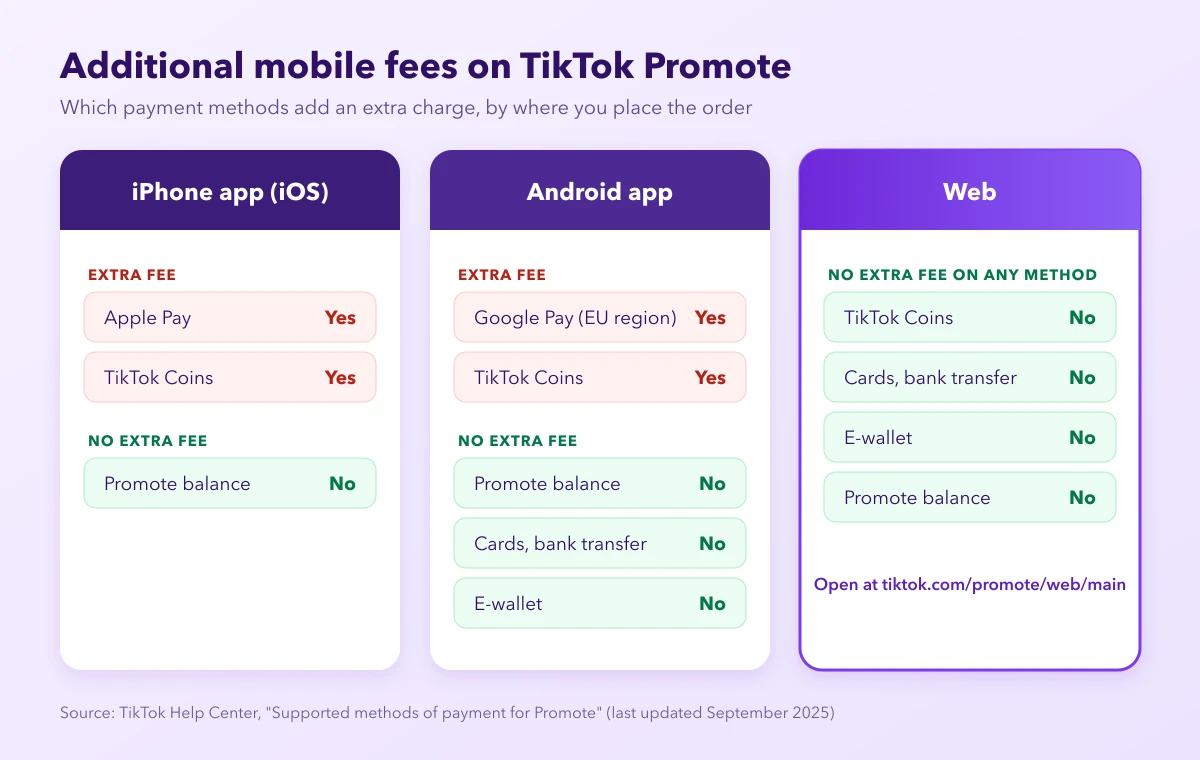
On iPhone, Promote balance is the only method marked No. On the web, every listed method is marked No, Coins included. And Android isn't fully clear: Google Pay in the EU region and Coins carry the fee there too.
Two gaps. The table lists only those methods for iOS, so it says nothing either way about cards inside the iPhone app. And there's no row for GMV Pay or TikTok Ads Manager balance, so don't assume either is fee-free in the app.
How to avoid it: place the order on the web
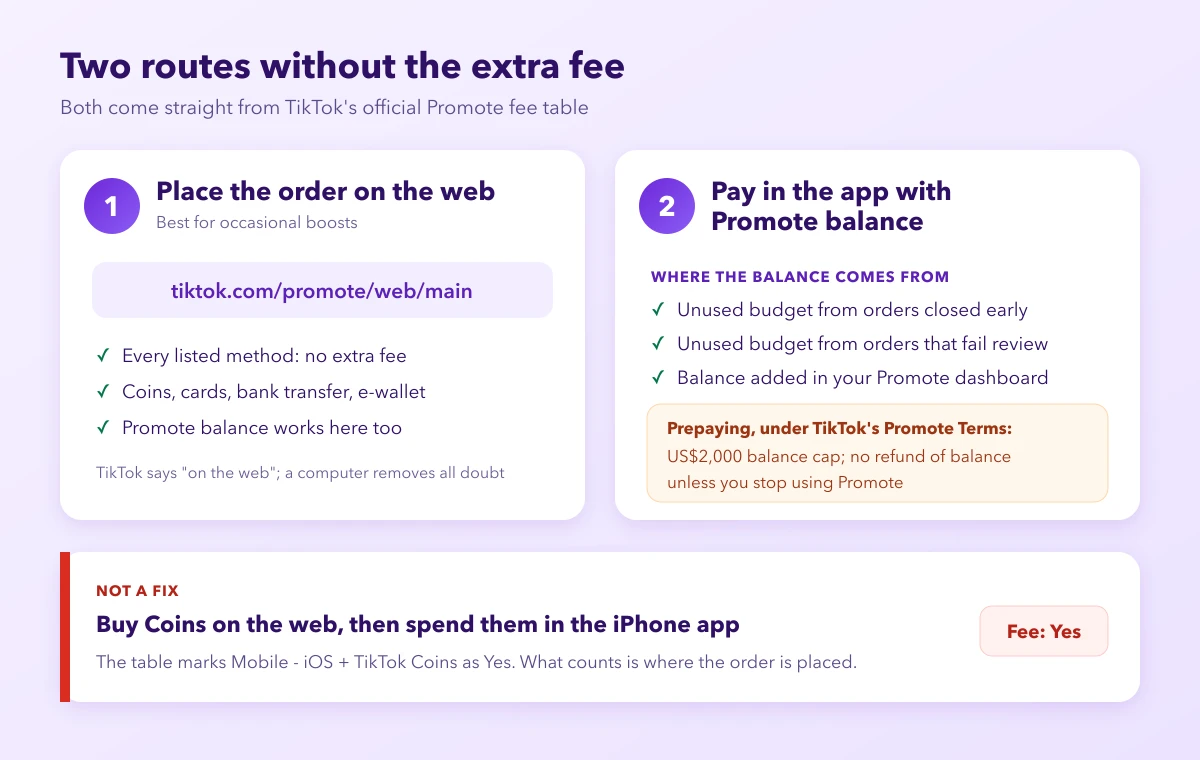
This is the cleanest way to use TikTok Promote without the Apple fee. Open Promote on the web at tiktok.com/promote/web/main and create the order there. Every method the table lists for Web is marked No.
One caution: TikTok's page only says "on the web" and doesn't say whether a phone's browser counts the same as a computer. For zero doubt, use a laptop or desktop, and check the total before you confirm.
Paying in the app with Promote balance
Prefer staying in the app? Then Promote balance is your route. Money gets into it two ways.
Refunds from earlier orders. When a launched order is closed early or fails review, the unused budget goes back to your Promote balance, visible under the Mine tab. See our guides on refunds after a rejected Promote order and orders stuck under review.
Adding balance up front. Under TikTok's Promote Terms, if you haven't connected Promote to an Ads Manager account, you can add balance in your Promote dashboard. It comes with strings:
- Your Promote balance can't exceed US$2,000, and your total access to balance in one day (UTC+0) is capped at US$2,000.
- Once money is in your Promote balance, you can't get a refund of it unless you stop using Promote.
Prepaying suits people who'll keep boosting. Testing one video? Use the web.
Common workaround that doesn't work: buying Coins on the web, spending them in the app
A tip you'll see everywhere: buy Coins in a browser, then spend them on Promote inside the iPhone app.
TikTok's table doesn't back it. Mobile - iOS with TikTok Coins is marked Yes. Coins are only marked No when the Promote order itself is placed on the web. What counts is where you place the order, not where you bought the Coins.
In-app Coins can also cost more than the price tag. One seller on r/TikTokAds wanted the £16 recommended option: "I had to spend £23 to be able to afford the amount of coins needed." Coins come in packs, so part of that gap may be leftover Coins, but the surprise is familiar.
Already paid the fee?
If the fee is already on your receipt, the useful next question is where your Promote money sits now. Our guide on TikTok Promote refunds and withdrawals covers where that balance goes and what you can withdraw depending on how you paid.
When to move from Promote to Ads Manager
Once you're pushing several videos or products a week, managing it order by order on your phone gets messy. After you integrate Promote with TikTok Ads Manager, you can pay for Promote campaigns with your Ads Manager account balance.
Just don't treat that as a fee workaround: the fee table has no row for it. Move because you need budgets, targeting and reporting in one place. Our TikTok Promote vs Ads Manager comparison lays out the differences.
FAQ
Is the Apple service fee charged by Apple or TikTok?
TikTok's help page calls it "additional mobile fees" that may apply to some payment methods used in the TikTok app. It doesn't say who keeps the money. For your wallet, what matters is the payment method and where you place the order.
Does Android have the fee too?
For some methods: the table marks Google Pay (EU region) and TikTok Coins as Yes on Android.
Can I get the Apple service fee back?
TikTok's payment-methods page doesn't cover this, so we won't guess. For money in your Promote balance, our Promote refund and withdrawal guide explains where it goes.
Is there a TikTok Promote web version?
Yes: tiktok.com/promote/web/main. Orders placed there carry no additional mobile fees for any listed method.
Pick the route that fits how often you boost
Boosting now and then? Order on the web, or keep a Promote balance for in-app orders. Promoting every week across products and videos? That's when moving to Ads Manager pays off, and when a tool like AdRate can help keep those campaigns organized as you grow.
Official TikTok new advertiser program - exclusive benefits for new advertisers
Open a new TikTok ad account and earn official ad credit as you spend
Spend $200 within 30 days of signing up and get $200 in ad credit, rising to $6,000 when you spend $10,000. Credits go straight into your TikTok ad campaigns.
Coupons are issued by TikTok once it confirms you qualify as a new advertiser. Actual issuance and tiers are shown on the Coupon Progress page inside your TikTok Ads account.